



B_C_E_75
Inspiring
June 16, 2020
Answered

Unable to Shift+Drag objects in Illustrator 2020 (24.2)

  • June 16, 2020
  • 20 replies
  • 17898 views

Just updated Illustrator a few hours ago and have noticed that when I try to click+shift and drag any object, it just...won't. The object highlights as usual when selected, but when I drag the object I get a quick view of the object dragging but it snaps back in place.  Im on a pretty powerful HP Z4 Workstation with up to date Windows 10 Pro. This was working fine earlier today, but I'm not having any luck in fixing this issue now.


{Renamed by MOD}
Correct answer Srishti Bali

Hi all,


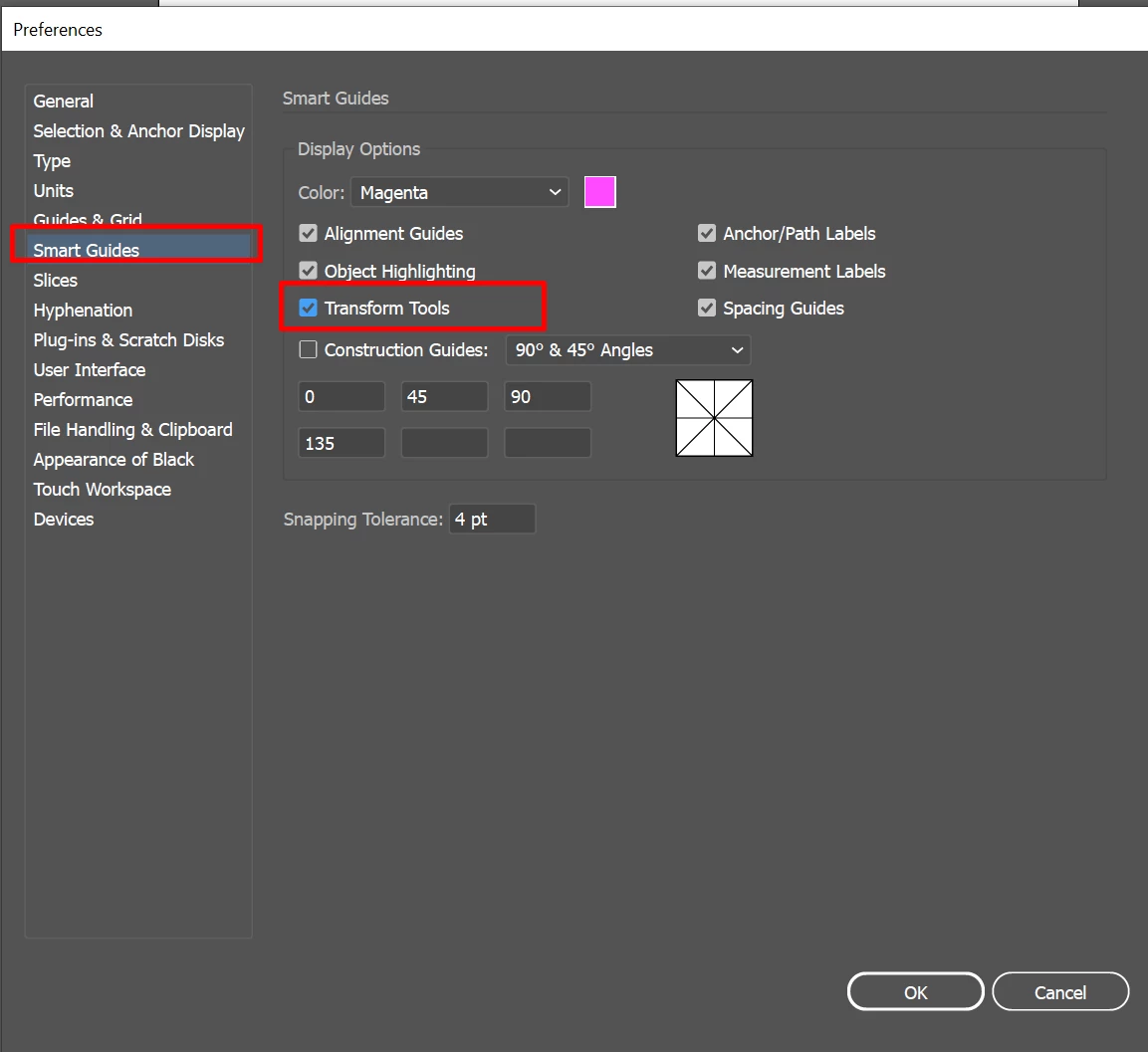
Sorry about the trouble this issue has caused. We are able to reproduce this issue and it is currently under investigation. As a workaround you may try unchecking Transform Tools from Smart Guides preferences (CTRL/ CMD + K > Smart Guides > untick Transform Tools) and share your observations with us:


I would also request that if you could upvote this issue here (https://illustrator.uservoice.com/forums/601447-illustrator-bugs/suggestions/40687171-dragging-objects-with-shift-key-hold-down-broken). This way you'll keep getting all the updates related to this issue.


Regards,

Srishti


20 replies

B_C_E_75
B_C_E_75Author
Inspiring
June 18, 2020

I couldn't take it, so I'm back to 24.1.3.

DRock22
Inspiring
June 18, 2020

I don't blame you. 

DRock22
Inspiring
June 18, 2020

Looks like a potential work around to this problem it to uncheck the "Transform Tools" option in the Smart Guides prefrences. Downside is you won't get Smart Guide information when you scale, rotate, and shear objects.
Edit > Preferences > Smart Guides > untick Transform Tools

New Participant
May 5, 2021

Thank you so much! 

Known Participant
June 18, 2020

I am having the same problem. When I click on SHIFT+OPTION, I cannot do anything. This occurs when Smart Guides are turned on ONLY. But I need the Smart Guides on! I use this feature ALL THE TIME and hope to see a fix quickly! I am about to release a book about making pattern brushes in Illustrator and if this feature doesn't work, I will have to do a major rewrite!

Kurt Gold
Adobe Expert
June 18, 2020

I do see the same issue with Shift or Shift-Alt dragging objects when Smart Guides are turned on (latest version of Illustrator, Mac OS 10.14.6).


Just to confirm that there is obviously something wrong (whatever it may be).

Ton Frederiks
Adobe Expert
June 18, 2020

Smart Guides on or off, the Shift constrains fine for me (and with the Alt key creates a copy).

But I have MacOS Mojave 10.14.6 

Monika Gause
Adobe Expert
June 18, 2020

Same system for me.

Shift-dragging with Smart Guides on is working well for me at least for simple objects. I seem to remember it didn't always work as well.

DRock22
Inspiring
June 18, 2020

I believe it's a "Smart Guides" issue. I've noticed the same thing. If you have Smart Guides on, you have to keep your cursor perfectly aligned with where you origially grabbed the object while dragging and holding shift or it will snap back. Turning off Smart guides fixes the problem (though not if you need to use Smart Guides).

B_C_E_75
B_C_E_75Author
Inspiring
June 18, 2020

Well, I believe you are correct. I turned them off and it resolved my issue, which really sucks! I've been using smart guides since..CS6 I think, and haven't had any issues until now. I layout pages for parts books and I find that smart guides help immensely. I hope Adobe gets around to fixing this asap!

DRock22
Inspiring
June 18, 2020

I agree with you 100%. I've been using smart guides for years as well. Was really frustrating when my objects weren't moving when I was tring to move them! Fingers crossed they get a new update out soon because this isn't the only thing that was working fine and isn't with the latest update. 

dirklenz
New Participant
June 18, 2020

Same Problem on Mac running macOS 10.15.5

I am honestly so tired of Adobe.

dirklenz
New Participant
June 18, 2020

Only seems to happen with activated Smart Guides

New Participant
June 17, 2020

I updated illustrator to the latest software and when I was working on a project and wanted to duplicate the object and shift it to line up perfect to the side it wasn’t working. It lets me duplicate the object by using option just fine but once I hit shift and drag it doesn’t move the object at all. I have noticed that it will work when smart guides are turned off, but I never had to do that before. I always have my smart guides turned on beccause I'm very meticulous with my work. I tried restarting my computer and restarting the program, neither option worked. 

Monika Gause
Adobe Expert
June 17, 2020

Moving some object with Shift pressed and smart guides turned on has been an issue during the recent versions. I have experienced it quite a few times.

You don't need to press Shift when you use Smart guides, because that is exactly what smart guides is for.

Ashutosh_Mishra
Inspiring
June 16, 2020

Hi there,


Sorry to hear about your experience. I tried to replicate this on my end but could not. It is working as expected. I'd request resetting the preferences once. Please follow the instructions below:

  • Close all Adobe applications. 
  • Go to Location C:\Users\user\AppData\Roaming\Adobe 
  • Rename  Adobe Illustrator and Adobe Illustrator 24 Settings folders to Adobe Illustrator.old and Adobe Illustrator 24 Settings.old 
  • Launch Illustrator from the Creative Cloud. 


**Please note that resetting preferences will remove all the custom settings and Illustrator will launch with default settings. This way all your old settings will be saved in .old folders and Illustrator will recreate new folders with default settings.


Let us know if it helps.


Regards,

Ashutosh

B_C_E_75
B_C_E_75Author
Inspiring
June 17, 2020

Thanks for following up! I have reset my preferences and unfortunately that did not solve the issue. I noticed that the issue happens when I try to make a copy of an object as well. I have a screen recording of what it does if that would help? I couldn't find a way to post it on here though.

Ashutosh_Mishra
Inspiring
June 17, 2020

Thanks for trying that. You may upload the video file on Creative Cloud(or any other cloud service you prefer) and share the link with us. Thanks!

Mike B527
New Participant
June 16, 2020

Another update that takes away shortcuts I've been using for years. With the new update I can no longer "peel" a copy of an image using the alt+shift keyboard shortcut without turning off smart guides. Anyone know how to  resolve this?

Monika Gause
Adobe Expert
June 17, 2020

You are using Shift in order to move the copy exactly?

Just don't press Shift, because that's what smart guides do.


It's been like this for a few versions already now.

Mike B527
New Participant
June 17, 2020

I use shift to keep the copied object in-line with the source object. I've been doing this for over 14 years. It's one of the basic concepts of using the software.