


Known Participant
December 18, 2020
Question

Use Pathfinder to make an overlapping stack of objects

  • December 18, 2020
  • 2 replies
  • 451 views

I'm looking for a way to merge layered compound paths into a stack of simple "solid" objects.

In the Image Trace Advanced settings there is a option labeled Method. The Overlapping method does exactly this for rasterized images.

I can't find a way to do this with vector objects.

Maybe there's a setting in Pathfinder that I'm missing?
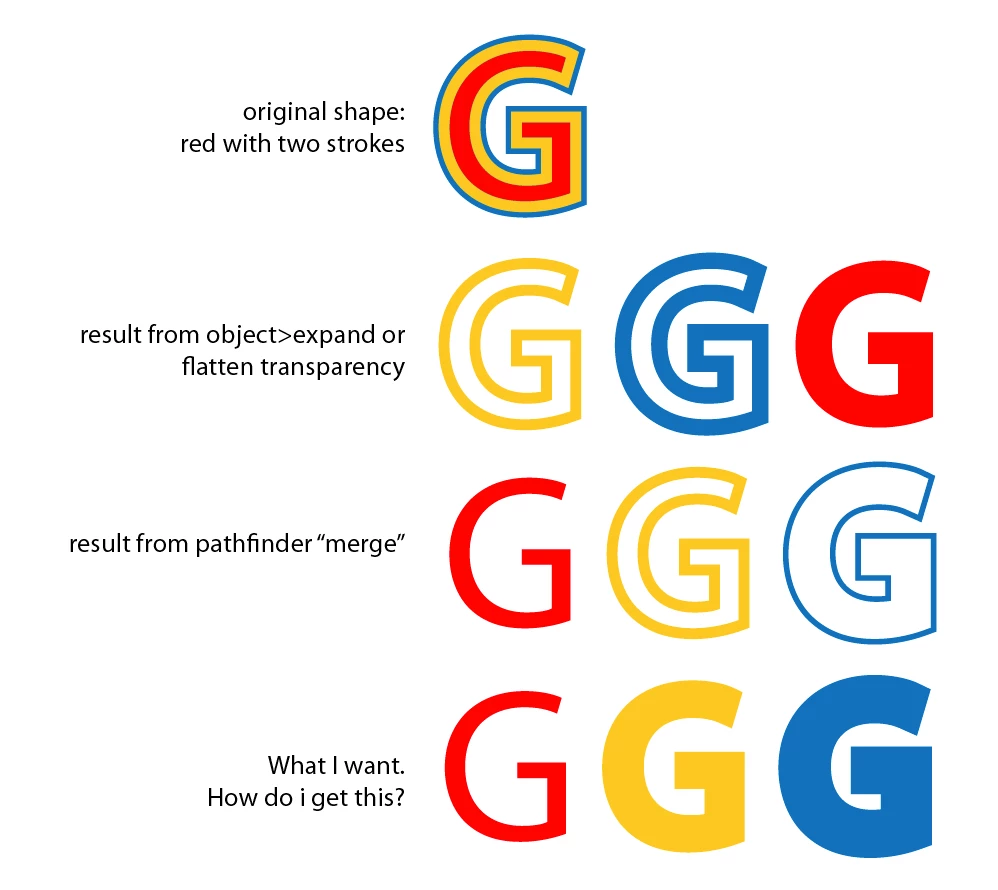


[ attachment inserted as inline image by moderator ]

This topic has been closed for replies.

2 replies

pixxxelschubser
Community Expert
Community Expert
December 18, 2020

It then looks like this (after Expand Appearance and ungrouping):


pixxxelschubser
Community Expert
Community Expert
December 18, 2020

Just use two new fills with Effect --> Offset Path (instead of strokes) and then menu: Object --> Expand Appearance

That's all

KalowAuthor
Known Participant
December 18, 2020

Thanks - I'll try that next time 👍

I'd still like to see a "stack" option in pathfinder.

Monika Gause
Community Expert
Community Expert
December 18, 2020

If you apply just a stroke, then that result is only logical.