


Exit
  • Global community
    • Language:
      • Deutsch
      • English
      • Español
      • Français
      • Português
  • 日本語コミュニティ
  • 한국 커뮤니티
0

Using canvas in Adobe CEP

New Here ,
Oct 27, 2019 Oct 27, 2019

Hi,


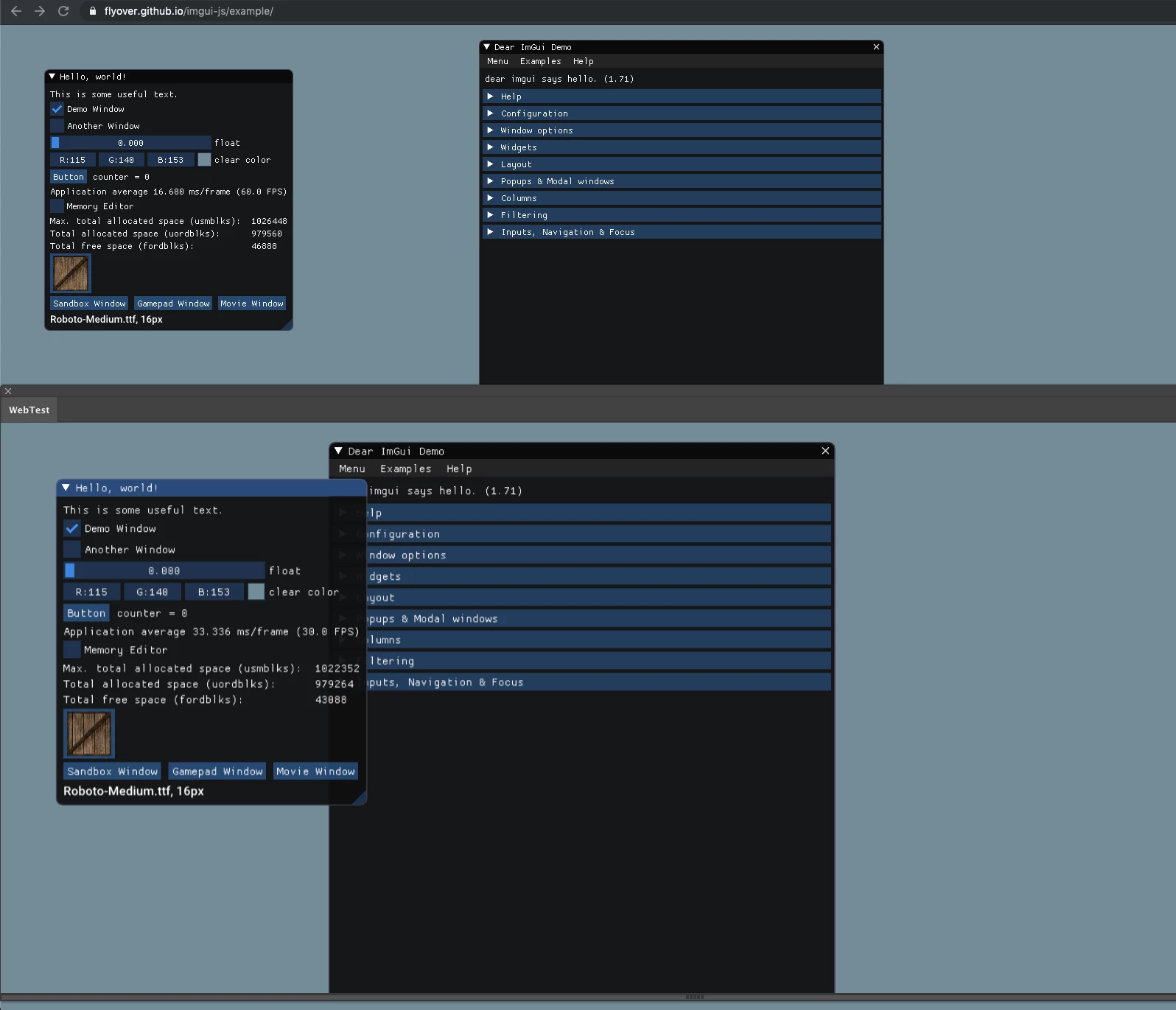
I'm doing some tests rendering WebGL stuff inside Illustrator. It works, but everything in the canvas is scaled at 1.25, i.e. everything seems 25% larger. I'm attaching an image that shows the same thing being rendered in Chrome (background) and in Adobe CEP (foreground).


Any idea on what's going on?


Thanks in advance,

AlexScreenshot 2019-10-27 at 11.03.12.png
565
Translate
Report
Community guidelines
Be kind and respectful, give credit to the original source of content, and search for duplicates before posting. Learn more
community guidelines
Adobe
LEGEND ,
Oct 27, 2019 Oct 27, 2019

Sounds perfectly normal. All such panels respond to the apps' DPI settings, in particular on high-DPI screens and Adobe has some own ideas on what values they deem correct. You may need to add some extra math to compensate for that and make it behave more like a web browser at the risk of breaking compatibility for users.


Mylenium

Translate
Report
Community guidelines
Be kind and respectful, give credit to the original source of content, and search for duplicates before posting. Learn more
community guidelines
New Here ,
Oct 27, 2019 Oct 27, 2019

Thank you.


In Preferences->User Interface->UI Scaling, there is a UI Scaling slider, that scales everything.


My problem now is how to get that scaling. In the canvas, clientWidth and clientHeight are always equal to width and height respectively, even when the UI Scaling property changes.


Is there a programatic way of finding out what the UI Scaling is?

Translate
Report
Community guidelines
Be kind and respectful, give credit to the original source of content, and search for duplicates before posting. Learn more
community guidelines
Community Expert ,
Oct 27, 2019 Oct 27, 2019

You can use getScaleFactor method.

var csi = new CSInterface();
alert(csi.getScaleFactor());


Translate
Report
Community guidelines
Be kind and respectful, give credit to the original source of content, and search for duplicates before posting. Learn more
community guidelines
New Here ,
Oct 28, 2019 Oct 28, 2019
LATEST

Thank you!

Translate
Report
Community guidelines
Be kind and respectful, give credit to the original source of content, and search for duplicates before posting. Learn more
community guidelines