


Participant
December 16, 2021
Answered

Washed out colors of imported PNG

  • December 16, 2021
  • 2 replies
  • 387 views

Hello !


I have an issue with Illustrator.

When I import .png photos, they looked washed out or desaturated. Even after exporting, the colours are incorrect.

I have checked all the colour settings and tried every possible combination, yet I cannot solve this issue.

This issue comes only with picture I got from a photographer who used Photoshop to edit them, and does not happen with other .png

Attached some screenshots to visualize the issue I have.

Is it a bug, or am I doing something wrong ?

Is anybody experiencing the same issue ?


Thanks in advance
 

This topic has been closed for replies.
Correct answer Ton Frederiks

PNG is problematic in Illustrator, Illustrator does not export the color profile and ignores PNG color profiles when imported. If there is a difference between the Illustrator Document Color Profile and the (sometimes missing) profile of the PNG the colors will be displayed wrong.

Try to save the PNG as PSD in Photoshop with an included profile and when exporting as PNG assign the document profile to the exported file in Photoshop.

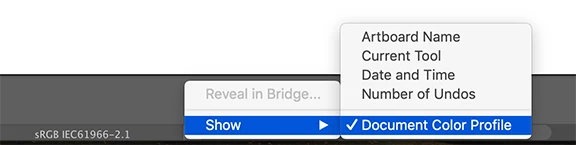
To check your Illustrator Document Color Profile see the bottom of your window:


2 replies

Monika Gause
Community Expert
Community Expert
December 16, 2021

Does that photo have an embedded color profile?

Does that color profile match your settings or is there a warning?

Ton Frederiks
Community Expert
Ton FrederiksCommunity ExpertCorrect answer
Community Expert
December 16, 2021

PNG is problematic in Illustrator, Illustrator does not export the color profile and ignores PNG color profiles when imported. If there is a difference between the Illustrator Document Color Profile and the (sometimes missing) profile of the PNG the colors will be displayed wrong.

Try to save the PNG as PSD in Photoshop with an included profile and when exporting as PNG assign the document profile to the exported file in Photoshop.

To check your Illustrator Document Color Profile see the bottom of your window: