


We Need An Outline Extrude Feature
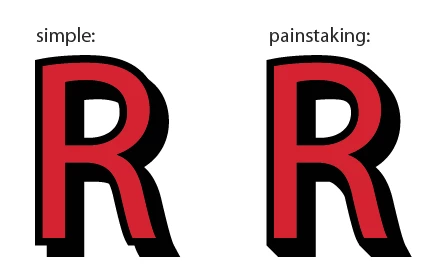
If there's one thing Illustrator is conspicuously missing, its an "Outline Extrude" feature. Other, more primative vector software has this as a built in feature, but I've yet to see anyone discover a simple way of achieving it in Illustrator without manually removing and adjusting a lot of anchor points. As shown in the image below, it's quite simple to duplicate an outline to use as a little faux shadow, but to connect that "shadow" into the original outline as if it were the outlines faux-3D edge involves merging the two shapes, and selectively deleting anchor points and smoothing curves, which can be quite painstaking for an entire logo. I have seen some suggest using the "blend" tool to add incremental morph steps from the outline to the shadow, but doing so just results in a messier staircase of right angles to clean up manually if you want a clean and tidy vector. The other imperfect solution would be to use Illustrator's clumsy 3D tools, but those 3D tools have the unfortunate side-effect of changing the 3D perspective of the original outline shape, and results in the new 3D edge being in perspective as well rather than keeping their appearance in-tact while adding a 3D edge with a simple orthographic perspective (akin to the simple drop-shadow style shown below.) And more often than not the 3D tools in Illustrator result in the vector being converted into a raster image, which is not what anyone using Illustrator is after. If anyone knows a better solution to this problem, I'd be happy to hear it, otherwise I hope Adobe adds this feature in a future update, as it's been available in lesser software as a simple, one-click effect for over two decades.
 AdChoices