


Known Participant
November 6, 2023
Answered

Weird black lines appearing after I export to png or jpeg

  • November 6, 2023
  • 2 replies
  • 3669 views

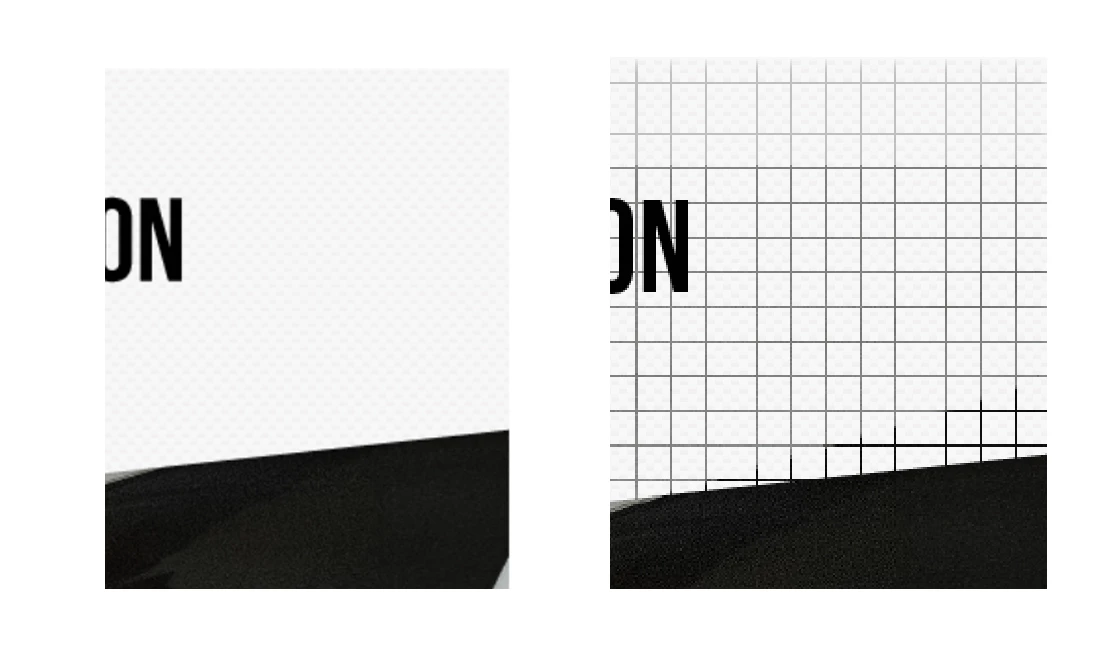
I've been having problems with this particular pattern on Illustrator (see the pattern on the left photo below). I can't figure it out because no matter what settings I try the exported file appears with vertical and horizontal lines which you can see on the right photo below. It disappears when I try to preview a GIF export with Save for Web (legacy). With other options (PNG, x2 PNG, JPEG, Art Optimized, Type Optimized, etc), these lines appear. And they're not consistent. I have other files that use this pattern and sometimes they don't appear when I save with Export for Screens x2 PNG, or they appear in a different way (lighter and smaller or with less spaces in between lines). How do I figure out what the problem is and solve this? This is becoming increasingly frustrating.
 

This topic has been closed for replies.
Correct answer Ton Frederiks

I had a closer look at your file. 

Artboard 3 has a part that has a clipping mask filled with a pixel pattern.

Working with pixels and patterns is a little tricky in Illustrator. Somehow the position of this pattern does not align with Illustrators pixelgrid and transparent pixel lines are generated on export.

If I fill the object firt with a flat color and than replace the fill with the White Carbon 5 pattern it exports correct.

2 replies

Ton Frederiks
Community Expert
Community Expert
November 7, 2023

Thanks Jessica, I've got the file, but I cannot see those lines you showed.

What I see are objects filled with patterns that are made of 4x4 pixel images.

Do you have a special reason to use these tiny images instead of vectors for these patterns? 


Ton Frederiks
Community Expert
Community Expert
November 6, 2023

Can you share an .ai file that generates the problem?

Use sharing services like CC filesharing, DropBox, Google, WeTransfer.

Known Participant
November 7, 2023

Here's a link to the file. Let me know if that works for you.

Ton Frederiks
Community Expert
Ton FrederiksCommunity ExpertCorrect answer
Community Expert
November 7, 2023

I had a closer look at your file. 

Artboard 3 has a part that has a clipping mask filled with a pixel pattern.

Working with pixels and patterns is a little tricky in Illustrator. Somehow the position of this pattern does not align with Illustrators pixelgrid and transparent pixel lines are generated on export.

If I fill the object firt with a flat color and than replace the fill with the White Carbon 5 pattern it exports correct.