



Exit
  • Global community
    • Language:
      • Deutsch
      • English
      • Español
      • Français
      • Português
  • 日本語コミュニティ
  • 한국 커뮤니티
0

Weird bug with colors/layers on Illustrator.

Explorer ,
Mar 21, 2020 Mar 21, 2020

Hello.

I was working on an illustration and an unexpected bug has occured.

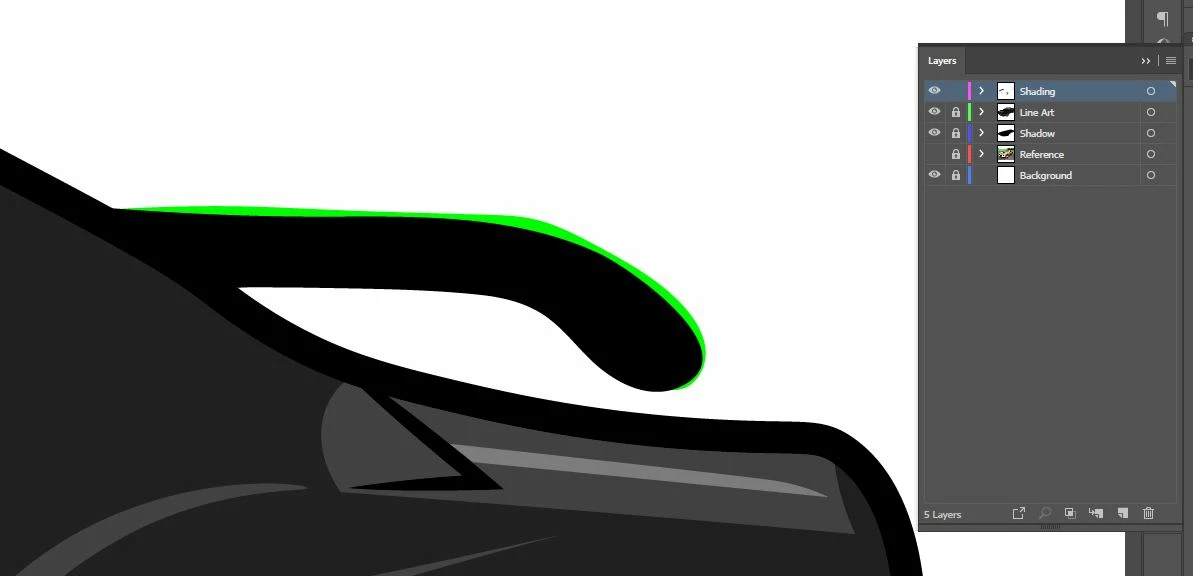
I'm using my Wacom Tablet to draw illustrations, and for unknown reasons the colors/layers in the artwork aren't overlapping each other.
Capture.JPG


The shading is suppose to be gray, but made it green so you can see where I'm trying to do it. The green is on the Shading layer, and the spoiler is on the Line Art. Colors are set to Adobe RGB (1998), opacity to 100%, and transparency settings to Normal. It's not even overlapping certain parts of the car too, which is weird.


Is there a solution to this? If so, let me know.

 
TOPICS
Bug , Draw and design , Tools
363
Translate
Report
Community guidelines
Be kind and respectful, give credit to the original source of content, and search for duplicates before posting. Learn more
community guidelines
Adobe
Community Expert ,
Mar 21, 2020 Mar 21, 2020
LATEST

Did you check if View > View using CPU makes a difference?

Translate
Report
Community guidelines
Be kind and respectful, give credit to the original source of content, and search for duplicates before posting. Learn more
community guidelines