


New Participant
June 15, 2017
Answered

Weird texture stroke on font and shapes?

  • June 15, 2017
  • 2 replies
  • 1011 views

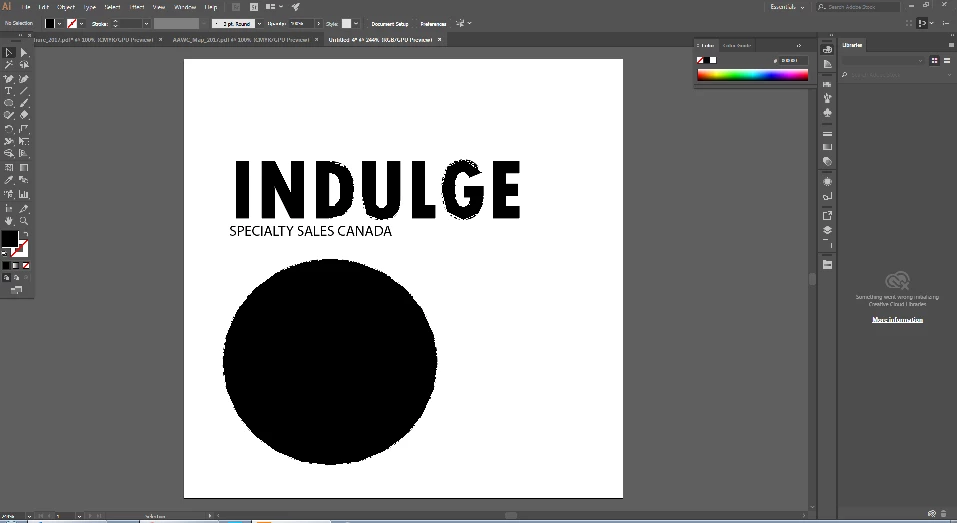
WHAT is going on? I just recently started getting these choppy edges on everything I work with in illustrator? Font, shapes, etc. I start a new file and create things from scratch and they look like this? Hopefully you can zoom in on this image, but essentially it looks like i've added a texture stroke to random things in my project? As per below, the INLG and clear and the DUG have this weird graffiti edge. The circle is also all choppy.  How do I get rid of this? Where did it come from?
    This topic has been closed for replies.
    Correct answer Larry G. Schneider

    Try turning off GPU acceleration using the Rocket icon in the top menu bar.

    2 replies

    New Participant
    September 20, 2017

    Larry,  if I leave gpu  acceleration on then will the edges stay like that when I export as a png?

    Larry G. Schneider
    Community Expert
    September 20, 2017

    As far as I know, it will carry over to the export.

    Larry G. Schneider
    Larry G. SchneiderCorrect answer
    Community Expert
    June 15, 2017

    Try turning off GPU acceleration using the Rocket icon in the top menu bar.

    New Participant
    June 15, 2017

    Larry you a a dream come true.  Thank you!