



Minus Front
Known Participant
October 21, 2023
Answered

What am I doing wrong? (Image Trace)

  • October 21, 2023
  • 2 replies
  • 817 views

So I've seen some (fairly old) online videos where using image trace is a breeze. People use really complex photos of buildings and just go image trace and after a few seconds thousands of vectors are created.


now i am trying to trace a simple rasterized halftone effect with shades of grey preset and get warnings, tracing is very slow and AI ultimatelly freezes and I am forced to shut it down.


I am suggested to rasterize the image but its already rasterized. and there is nothing large about it.


I am under the impression there is a switch or toggle somewhere that I am not aware of that is making this a pain for me.
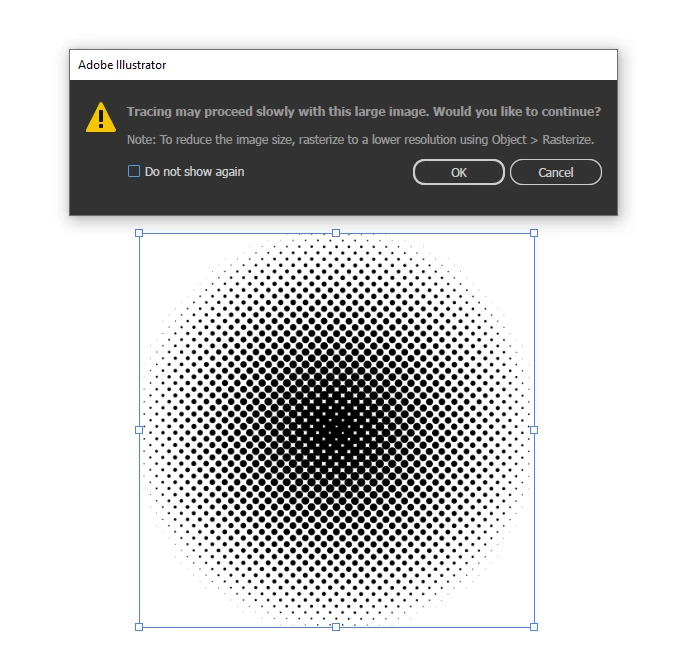
 

This topic has been closed for replies.
Correct answer Ton Frederiks

Try Black and White as setting with 0% corners.

2 replies

Ton Frederiks
Community Expert
Ton FrederiksCommunity ExpertCorrect answer
Community Expert
October 21, 2023

Try Black and White as setting with 0% corners.

Minus Front
Known Participant
October 21, 2023

@Ton Frederiksthank you this is what i needed to find. the advanced trace settings were eluding me all this time as they are collapsed by default and easy to miss.

Ton Frederiks
Community Expert
Community Expert
October 21, 2023

Good to hear that helped.

Monika Gause
Community Expert
Community Expert
October 21, 2023

Illustrator puts up this warning by default. But when you do not have a lot of RAM installed, then indeed it will get slow. Illustrator gives you the tip to lower the resolution by using the Rasterize command and set up a low resolution in there.

Minus Front
Known Participant
October 21, 2023

Hi. I have 32GB of ram installed.


Switching to a 150 ppi resolution as opposed to 300 ppi fixed this, but the tracing quality is pretty bad.


Im just confused that it requires so much resources to trace a simple pattern as opposed to a complex photograph