


Participant
July 15, 2025
Answered

Where Is a Rectangle Path (With Stroke/Fill None) Stored in AI File’s Internal Structure?

  • July 15, 2025
  • 2 replies
  • 350 views

I created and saved an Illustrator .ai file that contains only a simple rectangle path with both stroke and fill set to none.


While the shape is invisible on the canvas, I can confirm that the path exists when viewing the wireframe or checking the layer structure in Illustrator.


However, when I inspect the PDF stream inside the .ai file — looking at operators like m, l, or re — I cannot find any operations corresponding to this rectangle with no stroke or fill.


My question is:
Where is this rectangle path stored internally?
Is it kept in a specific COSObject or Stream, or is it stored somewhere else entirely within the .ai file structure?
Correct answer Brad @ Roaring Mouse

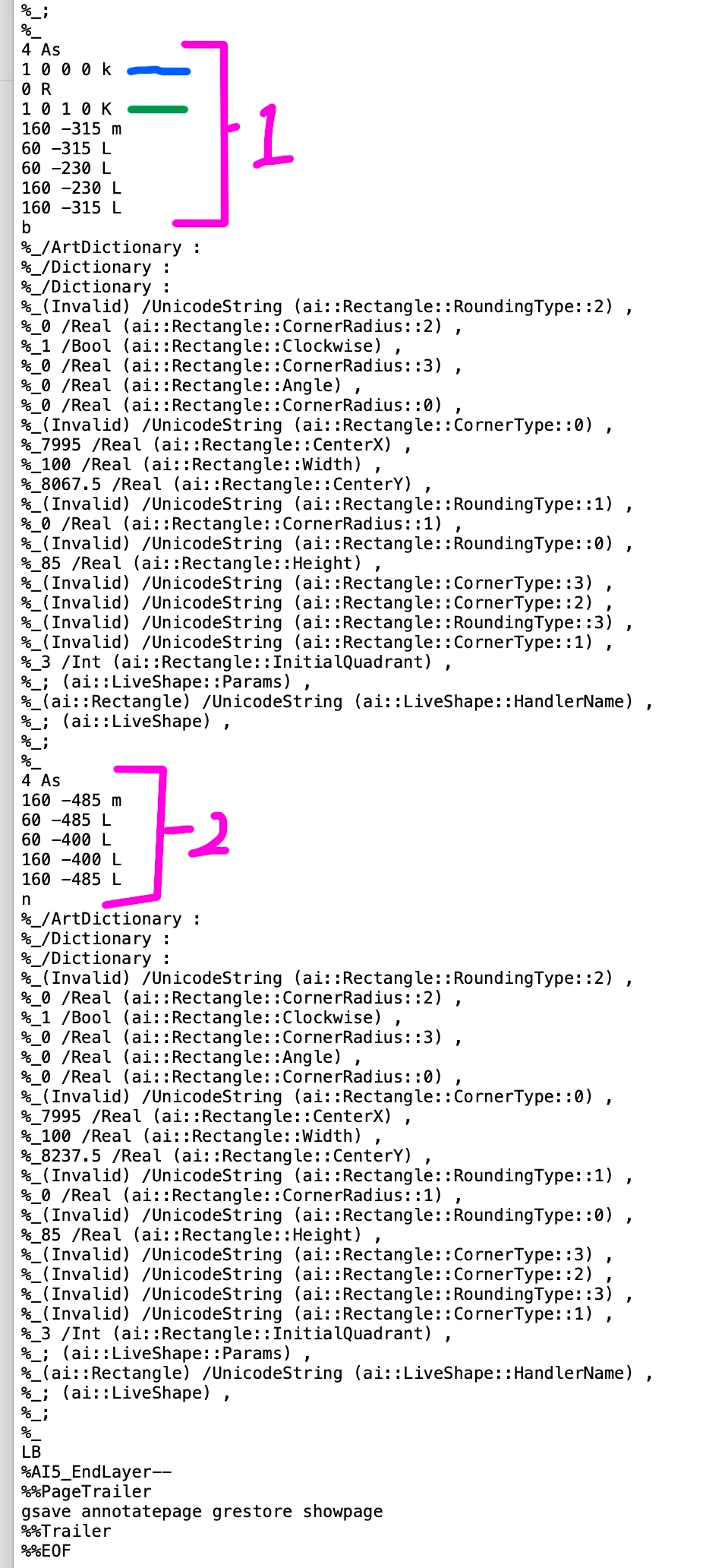
By default, an .AI file is saved with compression, so you cannot search for the typical Postscript operators that define a shape. If you Save As  without compression, you will find the code for your rectangle. like so: 

Rectangle 1 is filled with 100C and stroked with 100C 100Y Green

Rectangle 2 has no fill and no stroke

That being said, unfilled shapes, since they do not cause anything to print, are discarded when saved as PDF, so if you open a PDF with that rectangle, it won't be there.

2 replies

Brad @ Roaring Mouse
Community Expert
Brad @ Roaring MouseCommunity ExpertCorrect answer
Community Expert
July 17, 2025

By default, an .AI file is saved with compression, so you cannot search for the typical Postscript operators that define a shape. If you Save As  without compression, you will find the code for your rectangle. like so: 

Rectangle 1 is filled with 100C and stroked with 100C 100Y Green

Rectangle 2 has no fill and no stroke

That being said, unfilled shapes, since they do not cause anything to print, are discarded when saved as PDF, so if you open a PDF with that rectangle, it won't be there.

Participant
July 17, 2025

I had just confirmed that depending on the program version, the data was compressed with either zstd or zlib, and I was in the middle of decompressing it and analyzing the results, which matched the image you attached. Thanks to the image you shared, I’m confident that I identified and decompressed the right part. I really appreciate it!

Abhishek Rao
Community Manager
Community Manager
July 15, 2025

Hi @skillful_problem6766,


Thanks so much for sharing your detailed question. I am checking this with the product team to get the most accurate information for you. I will reach back as soon as I receive an update.


Appreciate your patience and looking forward to sharing more details soon!

Abhishek 

Participant
July 15, 2025

Thank you for your reply and for checking with the product team.

Abhishek Rao
Community Manager
Community Manager
July 16, 2025

Hi @skillful_problem6766,


Thanks so much for your patience. I checked with the product team and got some details for you.

The PDF part of an .ai file isn't guaranteed to include hidden objects like paths with no stroke or fill. The full document structure, including these invisible paths, is stored in a private data section of the Illustrator file, which is not an open format.

If you need an open structure that includes all objects (even hidden ones), using SVG format is recommended.


Let me know if you have any more questions. I'm happy to help!

Abhishek