


Participating Frequently
October 25, 2022
Answered

Where to find the transparancy of a color in an .eps file

  • October 25, 2022
  • 3 replies
  • 1073 views

I'm working on a project and i'm not really experienced with this. I want to make a plugin where users can upload only .eps files. But there's a catch...

The user can only upload .eps files and these files can not have transparant color in it. I thought of something to search for specific transparancy value and if they are there the plugin won't accept the file. But actually i don't know anything at al about .eps files. I hope somebody can teach me the basics or help me find the terms i have to look for in the file to not accept it.

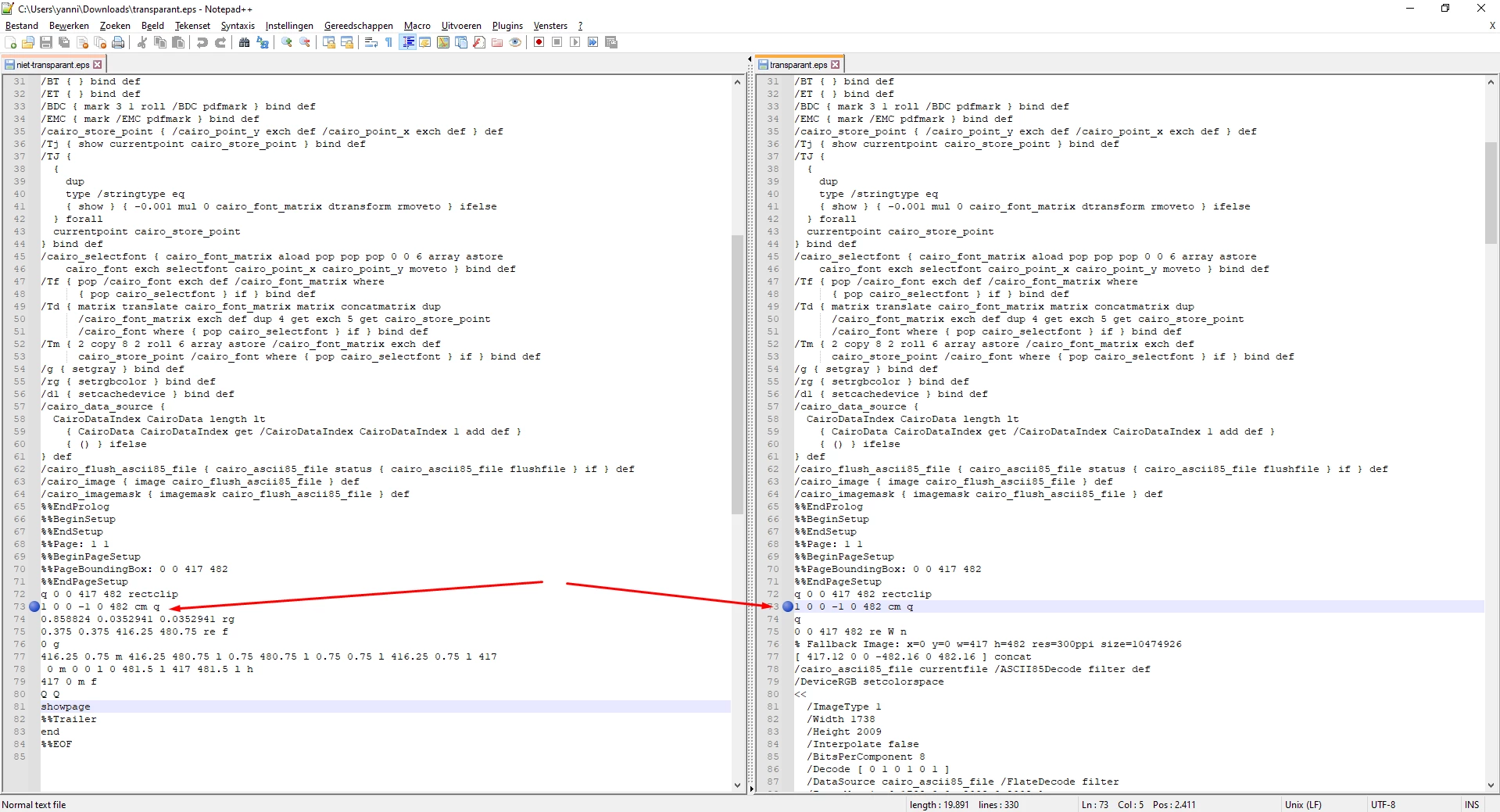
I have made 2 .eps files one file contains a transparent color the other doesn't. I've noticed that the file which does not is much shorter. Also the file with transparency in the color has a fall back image and is much longer. Is this because of the transparency color or are there other things. I will ad the screenshot of the difference between the files.


This topic has been closed for replies.
Correct answer Ton Frederiks

EPS files cannot contain transparency. What you see is probably the Illustrator part of the file.

3 replies

Luke Jennings3
Community Expert
Community Expert
November 2, 2022

.eps files should usually be avoided, there is almost no reason to use them and many reasons not to use them. PDF is a better option. What plug-in are you using? there may be an update. That said, transparency should not be an issue for a modern workflow, however, you can use an Acrobat preflight profile to check a pdf for transparency. Tools> Print Production> Preflight.

Participating Frequently
November 8, 2022

Is there a way to check if the .ai or .pdf has transparancy in the colors without acrobat preflight profile? We are trying to create a custom plugin for in wordpress with php and some libaries. I've made 2 exact same files while one has transperncy in the color and the other one doesn't. I can see the one with transparency has something like transparency true. Is this the same when you use more objects in the vector? Is this the way to detect transparency in the source file? Thanks a lot for all the help and thinking 🙂

Monika Gause
Community Expert
Community Expert
November 8, 2022

The plugin Select Menu can select "Transparent Art", but I have not tried yet what exactly it can find. If this is reallly all kind of transparency.

m1b
Community Expert
Community Expert
October 25, 2022

Hi @brilliant_Mountain5D09, how are you generating the .eps files? If you are exporting .eps from Illustrator, it may be rasterizing section(s) of the page due to transparent elements which are not compatible with the .eps format (as @Ton Frederiks noted). That would explain why the file size is larger—because it contains the raster(s). I think it may be challenging to programmatically determine if the .eps code (ie. PostScript language code) has signs of being converted in this way unless you familiarize yourself with all the things that Illustrator does to "flatten" the file, and identify those things as tell-tales in the postscript. But what if one of your users gives you postscript generated with a different app, not Illustrator—it may have different tell-tales. Maybe someone has a quick fix, but I think it'll be a hard job you have set yourself.

- Mark


P.S. I wonder if .eps files are a bit old-fashioned to be working with these days? I haven't used one for 10 years at least.

Participating Frequently
October 25, 2022

Thanks a lot for the explanation.  I have generated these files in illustrator. The reason why i need it to be in .eps files is because the plug-in will be for a printing company. But this is pretty dissapointing, although i think most of users who will upload .eps file made it in illustrator. If we only inform people they have to use the illustrator style is there a way to search for specific words or variables that will be used to set transparancy in the .eps file. I think it will not work because it is to complex to me but if we can make it happen it would help the company a lot.

m1b
Community Expert
Community Expert
October 25, 2022

Perhaps you could require an .ai file instead? Then it would be easier to just open it up and check for transparent objects. It would still be a fair bit of work to write that script but I think it is much more feasible than using .eps files.

- Mark

Ton Frederiks
Community Expert
Ton FrederiksCommunity ExpertCorrect answer
Community Expert
October 25, 2022

EPS files cannot contain transparency. What you see is probably the Illustrator part of the file.

Participating Frequently
November 1, 2022

So is if there's a fallback image like on second file, it's not a correct .eps file to use for print work?

Ton Frederiks
Community Expert
Community Expert
November 1, 2022

The Illustrator part that is saved with some .eps files is meant to be used by Illustrator when the file is reopened.

This part is not the .eps part, which will lose many editing capabilities.