


magiknizm
Participating Frequently
July 15, 2022
Answered

White stripes when using Ray-Tracing render
  • July 15, 2022
  • 4 replies
  • 3181 views

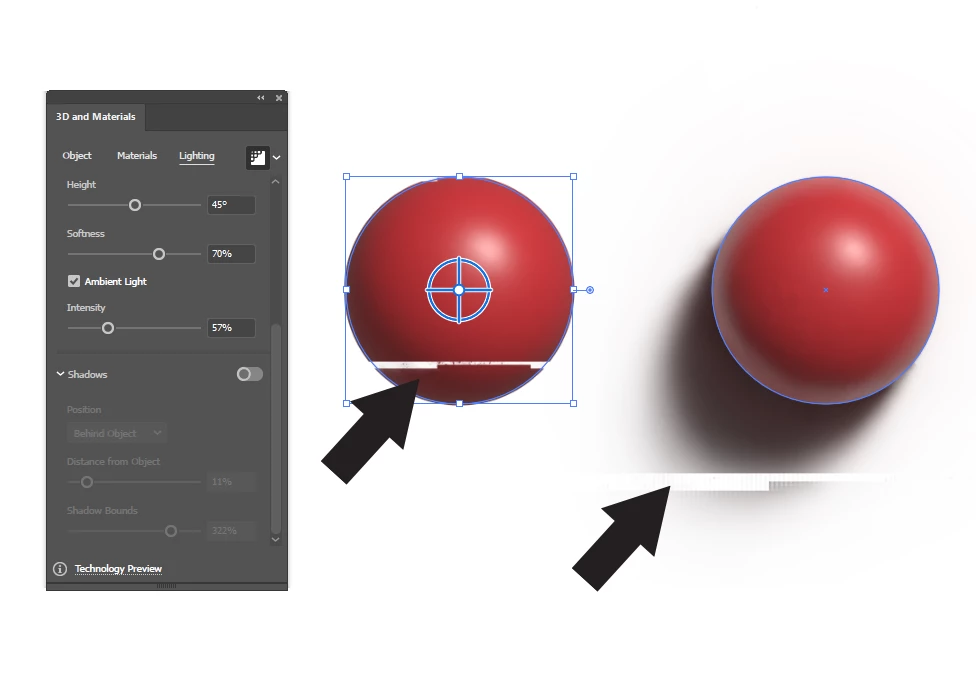
Can someone please help what is going on with my Ai? Everytime I try to render out with ray-tracing ON these white stripes always shows up.


Please someone help!

This topic has been closed for replies.
Correct answer ZBalling

Fixed in nvidia driver 517.48. 

  • [Adobe Illustrator] Using Reduce Noise with Ray Tracing appears pixelated [3709309]
 

4 replies

ZBallingCorrect answer
Inspiring
September 28, 2022

Fixed in nvidia driver 517.48. 

  • [Adobe Illustrator] Using Reduce Noise with Ray Tracing appears pixelated [3709309]
 
Community Manager
July 18, 2022

Hello @magiknizm,


I hope the problem is resolved by now. If not, kindly update this thread so we can investigate this issue further.


Regards.

magiknizm
magiknizmAuthor
Participating Frequently
July 25, 2022

The issues still exists 

Community Manager
July 26, 2022

Hello @magiknizm,


Thanks for confirming. I would request you try updating the GPU drivers and check if it helps.

Also, kindly share the System Info for your computer by following the steps shared in this article (https://support.audient.com/hc/en-us/articles/217206526-How-Do-I-Send-My-System-Information-), so we can check this further.


Looking forward to your response.


Thanks,

Anubhav 

Community Manager
July 15, 2022

Hello @magiknizm,


Sorry to hear about this experience. I hope updating to the latest version of Illustrator, as suggested by Ton, helped resolve the problem. If not, kindly try resetting Illustrator's preferences by following the steps shared in this article (https://helpx.adobe.com/illustrator/kb/troubleshoot-preference-issues.html) and sharing your observations.
Disclaimer: Please note that resetting preferences will remove all custom settings, and Illustrator will launch with the defaults. You may take a backup of these settings from the location mentioned in the article.

Looking forward to hearing from you.


Thanks,
Anubhav

Ton Frederiks
Adobe Expert
July 15, 2022

Do you use the latest Illustrator version?

magiknizm
magiknizmAuthor
Participating Frequently
July 25, 2022

Yes. I'm using the latest Adobe Illustrator and the issues still exists 

Ton Frederiks
Adobe Expert
July 25, 2022

The reason I asked is because your panel shows Technology Preview at the bottom and in the current version it says Share feedback. Did you update in the meantime to 26.3.1?