



Dave VanderWekke
Participant
February 9, 2023
Answered

Why doesn't replace spline repeat shape all the way to the end of the path?

  • February 9, 2023
  • 1 reply
  • 999 views

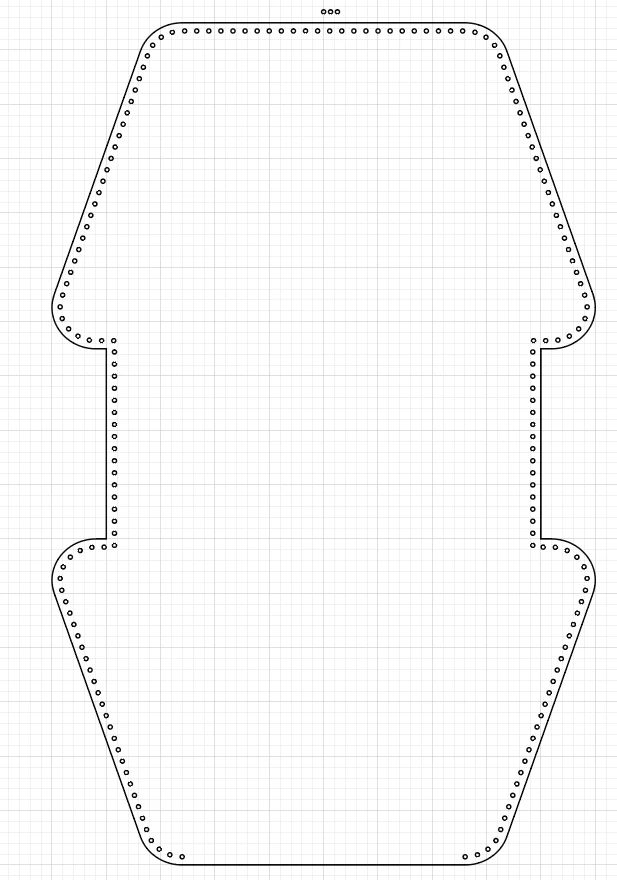
I have created a blend, circle that repeats every 5mm.  I then took my path and created an offset path (-3mm) so it would be inside my outer path.  When I used the Blend > Replace Spline tool, it repeated my blend however it does not go all the way around the path.  You can see it stops short of completing the bottom part.  I am not sure why this is happening.  Does anyone have any insight?
Correct answer jane-e

@Dave VanderWekke  


It needs to be an open path. All you need to do is use the Scissors tool and click it once anywhere along the path to cut it. 


Jane

1 reply

jane-e
Community Expert
jane-eCommunity ExpertCorrect answer
Community Expert
February 9, 2023

@Dave VanderWekke  


It needs to be an open path. All you need to do is use the Scissors tool and click it once anywhere along the path to cut it. 


Jane

Dave VanderWekke
Participant
February 9, 2023

All I can say is WOW and Thank you! Quite simple.  I come from the Autocad and Drafting world of app. Their version of this is different and just repeats along a path regardless of it being open or closed.  I guess Illustrator is looking for a Start and End Point on the path to begin and end the blend.

jane-e
Community Expert
Community Expert
February 9, 2023

You're welcome, @Dave VanderWekke , once you learn this simple trick, you never forget it!


Jane