

kxy9190
Participant
January 28, 2019
Answered

Why I can't activated my adobe font after re-open a file?

  • January 28, 2019
  • 6 replies
  • 1105 views

Here is my problem.

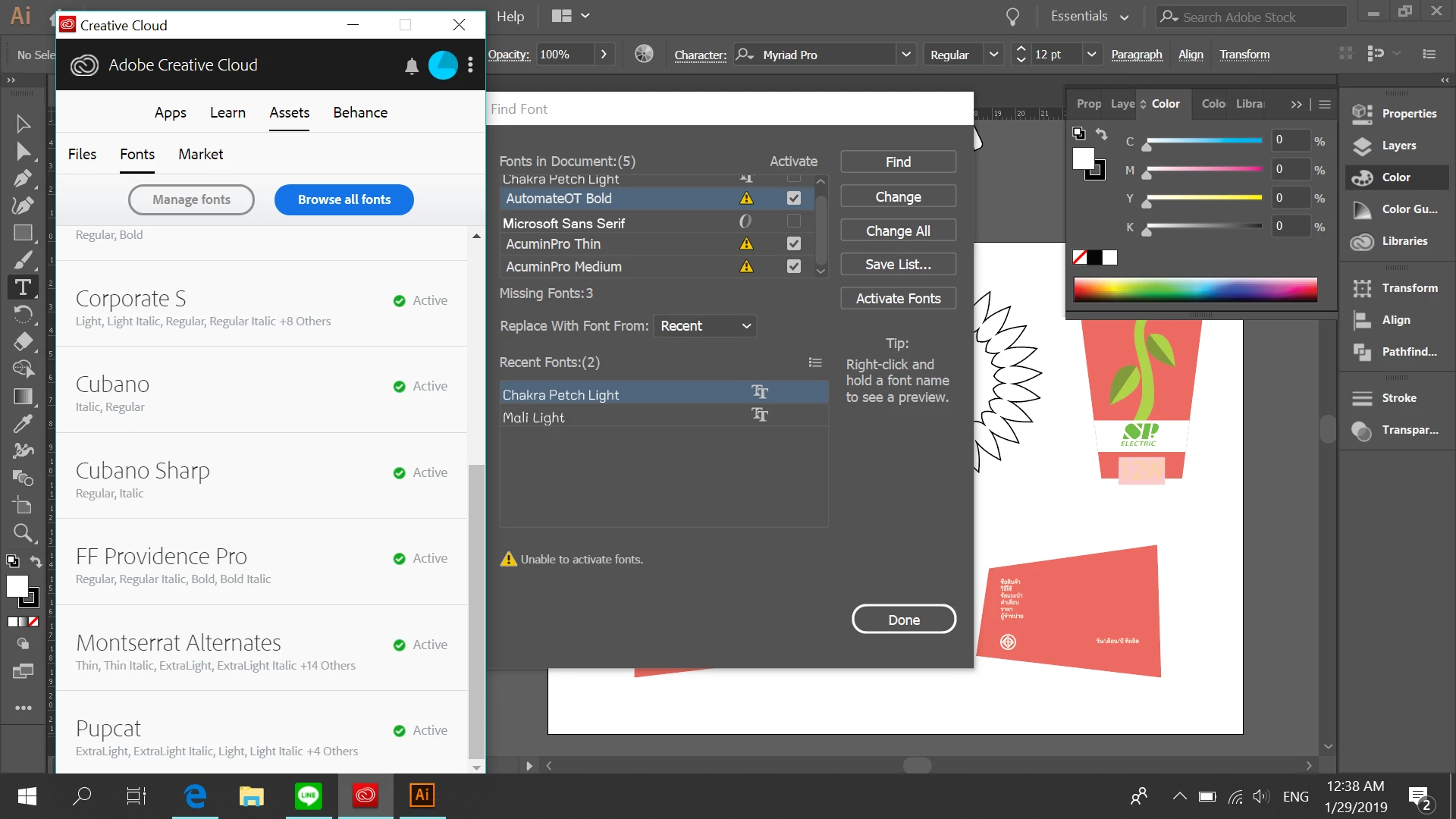
When I close and re-open my work, adobe always can't find adobe fonts although I click the 'Activate fonts' button.

Please help me answer.
This topic has been closed for replies.
Correct answer Ton Frederiks

You should be able to activate them.

It can be an Illustrator problem, but it could also be an Adobe Fonts activation problem.

Maybe it is better to also ask this in the Adobe Fonts forum.

Adobe Fonts (formerly Typekit)

6 replies

kxy9190
kxy9190Author
Participant
January 29, 2019

Thank you for all answers. I will try to solve it.

Monika Gause
Community Expert
Community Expert
January 29, 2019

WHat kind of file is this?

It's not a PDF by chance?

kxy9190
kxy9190Author
Participant
January 29, 2019

.ai file

Ton Frederiks
Community Expert
Ton FrederiksCommunity ExpertCorrect answer
Community Expert
January 28, 2019

You should be able to activate them.

It can be an Illustrator problem, but it could also be an Adobe Fonts activation problem.

Maybe it is better to also ask this in the Adobe Fonts forum.

Adobe Fonts (formerly Typekit)

tromboniator
Community Expert
Community Expert
January 28, 2019

Try closing and reopening Adobe Illustrator, rather than just closing and opening the document.

Daniel E Lane​ Not sure where you looked. I found all of them.

Peter

Daniel E Lane
Inspiring
January 28, 2019

where? still not coming up on a search of Adobe fonts. And I have it set to search All Fonts...

Search for AutomateOT Bold

Search for AcuminPro Thin

Search for AcuminPro Medium

All say they are not there. And Trombonator, you looked for the fonts they have already (the ones on the left), The ones that arent working are the ones with the yellow warnings in the window on the right. The ones they are trying to activate, AutomateOT Bold, AcuminPro Thin, and AcuminPro Medium

Monika Gause
Community Expert
Community Expert
January 28, 2019

Is that an Adobe Fonts font?

Is it still available on Adobe Fonts?

Is it still among the licensed fonts?

Daniel E Lane
Inspiring
January 28, 2019

I did the search for them. None of those fonts are on the Adobe Font list now.

Daniel E Lane
Inspiring
January 29, 2019

https://forums.adobe.com/people/Daniel+E+Lane  wrote

I did the search for them. None of those fonts are on the Adobe Font list now.

https://fonts.adobe.com/fonts/automate

https://fonts.adobe.com/fonts/acumin


So they are in there, just with an altered name. nice. That's why he cant get them to activate. The names are different.

He had AcuminPro Lite. Now it's listed as Acumin Pro Lite. The old fonts he was using are not seeing the new names.

Daniel E Lane
Inspiring
January 28, 2019

So, its saying the font is missing, not needing activation. The font is not installed on your computer. That's why it can't activate the font. There is no font there to activate. You need to either download them from somewhere and install them, or if you already did that at some point in the past, you need the install font files to get them loaded onto your computer. And those ones that you are looking for are not Adobe Fonts. I just did a search through all adobe fonts, and those are not on there.
