


Word Spacing too tight in Illustrator 2021
I've recently updated from Illustrator 2018 to 2021 and I've noticed with all documents, the word spacing seems to be way too tight. This happens with new documents, but even when I open files that were created in Ai2018 to edit the text in Ai2021, it tightens up the spaces between all the words when I click on live text. This happens on all fonts that I have tested.
Text seems to at least LOOK normal again when I set the word spacing to 200% in the paragraph justification settings, or if I just hit the spacebar 2 times insteaf of once (lol), but I shouldn't have to do that with every new document. Those settings in my 2018 version always remained at default and I never had an issue.
Here's what Ai2021 looks like with "default" word spacing, and what 200% looks like (which I think looks normal):
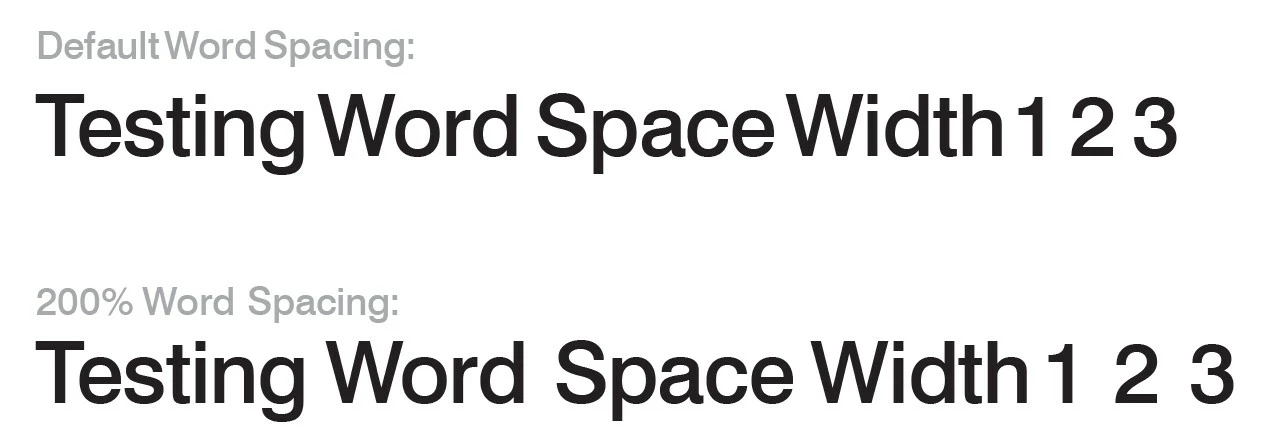
If there are any settings I'm unaware of that can be changed to resolve this issue, I'd be happy to hear them.
Thanks!
 AdChoices