
Participant
Sep 20, 2017 6:00 PM UTC
Answered

DPI OR PPI

I have been making a poster for someone and now that I am done with the poster, they said that they want me to export the poster do that it is PDF at 300 DPI. When I go to export settings to check that it is 300 DPI, it says :
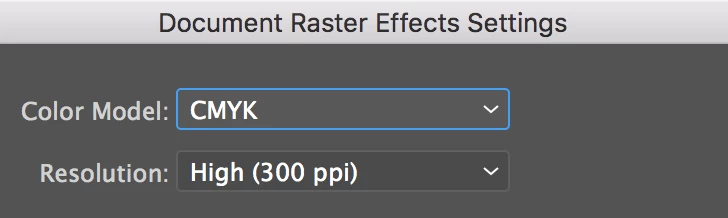
Is this right?
This topic is closed to new replies. Start a new post to keep the conversation going.
Mario Arizmendi
Mario ArizmendiCorrect answer
Legend
Sep 20, 2017 6:31 PM UTC

Maybe this article helps you to understand better...

PPI vs. DPI: what's the difference?

10 replies

Mario Arizmendi
Mario ArizmendiCorrect answer
Legend
Sep 20, 2017 6:31 PM UTC

Maybe this article helps you to understand better...

PPI vs. DPI: what's the difference?

Translate
Mike_Gondek10189183
Community Expert
Community Expert
Sep 20, 2017 7:44 PM UTC

True that DPI refers to the amount of dots in a printer, but that refers to desktop printers, rather than printing presses which use plates.

The article leaves out LPI which is also a printing measurement of dots, but the dots are created by halftones. For optimal quality you need atleast 2x the pixels for the lpi. So for 150lpi (most common in lithography), you need a 300 dpi image to get the best quality out of your printing plates.

Translate
JETalmage
Inspiring
Sep 20, 2017 8:47 PM UTC

For optimal quality you need atleast 2x the pixels for the lpi.

The rule of thumb is 1-to-2 times the halftone ruling. 300 ppi is not an "at least" minimum.

JET

Translate
Legend
Sep 20, 2017 6:10 PM UTC

For your purposes, and your printer's, and mine, ppi and dpi are the same. Some people get very addressed about the difference but I couldn't care less until someone shows me a job which messed up from mixing the terms. I think they're just showing off.

Translate
Participant
Sep 20, 2017 6:11 PM UTC

Ok thank you. This is the first client job that I have had, so I want to make sure before I send them the file.

Translate
Legend
Sep 20, 2017 6:16 PM UTC

It is worth noting though that the resolution they are quoting really only applies to images in the file (eg photos) And your setting has no effect on this: you need to be aware and set image resolution accordingly. Your vector work remains vector on PDF.

Translate