


TraylorDean
Participant
December 13, 2018
Answered

How do I get a line of text (menu item and item price) to justify left and right?

  • December 13, 2018
  • 2 replies
  • 2525 views

I have been using Illustrator (self-taught novice) to create menus for my restaurant. I always have trouble lining up all the prices on the right side of a text box. I thought there might be a way to have each line of text justify the MENU ITEMS to the left and the PRICES to the right. Currently I use TAB and SPACE to line everything up but it gets a bit tedious when changing the MENU ITEM text- it always throws off the PRICES on the right. I am not doing a great job at self-teaching on this matter - HELP! ...and thank you.
This topic has been closed for replies.
Correct answer Monika Gause

As has already been said this is a job for InDesign.

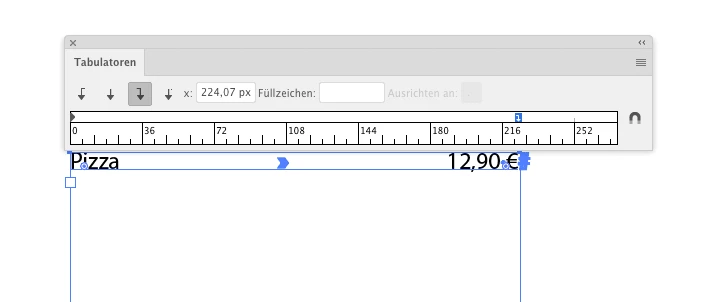
But if you insist in Illustrator:

2 replies

Monika Gause
Community Expert
Monika GauseCommunity ExpertCorrect answer
Community Expert
December 13, 2018

As has already been said this is a job for InDesign.

But if you insist in Illustrator:

Daniel E Lane
Inspiring
December 13, 2018

Hi, this is a tough question to answer without knowing how you created all of the elements and how they are all put together. And really, Illustrator isn't the best place to create the menus you are doing. I've created a few hundred menus over the years for many restaurants across the country. The best place to create them and make them easy to update when you have price changes or item changes is in Adobe InDesign, which is a program designed for laying out text and so forth. I've used it on the menus as well as for book and magazine layouts. It's amazing for that stuff. Illustrator is really just used to create vector graphics, that you would then utilize in InDesign or elsewhere.