


Inspiring
October 2, 2018
Answered

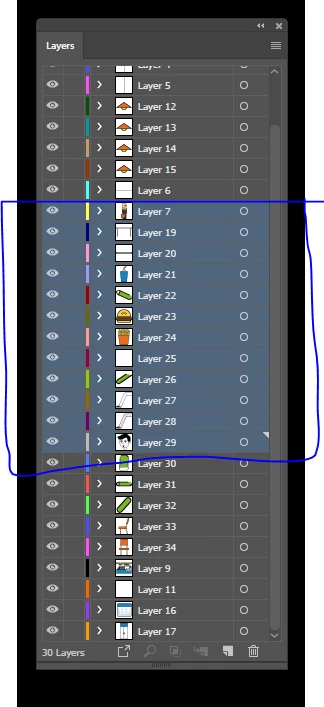
how do you group layers in illustrator to composition in after effects

  • October 2, 2018
  • 3 replies
  • 5212 views

I know how to do this in the  After Effects but I want to like a group of Photoshop shows in the After Effects composition
Thank you

Because this will save a lot of time in my pregnancy and make it easier

This topic has been closed for replies.
Correct answer Monika Gause

Please post feature requests there:

http://illustrator.uservoice.com

3 replies

Participant
March 30, 2023

did you find a solution please ?


Simmer1
Community Expert
Community Expert
October 2, 2018

Hi

Try creating a Sub Layer, give it a appropriate name and place Layer into it.

I hope this helps,

Sim

Monika Gause
Community Expert
Community Expert
October 2, 2018

If putting all those layers into a main layer in Illustrator does not do what you want then you can't do it.

asadssAuthor
Inspiring
October 2, 2018

Thank you

Monika Gaus
Simmer1

I need this service like a group in Photoshop

Because this property gives me great help in (after efficiencies) for making the composition

I would like to add this feature to the Illustrator program because it will allow the default users to create a composition

It makes it easy for painters to have lots of motion graphics

Greetings

asad

Monika Gause
Community Expert
Monika GauseCommunity ExpertCorrect answer
Community Expert
October 2, 2018

Please post feature requests there:

http://illustrator.uservoice.com