


Deaf_Guy
Inspiring
May 16, 2017
Answered

How to recreate letters of unknown font?

  • May 16, 2017
  • 1 reply
  • 4411 views

I am trying to recreate these letters by tracing over them in AI but as is always the case for me, my weakest skill set in Adobe is the pen tool.  So before I give this yet another whirl (I've already tried it several times to no avail; all of my attemps look worst than Illustrator's Image Trace feature) does anyone know what the name of this font is? It'd be easy if I could just find it and grab the font and make what I need.
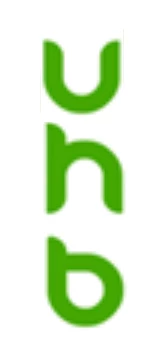
If not, any ideas on best ways to approach drawing these with pen?  My last attempt involved putting a lot of H and V guide lines next to the various pipes of each letter but as always, I failed at it.

Thanks.

PS - I've already asked around about the font and no one at my office knows the font name nor has the original design or source files.

    This topic has been closed for replies.
    Correct answer Danny Whitehead.

    Yeah, pretty much. Start with two ellipses, then the rectangles. Smart Guides will help you snap to the ellipses. Once you have all the base shapes drawn, you can use the pathfinder tools Minus Front and Unite to combine them.

    1 reply

    Danny Whitehead.
    Legend
    May 16, 2017

    That's about as geometric as it gets, so it would be better done using shape tools rather than the pen tool. I'd start by drawing two concentric circles based on the bottom of the B, and all the other pieces else can be built from there. The tapered straight portions would be rectangles with one rounded corner.

    Deaf_Guy
    Deaf_GuyAuthor
    Inspiring
    May 16, 2017

    Danny thank you dumb question but when you say shape tools do you mean like the ellipse and circle tool - just draw the shapes to match and then work in some rectangles?

    Danny Whitehead.
    Danny Whitehead.Correct answer
    Legend
    May 16, 2017

    Yeah, pretty much. Start with two ellipses, then the rectangles. Smart Guides will help you snap to the ellipses. Once you have all the base shapes drawn, you can use the pathfinder tools Minus Front and Unite to combine them.