


September 27, 2018
Answered

Logo .ai file, how to resize and save in PNG lossless?

  • September 27, 2018
  • 3 replies
  • 11900 views

I guys, I'm sorry but AI is so hard to understand. Simple question:

how can I resize in pixel my *.ai logo file in Illustrator and export in png? I would like to create a lot of version of my logo like 250x250, 12x12, 4000x1678 and I don't know how many but all of them always in a 100% quality

Please can someone help me?

Thanks ❤️
This topic has been closed for replies.
Correct answer Muqqarib Hassan

just did but I only have to choose where and the name of the file...


Hi, Check this out.

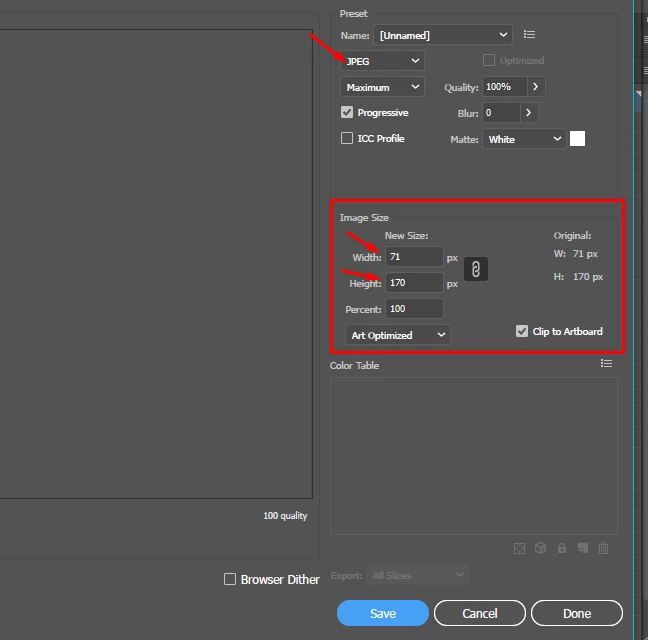
Press the Alt+Shift+Crtl+S and open this setting to change the dimensions.

3 replies

Muqqarib Hassan
Inspiring
September 27, 2018

Simply open your logo.ai file and then go to file and select export and then export as and then choose your required size and select your format in PNG.

September 28, 2018

umm well ok but...I don't understand where to insert the vertical and horizontal size --> http://prntscr.com/kzq1eo

Muqqarib Hassan
Inspiring
September 28, 2018

No You are doing it Export for Screen. You have to do it Export as then insert the vertical and horizontal size.

like this.

September 27, 2018

Thanks guys! I'm very very very ignorant about this program and my only only small need is to do it right...tomorrow I will try and let you know even if I still don't understand where to go from the menu to do all this! John, do you know some tutorial that I can read about your method?

John Mensinger
Community Expert
Community Expert
September 27, 2018
meganchi
Legend
September 27, 2018

If your original logo is in pixels, then all you can do is make it smaller to maintain the same quality as your original. Increasing the logo size will degrade the quality.

I'd recommend redrawing your logo in Illustrator to make it a vector format. This will allow you to scale it any size with 100% quality.

September 27, 2018

My original file is with ai extension so i also have the vector one. On illustrator how can I resize my logo with specific Size?

Monika Gause
Community Expert
Community Expert
September 27, 2018

You can use the Export for screens function.

Adobe Illustrator’s Export for Screens Saves You Time - Big Time | Adobe Blog

If this doesn't produce high quality, then please show screenshots.