FalakBurch
Participant
July 24, 2018
Answered

page numbering on illustrator CC 2017

  • July 24, 2018
  • 2 replies
  • 47714 views

1) How do i enter page number on document tiles that GET printed.

2)How do i give a border to a page (a black border)

I am trying to create a book, and there is no info on how to insert page numbers that PRINT nor how to create SAME border for all the pages. HELP

I do not know scripting

Correct answer jane-e

Illustrator does not have automatic page numbering. You can manually type the numbers in a printable area. If you have InDesign, if is better suited for books with pages (as opposed to artboards), margins, columns, headers, footers, page numbers and more. You will be very frustrated if you continue in Illustrator.

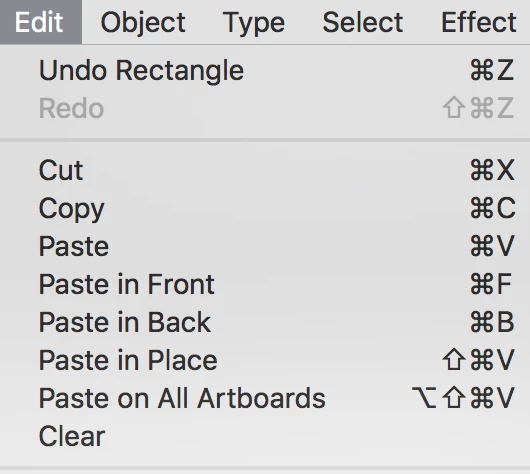
To create a border, draw it on one page, then cut it. Go to Edit > Paste on All Artboards. To edit it, manually delete it from every artboard and repeat. In InDesign, you would put it on a Master Page and it would show up on all pages using that master.
Do not think of artboards as pages. They are artboards.

How to set up multiple artboards in Illustrator

The number of artboards depends on the size. If the page size if 8.5x11, for example, you can get 420 artboards.

My advice? (I have to give it.) Don't create a book in Illustrator. Use InDesign.

2 replies

Ares Hovhannesyan
Community Expert
Community Expert
July 24, 2018

You can also add pages number in Adobe Acrobat. Open Ai file in Adobe Acrobat add page number and print.

Add headers, footers, and Bates numbering to PDFs, Adobe Acrobat

runninghead_design
Inspiring
June 11, 2019

There's also a script to add page numbers in AI.

Not sure where the current, working version of this is yet but here's one variation from CarlosCanto

Introducing: Insert Page Numbers

I've used one such script and it was great- adding all page numbers to a layer above the rest.

It would be great to have something as fundamentally useful as Artboard numbers available from the default AI build but even CC 2019 has a HUGE snagging list and I doubt numbers will be prioritised.

Monika Gause
Community Expert
Community Expert
June 12, 2019

I don't feel like learning more inDesign than I have to as I'm really not a fan of the app and can do almost everything I need to in AI anyway.

I can't imagine it would be very difficult to add page numbers to AI as CarlosCanto's​ shown with his short, elegant jsx script.

It always strikes me as odd when apps refuse to cater for functionalities that lie within such easy reach, right there in the OS.

AI is already keeping track of both the artboard numbers and the layer numbers.

AI is great for making PDF documents and saves to PDF formats very well.

So it follows that basics like page numbering should be catered for natively and there's an expectation from users for this.

I'm impressed by, and grateful to, the AI devs that allowed mathematical operations right there in the dialogues.

Awesome work there!

Many more positive examples can be found within AI and many negative examples might also be found in the forums and user voice realms.


runninghead_design  schrieb

It always strikes me as odd when apps refuse to cater for functionalities that lie within such easy reach, right there in the OS.

AI is already keeping track of both the artboard numbers and the layer numbers.

All the features added have to be tested against existing functions. They have to be taken care of when updating. They have to be maintained and maybe even updated. So when adding functions you have to be careful if they make sense in the context.

Carlos' script is great, but when you change the order of artboards, the numbering doesn't get updated, which would be useful. There would be quite a few additions to it in order to be shipped as an Illustrator update, which might make it slightly more complicated.

I don't get it why people would even want to use Illustrator in a context of making books with left and right pages, while InDesign has several features to take care of the layout in such a situation. Make life more complicated because you don't like to learn another app?

jane-e
Community Expert
jane-eCommunity ExpertCorrect answer
Community Expert
July 24, 2018

Illustrator does not have automatic page numbering. You can manually type the numbers in a printable area. If you have InDesign, if is better suited for books with pages (as opposed to artboards), margins, columns, headers, footers, page numbers and more. You will be very frustrated if you continue in Illustrator.

To create a border, draw it on one page, then cut it. Go to Edit > Paste on All Artboards. To edit it, manually delete it from every artboard and repeat. In InDesign, you would put it on a Master Page and it would show up on all pages using that master.

Do not think of artboards as pages. They are artboards.

How to set up multiple artboards in Illustrator

The number of artboards depends on the size. If the page size if 8.5x11, for example, you can get 420 artboards.

My advice? (I have to give it.) Don't create a book in Illustrator. Use InDesign.