



o-marat
Inspiring
August 6, 2016
Answered

RegExp search and replace, keep original text formatting

  • August 6, 2016
  • 3 replies
  • 7971 views

Hello!

Required to make search and replace in a text frame using RegExp.

And at that keep original character formatting of the text frame.

How it's possible?

Bad example – it changes the formating of the entire text to the format of the first character:

var reg = /a/gmi;

var replacer = '*';

var fr = activeDocument.textFrames[0];

fr.contents = fr.contents.replace (reg , replacer);
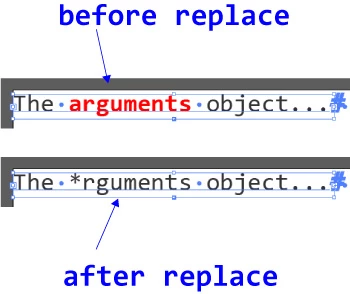
Thanks!

This topic has been closed for replies.
Correct answer pixxxelschubser

I didn't tested your code yet.

But why you didn't play with my code snippet and use something like this:

// regex_changeContentsOfWordOrString_RemainFormatting.jsx

// regards pixxxel schubser

var s = /arguments/gi;

var replacer = "other string", result;

var atf = activeDocument.textFrames[0];

while (result = s.exec(atf.contents)) {

    try {

        aCon = atf.characters[result.index];

        aCon.length = result[0].length;

        aCon.contents = replacer;

        } catch (e) {};

    }

Try it and have fun

3 replies

o-marat
o-maratAuthor
Inspiring
August 11, 2016

Now it is working as it should. Thank you all for your help!

function replaceKeepFormatting (reg, replacer, txtFrame) {

  var result;

  while (result = reg.exec (txtFrame.contents)) {

    for (var i = 0; i < result[0].length; i++) {

      txtFrame.characters[result.index + i].select (true);

    }

    if (txtFrame.textSelection.length == 2) {

      var str                            = (txtFrame.textSelection[0].contents + txtFrame.textSelection[1].contents).replace (reg, replacer)

      txtFrame.textSelection[1].contents = str.slice (-1);

      txtFrame.textSelection[0].contents = str.slice (0, -1);

    } else {

      txtFrame.textSelection[0].contents = (txtFrame.textSelection[0].contents).replace (reg, replacer);

    }

    result.lastIndex += replacer.length - result[0].length;

    txtFrame.textRange.deSelect ();

  }

}

pixxxelschubser
pixxxelschubserCorrect answer
Braniac
August 11, 2016

I didn't tested your code yet.

But why you didn't play with my code snippet and use something like this:

// regex_changeContentsOfWordOrString_RemainFormatting.jsx

// regards pixxxel schubser

var s = /arguments/gi;

var replacer = "other string", result;

var atf = activeDocument.textFrames[0];

while (result = s.exec(atf.contents)) {

    try {

        aCon = atf.characters[result.index];

        aCon.length = result[0].length;

        aCon.contents = replacer;

        } catch (e) {};

    }

Try it and have fun

o-marat
o-maratAuthor
Inspiring
August 12, 2016

pixxxel schubser, it's great!

Just one thing:

aCon.contents = aCon.contents.replace(s, replacer);

pixxxelschubser
Braniac
August 9, 2016

o-marat schrieb:

Hello!

Required to make search and replace in a text frame using RegExp.

And at that keep original character formatting of the text frame.

How it's possible?

Going this way

// regex_changeContentsOfSingleCharacterRemainFormatting.jsx

// regards pixxxel schubser

var s = /a/gi;

var replacer = "*";

var result;

var atf = activeDocument.textFrames[0];

while (result = s.exec(atf.contents)) {

    try {

        atf.characters[result.index].contents = replacer;

        } catch (e) {};

    }

Have fun

Silly-V
Braniac
August 6, 2016

This one's a lot more tricky when wanting to keep formatting: you have got to select the stretch of text you want using one of the selection commands, however they have it in the textRange object, or one of the object's descendants. Then, when your text range is selected you can replace just the contents of that range, which keeps the styling. This is exactly the same method where if you highlight the text manually and type in replacement text, it will keep the styling. However for reasons unknown, this method would always produce 2 ranges within the selection: the bulk of the range from 1st character to 2nd-to-last character and another range with just the last character. Not sure why it occurs, but it's a mild expected annoyance.

Here, I actually looked it back up for you, meditate on this following scripture and the righteous path shall be revealed to thee:

#target illustrator-20

function test(){

    var doc = app.activeDocument;

    var s = doc.textFrames[0];

    s.textRange.characters[0].select();

    s.textRange.characters[1].select(true);

};

test();

o-marat
o-maratAuthor
Inspiring
August 6, 2016

Silly-V, many thanks for the thought!

If I understand you correctly, the sequence of actions can be something like this:

Define attributes for comparison

  • Select char n
    • If (char n == n + 1) add the char n + 1 to the selected area
    • else use the search/replace to the selection
      • Remove selection
  • Start the cycle again from the current position

It seems that there is one problem: from the search is excluded the boundary between the two blocks with different formatting...

But, in any case, this is the best solution available.

And I forgot to clarify one obvious point (just in case): search for a single character (as in my first post) does not present any problems - the replacement can be carried out in a loop over the elements TextFrame.textRanges .

The whole point in more complex regexp.