


August 4, 2017
Answered

Show all and render anchor point handles

  • August 4, 2017
  • 5 replies
  • 24244 views

Hi,

I am trying to create a type style logo that shows all the anchor point handles used to create it, and am failing to find an option to view all handles at once on an object. When more than one point of an object is selected using the direct selection tool handles begin disappearing, so I cannot use print screen for a quick solution.

Does anyone know of a way to show all handles of an object at once, or better yet, render them out along with the image?
Correct answer Bill Silbert

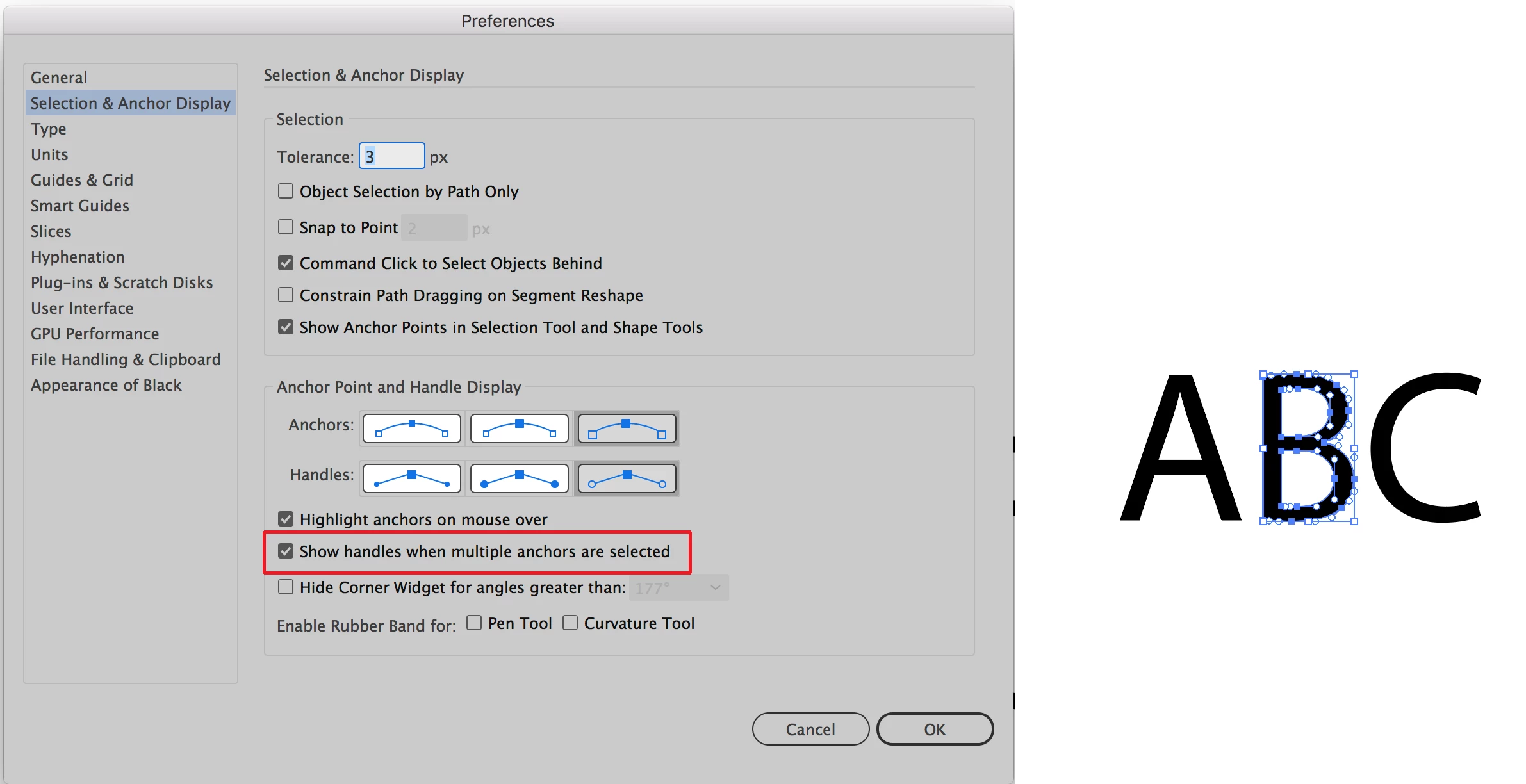
See screen shot below:

In The Selection & Anchor Point section of the Illustrator Preferences check Show handles when multiple anchors are selected. Then marquis (lasso) the object using the direct selection tool as in example above right. Hope that's why you're looking for.

5 replies

Participant
December 4, 2024

CTRL-H

designer352523165
Participant
July 25, 2021

If you still can't find what you're looking for even after setting up the Preferences menu, you can go to View < Show Edges. 

Participant
August 27, 2021

And if I still can't see any handles? Everything was working fine yesterday. Today, the handles are gone. I've followed all previous steps, my preferences are correct, still nothing. I've spent 2 hours now trying to get my handles back. 😞  

Participant
November 27, 2017

Thank you, that worked!

Monika Gause
Community Expert
Community Expert
August 4, 2017

if you want to deaw the handles as paths, there's a script that does it: generate handles, available from here https://design.tutsplus.com/articles/20-free-and-useful-adobe-illustrator-scripts--vector-3849

August 4, 2017

Great, I'll take a look into a script solution today. Thanks a bunch Monika

Bill Silbert
Community Expert
Bill SilbertCommunity ExpertCorrect answer
Community Expert
August 4, 2017

See screen shot below:

In The Selection & Anchor Point section of the Illustrator Preferences check Show handles when multiple anchors are selected. Then marquis (lasso) the object using the direct selection tool as in example above right. Hope that's why you're looking for.

August 4, 2017

Thanks for the prompt reply Bill. That's what I was looking for to start the process off.