Exit
  • Global community
    • Language:
      • Deutsch
      • English
      • Español
      • Français
      • Português
  • 日本語コミュニティ
  • 한국 커뮤니티
0

Add a custom character at end of paragraph

Guest
Dec 16, 2016 Dec 16, 2016

Hi

is there a way to define paragraph style that append a character at end of paragraph ??

I want to define a paragraph style that place a character at next line of end of paragraph.

whenever i applied that style on my paragraph this will automatically add that character at next line.

for example, my paragraph is "My name is ABCD",  whenever i applied that style on it this will look like

"My name is ABCD"

         "D"

here  "D" is character placed at last line.

thanks

3.1K
Translate
Report
Community guidelines
Be kind and respectful, give credit to the original source of content, and search for duplicates before posting. Learn more
community guidelines
People's Champ ,
Dec 16, 2016 Dec 16, 2016

I don't think you can get this behaviour by just applying a style.

However, something a grep F/C would easily do

applied style myStyle

FIND (.+)

Replace $1\rD

Translate
Report
Community guidelines
Be kind and respectful, give credit to the original source of content, and search for duplicates before posting. Learn more
community guidelines
Guest
Dec 16, 2016 Dec 16, 2016

Thanx for quick reply,

But I am having problem scenario such that create a template and define paragraph style in it. using script flow content from xml  and apply paragraph style in it. So i think this will not full fill my requirement.

is there another way to address this problem ????

Translate
Report
Community guidelines
Be kind and respectful, give credit to the original source of content, and search for duplicates before posting. Learn more
community guidelines
Mentor ,
Dec 16, 2016 Dec 16, 2016

First, you will need that extra line incorporated into the text imported from xml.

Next the character will have to be a single glyph in a custom font.

Then you use the same techniques you're using to apply the styles to the first paragraph to apply a second style to the "D" paragraph.

Translate
Report
Community guidelines
Be kind and respectful, give credit to the original source of content, and search for duplicates before posting. Learn more
community guidelines
LEGEND ,
Dec 16, 2016 Dec 16, 2016

Hi!

Just for comment! 

Capture d’écran 2016-12-16 à 13.58.48.png

Capture d’écran 2016-12-16 à 13.59.00.png

(^/)

Translate
Report
Community guidelines
Be kind and respectful, give credit to the original source of content, and search for duplicates before posting. Learn more
community guidelines
LEGEND ,
Dec 16, 2016 Dec 16, 2016

Capture d’écran 2016-12-16 à 14.06.30.png

… Of course! … where you want! 

(^/)

Translate
Report
Community guidelines
Be kind and respectful, give credit to the original source of content, and search for duplicates before posting. Learn more
community guidelines
Guest
Dec 16, 2016 Dec 16, 2016

Hii Obi-wan Kenobi

can you please provide the paragraph style and character style details????

Translate
Report
Community guidelines
Be kind and respectful, give credit to the original source of content, and search for duplicates before posting. Learn more
community guidelines
LEGEND ,
Dec 16, 2016 Dec 16, 2016

… if you give me your name!  Aha! 

(^/)

Translate
Report
Community guidelines
Be kind and respectful, give credit to the original source of content, and search for duplicates before posting. Learn more
community guidelines
Guest
Dec 16, 2016 Dec 16, 2016

Abhishek

Thanks in advance.

Translate
Report
Community guidelines
Be kind and respectful, give credit to the original source of content, and search for duplicates before posting. Learn more
community guidelines
Guest
Dec 16, 2016 Dec 16, 2016

Hi

Obi-wan Kenobi

I am waiting for your reply..........

Translate
Report
Community guidelines
Be kind and respectful, give credit to the original source of content, and search for duplicates before posting. Learn more
community guidelines
LEGEND ,
Dec 16, 2016 Dec 16, 2016

Sorry, busy! 

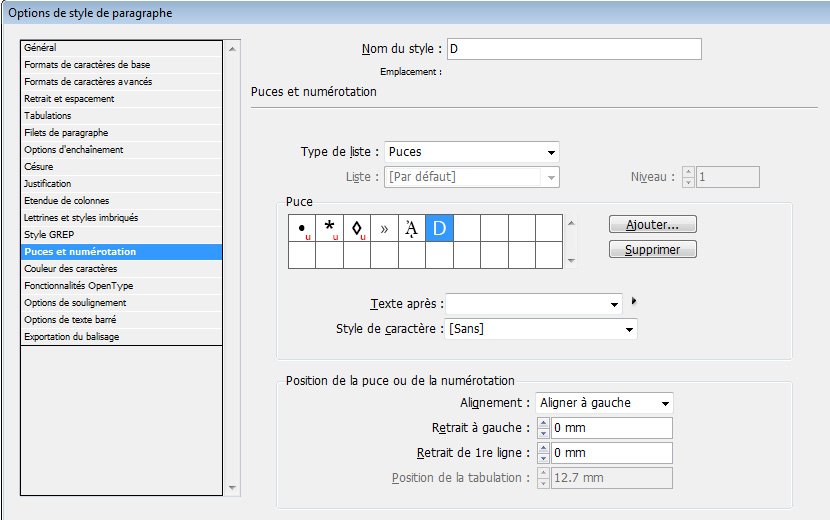
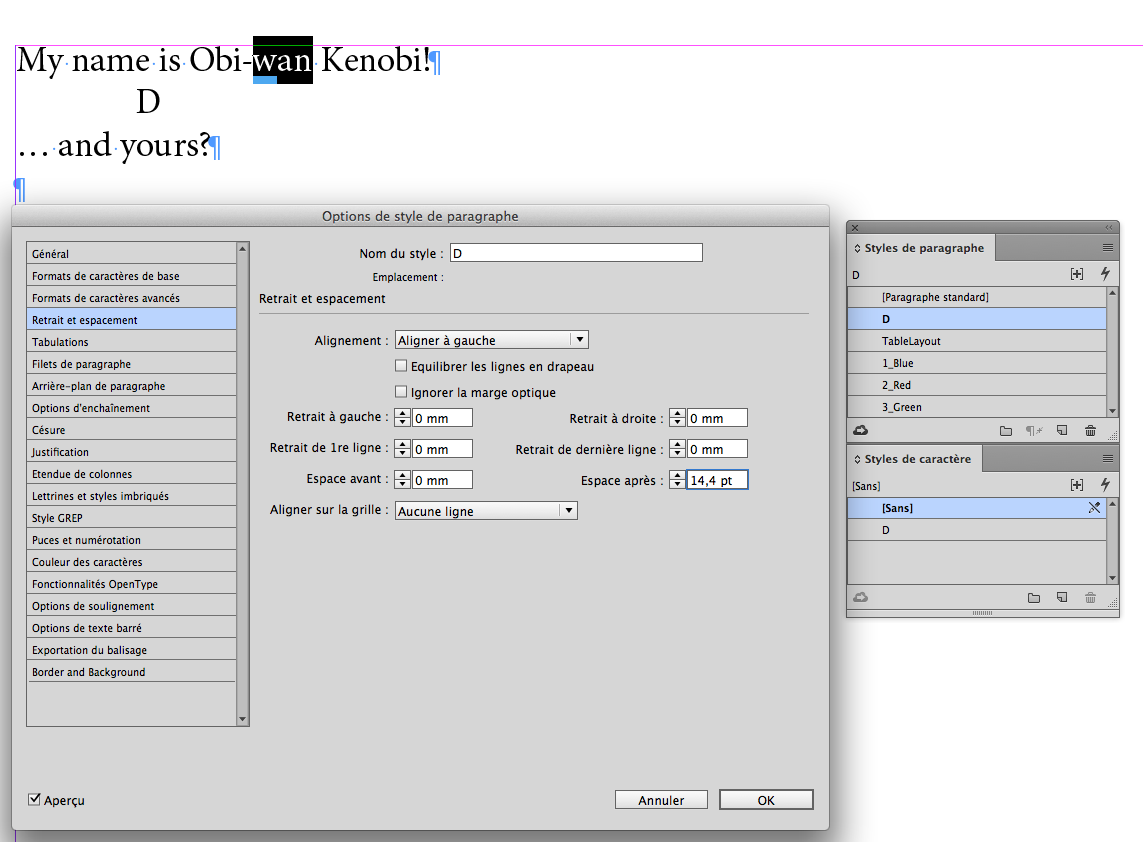
A simple auto-numbering para style!
Capture d’écran 2016-12-16 à 15.05.43.png

Capture d’écran 2016-12-16 à 15.06.13.png

Note I used several spaces in "Texte après" to move the "D" on the line!

Capture d’écran 2016-12-16 à 15.07.01.png

Capture d’écran 2016-12-16 à 15.07.11.png

Of course, this trick only works on a one-line para! …

(^/) 

Translate
Report
Community guidelines
Be kind and respectful, give credit to the original source of content, and search for duplicates before posting. Learn more
community guidelines
Guest
Dec 16, 2016 Dec 16, 2016

thanx for details reply.

Translate
Report
Community guidelines
Be kind and respectful, give credit to the original source of content, and search for duplicates before posting. Learn more
community guidelines
Community Expert ,
Dec 16, 2016 Dec 16, 2016

You could create a nested style that would apply none though a (trigger of your choice)  and then character style through one character. Use a dingbat of some sort for the character you want to use.

Translate
Report
Community guidelines
Be kind and respectful, give credit to the original source of content, and search for duplicates before posting. Learn more
community guidelines
Guest
Dec 16, 2016 Dec 16, 2016

HI BobLevine,

thanx for reply,

but how character style placed that character on next line???

Translate
Report
Community guidelines
Be kind and respectful, give credit to the original source of content, and search for duplicates before posting. Learn more
community guidelines
Community Expert ,
Dec 16, 2016 Dec 16, 2016

Soft return.

Translate
Report
Community guidelines
Be kind and respectful, give credit to the original source of content, and search for duplicates before posting. Learn more
community guidelines
LEGEND ,
Dec 16, 2016 Dec 16, 2016

The deal was:

Watching the screen … and without doing anything else but applying a para style [adding a soft return is therefore totally forbidden!], getting the result, it means a letter "D" below the para!

A true work for a Jedi! 

MTFBSWO!*

(^/)

[* May The Force Be Sometime With Others!]

Translate
Report
Community guidelines
Be kind and respectful, give credit to the original source of content, and search for duplicates before posting. Learn more
community guidelines
Guest
Dec 18, 2016 Dec 18, 2016

Is there any way to handle this scenario using paragraph rule, that is create rule strokes with this custom character????

Translate
Report
Community guidelines
Be kind and respectful, give credit to the original source of content, and search for duplicates before posting. Learn more
community guidelines
Guide ,
Dec 19, 2016 Dec 19, 2016
LATEST

Nope!

Unless you want a foot print,  a smiley, or dog paws...

happyfeet.jpg

see http://indesignsecrets.com/easter-egg-stroke-styles.php

Translate
Report
Community guidelines
Be kind and respectful, give credit to the original source of content, and search for duplicates before posting. Learn more
community guidelines
Guest
Dec 16, 2016 Dec 16, 2016

Hii Obi-wan Kenobi

can you please provide the paragraph style and character style details????

Translate
Report
Community guidelines
Be kind and respectful, give credit to the original source of content, and search for duplicates before posting. Learn more
community guidelines
Guide ,
Dec 19, 2016 Dec 19, 2016

Hi

please find below another trick

I don't know how your design looks like, so it definitely might not be suitable....

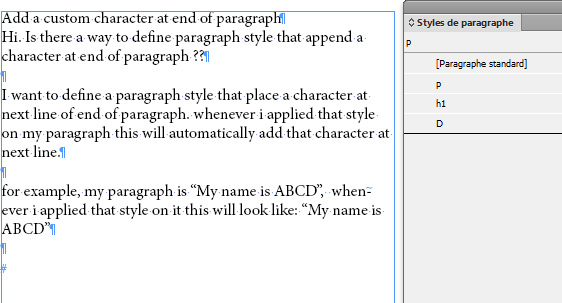
The idea is to put an extra carriage after the paragraphs where you want to add the "D". I usually never recommend such a thing, but well.. this is for a trick...

Let's say your design allow Title para style (lets call it "h1"), then Normal para style, which must be followed by a "D" (lets call it "p").

You'll need a specific para style for the D, lets call it... "D" ^^
normal.jpg

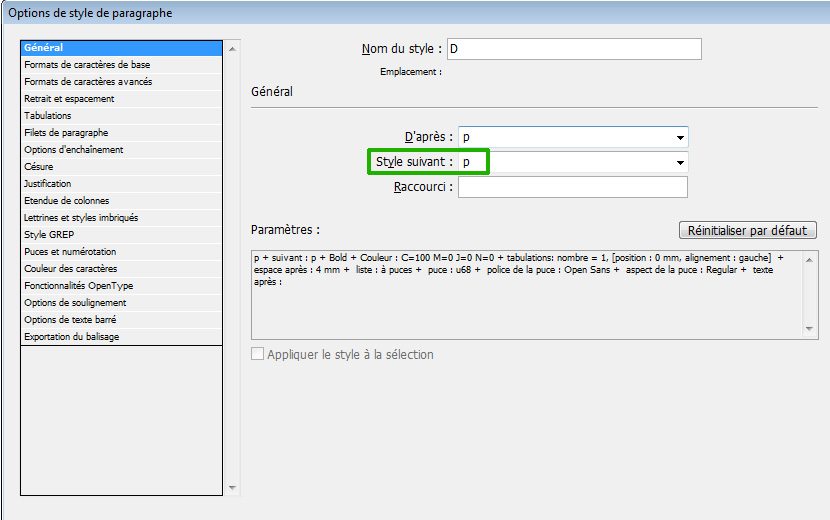
OK now, set your h1 style as being followed by "p", set "p" to be followed by "D" and "D" to be followed by "p".

Set up your "D" para style with the desired bullet...
parasrtyle.jpg

puce.jpg

Now, here come the "magic".

Create a new object style, based on text frame.

Go to paragraph styles submenu, select first style to apply ("h1" in this demo)

and... tick "Apply next style"

objectstyle.jpg

Apply this object style to your text frame.

Here's the result:
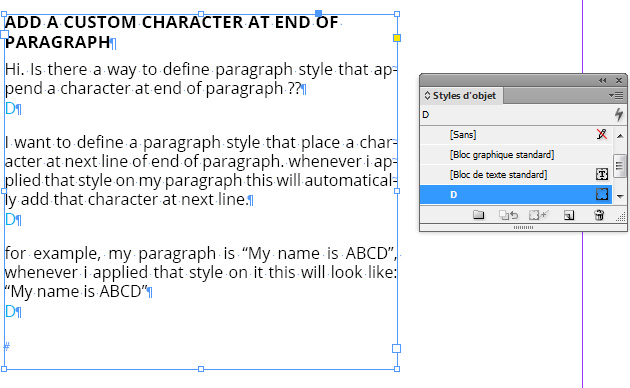
result.jpg

Most probably completely useless trick but... i had fun ^^

regards

Vinny

Translate
Report
Community guidelines
Be kind and respectful, give credit to the original source of content, and search for duplicates before posting. Learn more
community guidelines