denisep726548
Inspiring
July 22, 2022
Answered

Applescript to list swatches in swatch panel in a text box

  • July 22, 2022
  • 2 replies
  • 8849 views

How do I get Applescript to read all swatches used in the swatch panel, and list them in a text box?


I actually just need the part that tells it to read the swatch colors in the swatches panel list

This topic has been closed for replies.
Correct answer rob day

you are correct. I dont. The problem I had with the other post is that it was only searching page items and then not listing spot colors that were used in the placed eps files.


it was only searching page items and then not listing spot colors that were used in the placed eps files.


There’s no way to check an EPS’s spot colors from within InDesign, so if you want to include spot colors that are brought in via a placed asset, there’s no point in looping thru the page items and text. The only choice would be to simply output the used swatch list—the code without the page item and text loop:


tell application id "com.adobe.indesign"
	tell active document
		delete unused swatches
		set allSwatches to every swatch
		try
			set noprint to make color with properties {model:spot, space:CMYK, color value:{100, 0, 0, 0}, name:"noprint"}
		on error
			set noprint to every color whose name is "noprint"
		end try
		try
			wb to make color with properties {model:spot, space:CMYK, color value:{0, 0, 0, 100}, name:"wb"}
		on error
			set wb to every color whose name is "wb"
		end try
		try
			set infoLayer to make layer with properties {name:"Job Info - Non-Print", printable:true, layer color:blue}
		on error
			set infoLayer to every layer whose name is "Job Info - Non-Print"
		end try

		set ul to "Used Swatches:" & return
		set ds to {"None", "Registration", "Paper", "Black"}
		delete every page item of item 1 of infoLayer
		repeat with x in allSwatches
			if name of x is not in ds then
				set ul to ul & name of x & return
			end if
		end repeat
		
		set slugText to make new text frame with properties {geometric bounds:{(item 4 of page 1's bounds), 0.25, ((item 3 of page 1's bounds) + -1), 3}, stroke color:"noprint", stroke weight:1, item layer:"Job Info - Non-Print"}
		set contents of slugText to ul
		set fill color of text 1 of slugText to "noprint"
	end tell
end tell


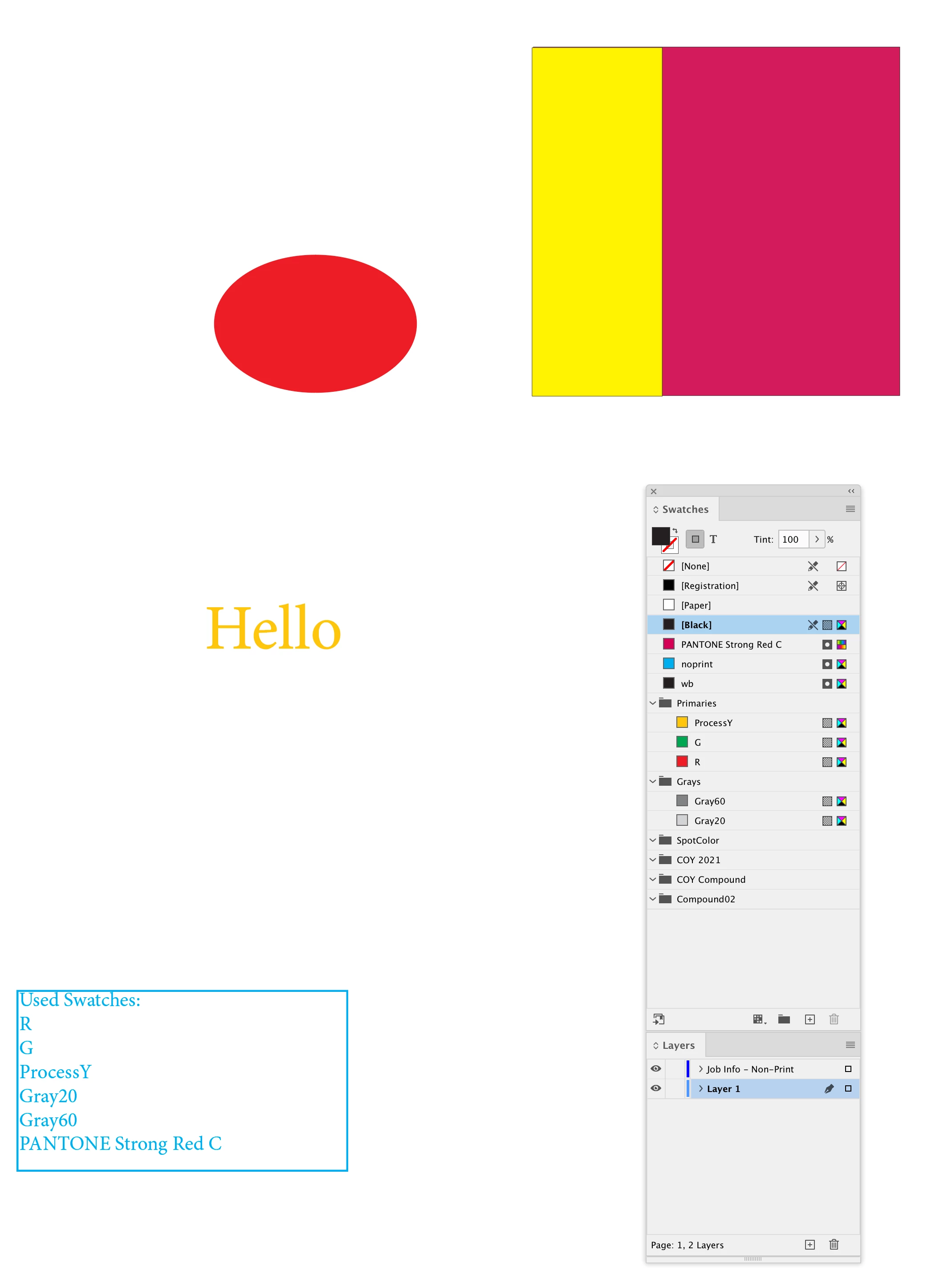
But as I mentioned in the other post just because a swatch is used doesn’t mean it will print. Here PANTONE Stron Red C is in a placed EPS, but G, Gray20, Gray60 are listed but they will not print:

 

2 replies

Legend
July 23, 2022

Hello @denisep726548,


Give this a try...


--

tell application "Adobe InDesign 2022"

tell active document

set SwatchList to ""

set mySwatches to get (name of swatches)

repeat with thisSwatch in mySwatches

set SwatchList to SwatchList & thisSwatch & return

end repeat

display dialog SwatchList

end tell


end tell

--


Regards,

Mike

denisep726548
Inspiring
July 26, 2022

Can you help me incorporate that in to the attached sample script?

I get an error that name is not recognized.

Thank you.

rob day
Community Expert
Community Expert
July 26, 2022

Do you know how I would be able to run this so it applies to any page in the document? or can run it on the current page I am viewing?


That’s the problem you will run into, the latest script is simply listing the document’s used swatches. You want the slug text to list the colors that will print on a given page, but there’s no way of knowing what colors will print–a color could be used on the pasteboard, on another page, behind an object, set to a tint of 0% etc.


Also, if you are delivering a PDF, the only named swatches that Export over to the PDF are Spots—named process colors export as CMYK, Lab, or RGB value objects—Acrobat does not know the ID swatch names.


Rishabh_Tiwari
Community Manager
Community Manager
July 22, 2022

Hi @denisep726548 ,


Thanks for reaching out. I am not a scripting expert however I found a similar discussion on the community which you can refer to here https://community.adobe.com/t5/indesign-discussions/as-get-a-list-of-the-used-swatch-colours-in-a-document/m-p/1116838#M271766


If that's not what you were looking for, I am leaving this discussion open for expert suggestions.


Regards
Rishabh