


Participant
June 28, 2017
해결됨

Beim Profil "Iso Coated v2 300 ECI" wird die Schrift in CMYK wiedergegeben

  • June 28, 2017
  • 2 답변들
  • 4384 조회

Wenn ich in InDesign ein PDF mit dem Profil "Iso Coated v2 300 ECI" exportiere, wird die Schrift in CMYK wiedergegeben anstatt nur in Schwarz. Wer kann mir helfen? Letztes Jahr ging es noch. Habe mir auch schon InDesign 2015 runtergeladen, um zu prüfen, ob es an der 2017 Version liegt... Tut es aber leider nicht.
    이 주제는 답변이 닫혔습니다.
    최고의 답변: rob day

    I can remember also, that I've ever used "Keep values". So there is no other solution do you mean?

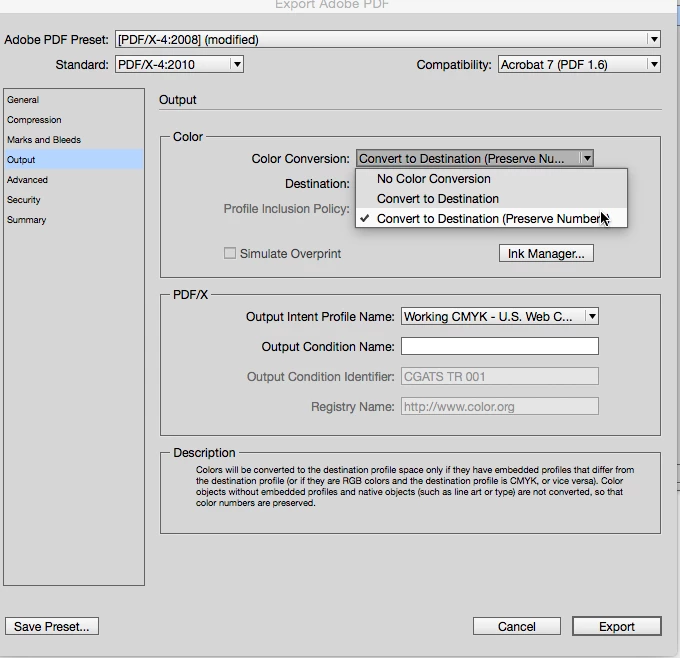
    In the Export dialog there is an option to protect InDesign native colors this does not apply to placed objects. But you still want your document's assigned profile to be Iso Coated:

    2 답변

    Willi Adelberger
    Community Expert
    Community Expert
    June 28, 2017

    Bei den Farbmanagementeinstellungen, Richtlinien CMYK muss stehen, Werte beibehalten, ansonsten kommt es zu einer CMYK-Lab-CMYK-Konvertierung, die in 4c-Schwarzwerten resultiert.

    Zudem erfordert diese Einstellung, dass Du für den Druck Farbbilder in RGB und nicht in CMYK platzierst und erst bei der Ausgabe, und nicht in Photoshop, die Bilder in das Zielprofil konvertierst.

    Participant
    June 28, 2017

    Diese Variante hatte ich auch mit Erfolg ausprobiert, wobei mich davon abgehalten hat, dass da steht "Farbige Objekte ohne eingebettete Profile werden nicht konvertiert".

    Ich finde es schwierig RGB-Bilder zu benutzen und sich dann vom Ergebnis im PDF überraschen zu lassen.

    Ich kann mich auch nicht daran erinnern, dass ich jemals "Werte beibehalten" benutzt habe. Es gibt also keine andere Lösung meinst Du?

    rob day
    Community Expert
    rob dayCommunity Expert답변
    Community Expert
    June 28, 2017

    I can remember also, that I've ever used "Keep values". So there is no other solution do you mean?

    In the Export dialog there is an option to protect InDesign native colors this does not apply to placed objects. But you still want your document's assigned profile to be Iso Coated:

    rob day
    Community Expert
    Community Expert
    June 28, 2017

    Make sure the document's assigned profile is ISO coated v2 300 ECI.

    Edit>Assign Profiles (not Edit>Color Settings)

    If the assigned profile is correct, then make sure it is also the Simulation Profile in Output Preview when you check the values in AcrobatPro

    Participant
    June 28, 2017

    I did so. And also the printing company hasn't find any solution ... thank you for your answer!

    rob day
    Community Expert
    Community Expert
    June 28, 2017

    the printing company hasn't find any solution

    Can you share the problem PDF?