

Best Way To Configure a Book for Double-Sided proofing
When I last attempted this project, I was under the gun and unable to understand some of the UI choices made by InDesign. Now that I am starting over, I would like to be sure that I am approaching this from the right perspective.
I am creating a book with a final size of 5.5" wide by 8.5" tall. All pages bleed on all four sides.
When I set the document size to 5.5 x 8.5 with facing pages and then print the pages to my double-sided laser printer, I expect the document to print page 1 with page 2 on the back. The front-to-back registration when I center the page for output is perfect.
However, if the left page bleeds on four sides and the right page does the same, by laying it out in spreads (facing pages), I end up with a problem where page 2 (left) doesn't show the right-side bleed (instead it shows the right page's left side bleed). Page 3 prints fine (because it overlapped page 2 on the left).
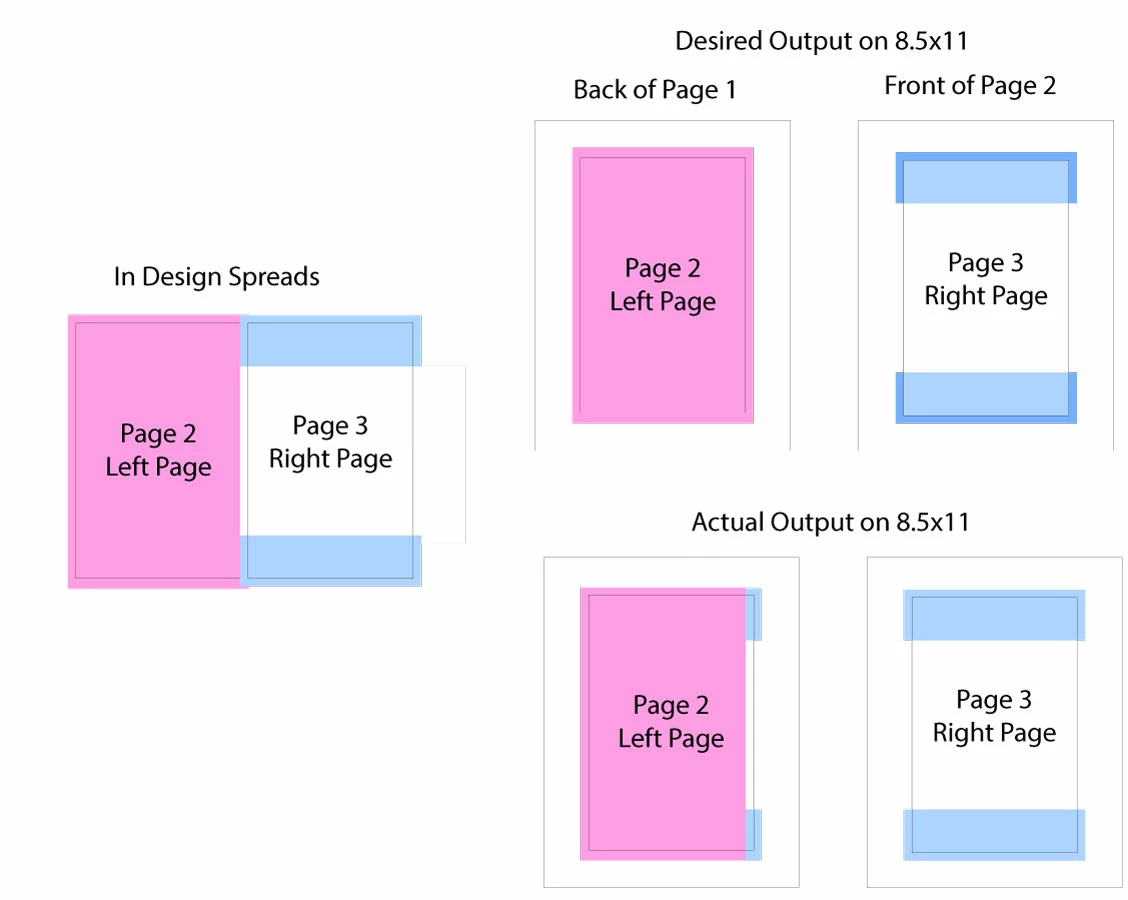
In the picture, the pages are laid out in InDesign as facing pages. When output as individual pages, however, the spread content overrides the page content and so the right edge of Page 2 is bad.
Is there any way to fix this or do I just have to forsake using the facing pages feature in InDesign?
Is there a better way to layout this book? Any suggestions?
 AdChoices