


Known Participant
October 4, 2019
질문

Can I make a line-tool line 'style' (InDesign)
  • October 4, 2019
  • 4 답변들
  • 1430 조회

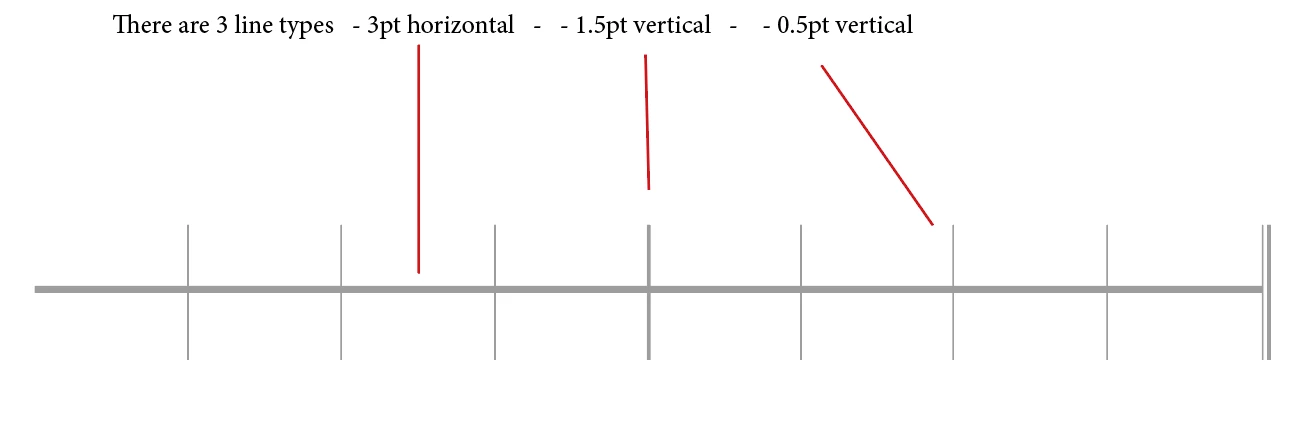
I am using three different line types, created using InDesign line tool.

This simplified music stave is used over and over (for different tunes).

The stave, and its lines, are not a single size.  ALL line lengths vary (depending on the tune length!).

I am wanting to standardise the three line types for line point size (only), retrospectively (!), on a large number of staves.

Can I, in Indesign, set three different line tool point sizes which I can then apply simply by highlighting the lines and clicking?


    이 주제는 답변이 닫혔습니다.

    4 답변

    Community Expert
    October 4, 2019

    You can do this…


    Type a series of vertical pipes and apply a paragraph style that has the following properties:

    Full Justify alignment

    Paragraph Rules: rule above, 3pt

    Nested Styles: a light weight character style applied through 3 characters, followed by a bold weight character style applied through one character. Then repeat the last two nested styles. 

    Hopefully the screenshots make this easier to follow. It's a bit of hack and you might be better off making a Pattern Brush in Illustrator if you're comfortable using Illustrator.


    No Notes작성자
    Known Participant
    October 4, 2019
    Thank you! I'll give it a try. (Illustrator is not an option!)
    Scott Falkner
    Community Expert
    Community Expert
    October 4, 2019

    If your line is meant to be attached to text look at creating a paragrph style and adding paragraph rules. You can control the weight, colour, and style of the rule as well as its position relative to the text and its length relative to the text margins.

    No Notes작성자
    Known Participant
    October 4, 2019
    Hi Scott, Thanks for you answer. I've re-edited the question to try and explain better my problem...
    Geоrge
    Legend
    October 4, 2019
    Remember, never say you can't do something in InDesign, it's always just a question of finding the right workaround to get the job done. © David Blatner
    No Notes작성자
    Known Participant
    October 4, 2019
    Hi! Yes I have. But I can't make 'stroke' styles apply to lines made with the line tool...
    No Notes작성자
    Known Participant
    October 4, 2019
    Hi! I'll try again. But what happened was that although my custom lines appear on the list of options they only work on frames, not line-tool-drawn lines...?only be effective
    OK... stroke style DOES recall the line style (dot, dash, wavy line, diamonds etc) BUT it doesn't save the point size. Thanks for sticking with it.
    Randy Hagan
    Community Expert
    Community Expert
    October 4, 2019

    There are ways you can create object styles with InDesign, but if the lines are not only consistent thicknesses but also consistent lengths, you can store them in an InDesign library to drag out and apply at will.


    You can find out more about how to reuse objects you create within InDesign in this link:


    Hope this helps,


    Randy


    No Notes작성자
    Known Participant
    October 4, 2019
    Thanks Randy. But there are too many! It will not be quicker than highlighting each individually. I've added a screenshot to try and explain the problem better.