


- Inicio
- InDesign
- Hilos de conversación
- Re: Can't rename layers inDesign 2021 (16.0) also ...
- Re: Can't rename layers inDesign 2021 (16.0) also ...

Copiar vínculo al Portapapeles
Copiado
I've been trying to rename layers for organization purposes, I used to be able to do this by double-clicking the layer and it would start the editing dialogue.
Now when I click it sometimes will pop open for like a tenth of a second but not enough time to do anything. I haven't found a workaround.
On iMac. Any help would be greatly appreciated!


 2 respuestas correctas


I need to fix this ASAP
If clearing caches or prefs doesn’t work, the name of page items within an item Layer can be changed via scripting. Select the page item either via the Layer panel or on the page and run this script:
var d = app.dialogs.add({name:"Page Item Name"});
var tf = d.dialogColumns.add().textEditboxes.add({editContents:"", minWidth:250});
d.show();
var r = tf.editContents;
d.destroy();

var s = app.documents.item(0).selection[0];
s.name = r;
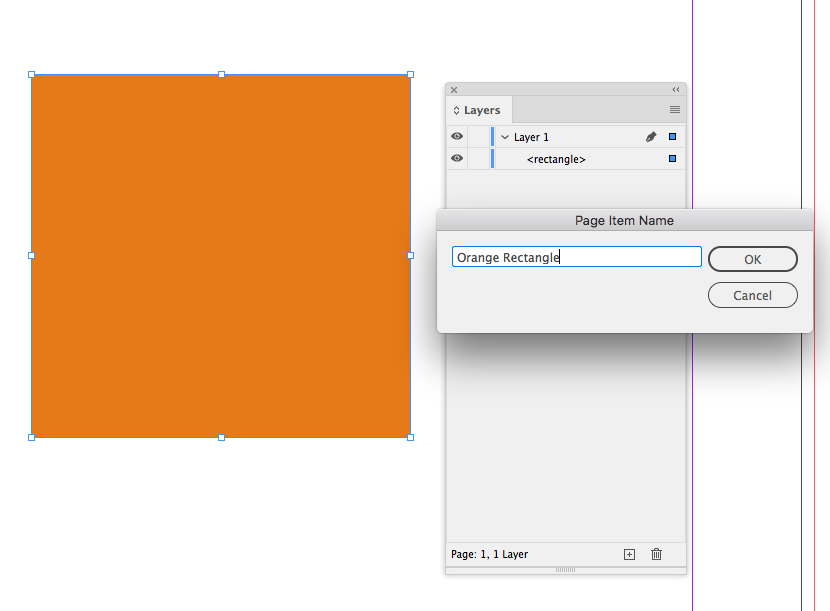
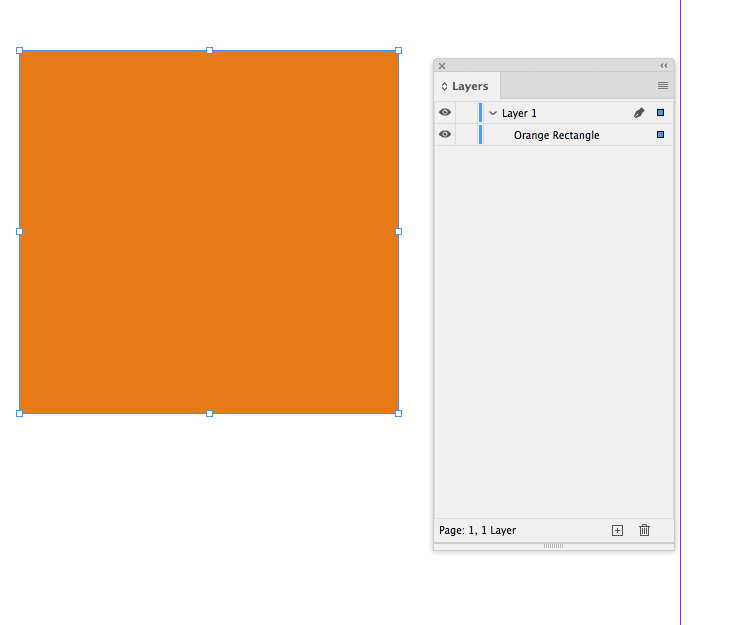


Hi,
I had the same issue. What worked for me was just changing my work place from Essentials to Essentials Classic. I know is not a long term fix but it works for when you need to make it work quick.
 60
réplicas
60
60
réplicas
60


Copiar vínculo al Portapapeles
Copiado
That should let you rename it.
If you're still having issues you may need to reset your preferences.
Copiar vínculo al Portapapeles
Copiado
Thanks for the response - I tried resetting preferences and no differences in behavior.
Again, the edit text mode pops up for a split second before disappearing. I'll try a full re-install...
Copiar vínculo al Portapapeles
Copiado
Update: Full re-install did not fix anything either.
Copiar vínculo al Portapapeles
Copiado
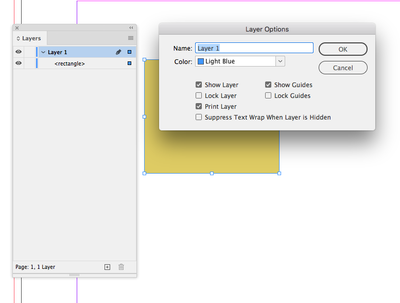
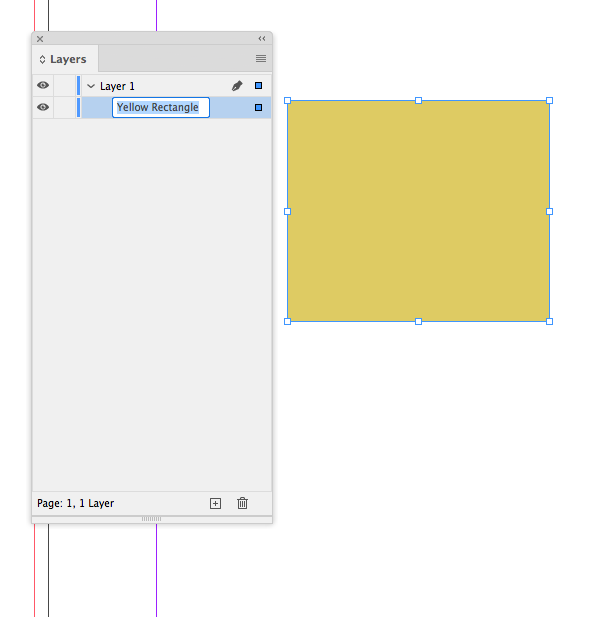
Double-clicking a Layer should normally open the Layer Options dialog—a double click won’t select the layer title inside of the panel for editing:
To directly edit the layer’s name in the panel, you have to single click twice with an explicit pause in between:
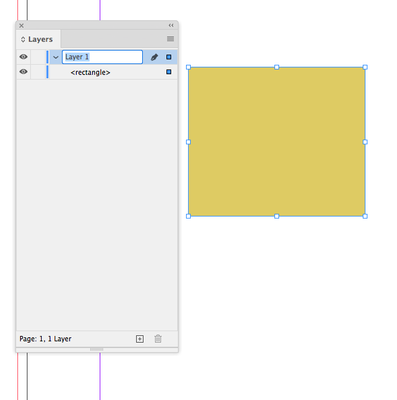
You can edit a page item that is listed inside of a layer the same way—a double-click won’t do anything it has to be two distinct single clicks:
Copiar vínculo al Portapapeles
Copiado
Thank you for helping me as far as terminology is concerned, but yup these things do not work.
I can get the layer dialog to pop up, but it's the individual page items (I realize now) I'm trying to rename. The single clicks with the distinct pause does not work, the edit option appears for only a split second.
Copiar vínculo al Portapapeles
Copiado
Have you tried deleting your Preference and Cache folders? A reinstall wouldn’t necessarily remove them.

Copiar vínculo al Portapapeles
Copiado
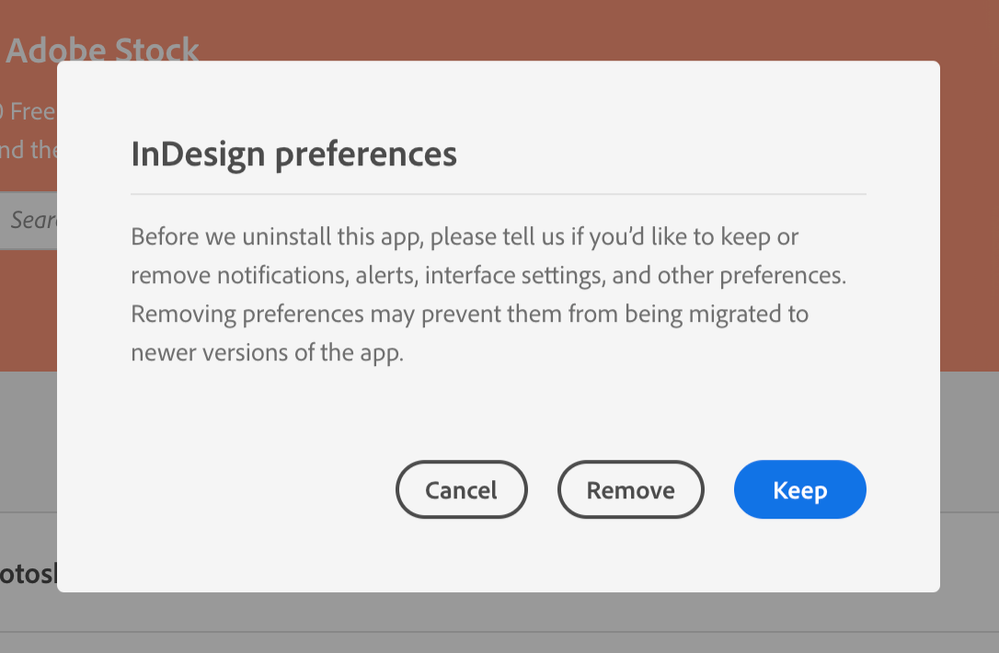
Would these not be deleted when you uninstall and choose to remove preferences?
Copiar vínculo al Portapapeles
Copiado
I think Bob is right—it‘s not actually a double-click, but two single clicks with a pause between.

Copiar vínculo al Portapapeles
Copiado
I am having the same issue, but for clarification mine is when I single-click.
The layer item name briefly flashes (you can see the highlighted text), but it goes straight back to how it was and I can't edit the name.
Very frustrating.
Copiar vínculo al Portapapeles
Copiado
I have this same issue. To clarify, when I click once on a layer or layer element and then click another time to rename it (as is the way with InDesign) the editing cursor/highlighted text pops up for a split second and then closes and goes back to normal. Yes, I can double-click on the layer and rename that in the pop-up dialogue box, but I need to rename layer elements as well.
I have done the same suggested fixes in this thread of reinstalling InDesign and erasing preferences and it doesn't work. I have a Wacom Intuos Pro tablet installed, but the renaming issue happens whether the tablet is connected or not. I haven't tried uninstalling the tablet software as I have too many projects to finish and don't have the time to be without the tablet.
I need to fix this ASAP as I cannot create proper mechanicals of my design files without renaming layer elements.
MacBook Pro (16-inch, 2019) MacBookPro16,1 / macOS Big Sur 11.0.1 (20B29) / InDesign 2021 (16.0)
Copiar vínculo al Portapapeles
Copiado
You reset your preferences, but did you also delete your Caches folder. Corrupt Caches often cause interface problems.
Copiar vínculo al Portapapeles
Copiado
I need to fix this ASAP
If clearing caches or prefs doesn’t work, the name of page items within an item Layer can be changed via scripting. Select the page item either via the Layer panel or on the page and run this script:
var d = app.dialogs.add({name:"Page Item Name"});
var tf = d.dialogColumns.add().textEditboxes.add({editContents:"", minWidth:250});
d.show();
var r = tf.editContents;
d.destroy();

var s = app.documents.item(0).selection[0];
s.name = r;
Copiar vínculo al Portapapeles
Copiado
Rob! The script did it, though clearing the Cache folder didn't. Hopefully this will get resolved properly in a future update, but for now I guess the script band-aid does the trick.
Thanks!


Copiar vínculo al Portapapeles
Copiado
Hi there,
We're so sorry to hear about this trouble. Please try the steps suggested on this page (https://community.adobe.com/t5/indesign/resolve-slow-performance-and-unexpected-behavior-of-indesign... and share your observations with us?
Also, please confirm if you have started noticing this behavior after the Big Sur update.
Regards,
Srishti

Copiar vínculo al Portapapeles
Copiado
@Srishti Bali Your link is broken.
Copiar vínculo al Portapapeles
Copiado
I'm not completely certain-- but I believe it was before Big Sur. I updated to a public beta but I'm pretty sure that was after
Copiar vínculo al Portapapeles
Copiado
Yes this is after my Big Sur update, and your link doesn't work.
Copiar vínculo al Portapapeles
Copiado
I'm a noob. How do I run a script?
Clearing cache and preferences didn't work 😞
Copiar vínculo al Portapapeles
Copiado
Paste the code into a plain text editor document,or an Adobe ExtendScript Toolkit doc, save with a .jsx extension into your InDesign Scripts panel folder:
Applications/Adobe InDesign 2020/Scripts/Scripts Panel
It should show in your Scripts panel under Application, make a selection and double click to run. Scripts can also have a key command assigned.
I wonder if this an OSX/mouse issue. I’m running 10.13.6 HS with 2020 and can’t replicate it
Copiar vínculo al Portapapeles
Copiado
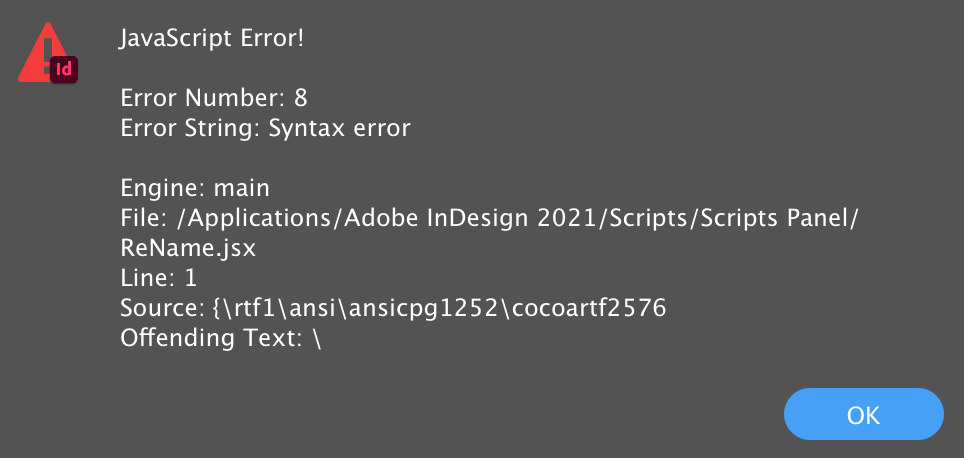
I cannot seem to get the script working.
Copiar vínculo al Portapapeles
Copiado
Nevermind! I used an online plain text editor and that worked!
Copiar vínculo al Portapapeles
Copiado
Still an issue with the InDesign 16.0.1 update. Script is still working fine.

Copiar vínculo al Portapapeles
Copiado
I also started experiencing this issue after the Big Sur update. I'm unable to rename any of my InDesign layers, even following the suggestions above. This is a CRITICAL issue for me, as I'm in the middle of several projects that require specific naming of the layers for programming of variables. Please tell us when to expect a fix.
Copiar vínculo al Portapapeles
Copiado
Update: I was able to run the script posted above using an online simple text editor to save the file as a .jsx file.


Encuentra más inspiración, eventos y recursos en la nueva comunidad de Adobe
Explorar ahora
 AdChoices