Participant
June 25, 2020
Answered

Color of placed photos does not match original photos

  • June 25, 2020
  • 4 replies
  • 1500 views

Hi-


Working from home and struggling! I made a new InDesign file to create a linesheet with some photos and text, and I'm noticing this issue where I'm placing photos onto the page and the color isn't matching the original photos. 


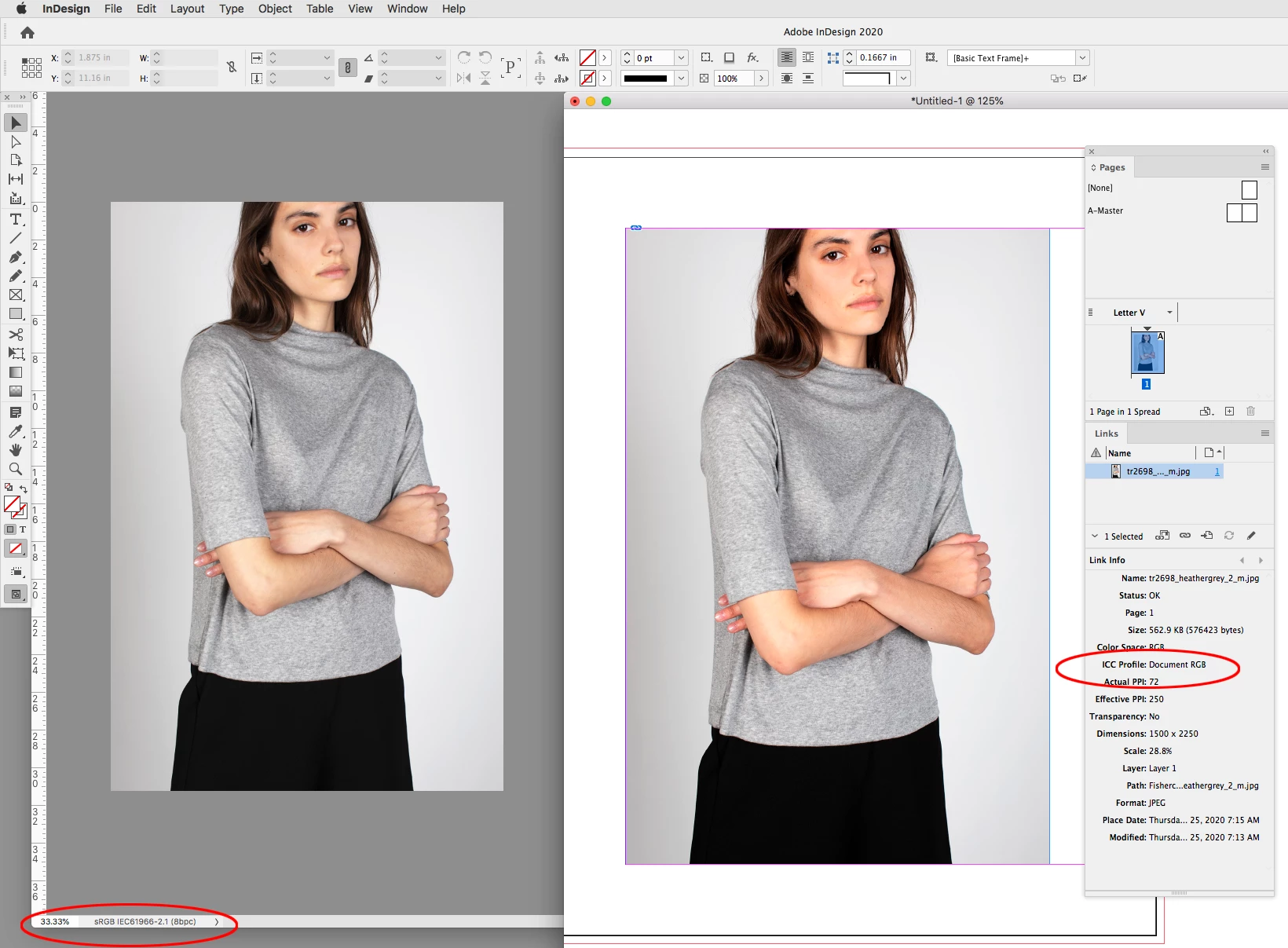
I don't think it's affecting all of the photos, only some and I can't figure out how to fix it. The main thing I notice is a reddish tint to skin in some photos. Here's an example of the original (left) vs after being placed onto the page (right):


It's been a while since I've gone over my color settings and profiles, so I'm wondering if that's the cause of this? I usually don't have any problems when I'm working on my computer at work, but I'm not sure what I'm doing wrong on my own laptop at home. Also not sure if this is releveant info, but I don't need to print the linesheet out - I will just need to export as a PDF to send in an email.


Any help would be greatly appreciated! 
This topic has been closed for replies.
Correct answer rob day


Here the Photoshop file has sRGB embedded, but if I save without including the profile it places as Document RGB in InDesign, so the InDesign document’s assigned RGB profile is used to display the color—AdobeRGB in this case


4 replies

rob day
Community Expert
rob dayCommunity ExpertCorrect answer
Community Expert
June 25, 2020


Here the Photoshop file has sRGB embedded, but if I save without including the profile it places as Document RGB in InDesign, so the InDesign document’s assigned RGB profile is used to display the color—AdobeRGB in this case


marynagaAuthor
Participant
June 25, 2020

Thank you for responding! 


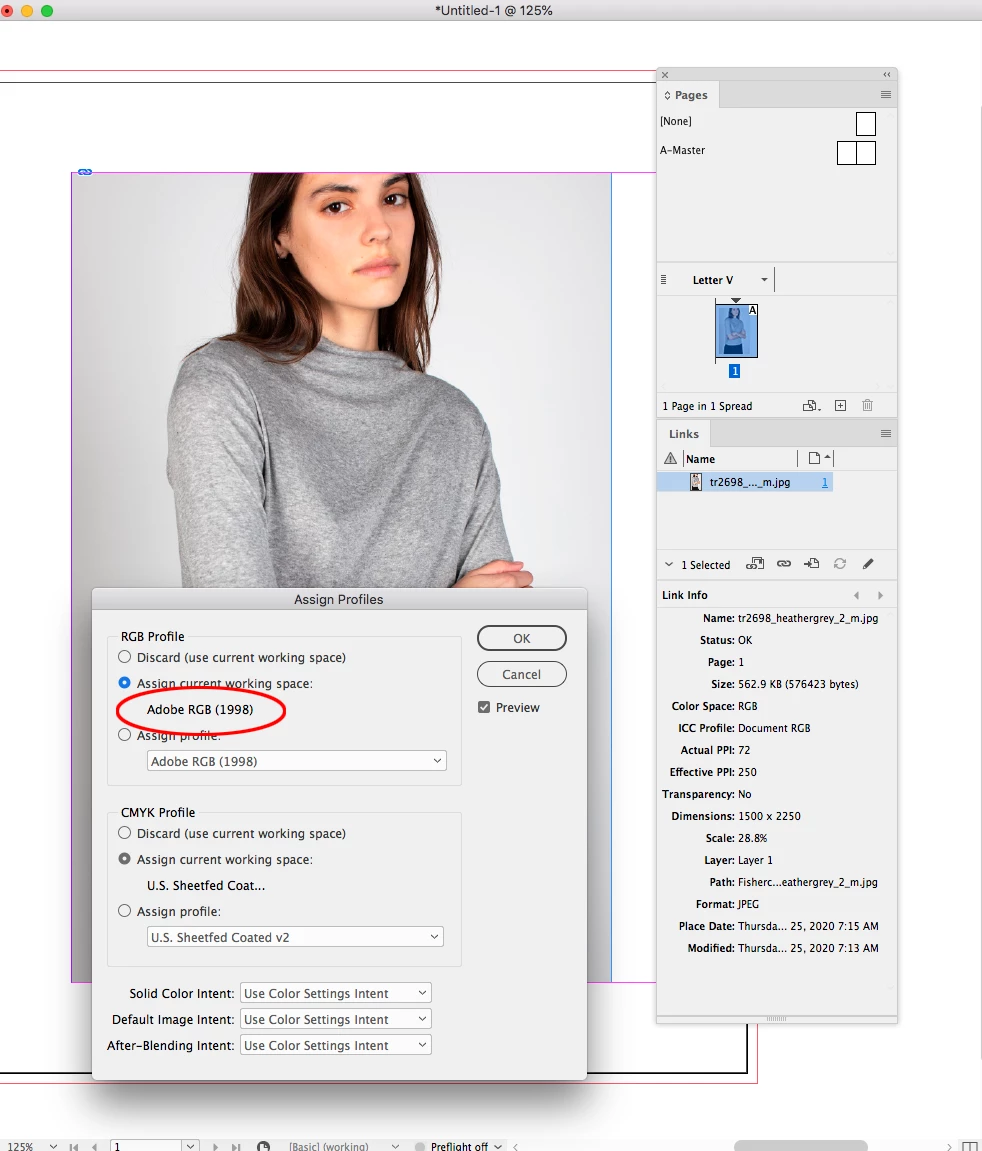
You were absolutely right about everything, it was placing my photos as Document RGB.


I went to Assign Profiles and changed it to sRGB and it fixed the color issue! Before it was at Adobe RGB and now this is what this panel looks like after I assigned the sRGB profile. 


Is this the right solution? 

rob day
Community Expert
Community Expert
June 25, 2020

Yes, if your final output is for screens.


You can also save the RGB image with the sRGB profile embedded. In general that’s the better approach, especially for print projects, where all RGB objects should always have a source profile embedded.

Ashutosh_Mishra
Inspiring
June 25, 2020

Hi there,


Thanks for reaching out. In addition to response given by Rob. I'd recommend checking out Adobe community discussion(https://community.adobe.com/t5/indesign/indesign-completely-messes-up-the-color-of-my-images/m-p/10361819?page=1) and see if it helps you out.

If you do not find it helpful, please provide information asked by Willi. Also, please share version of OS & InDesign?

Looking forward to your response.


Regards,

Ashutosh

marynagaAuthor
Participant
June 25, 2020

Hi Ashutosh! Thanks for responding. 


Looks like the person in the other discussion was experiencing a very similar issue, I'll read it and see if it helps at all - thanks for linking! 

rob day
Community Expert
Community Expert
June 25, 2020

It looks like your image does not have an embedded profile. Select the image and check your Link panel info, if the profile is listed as Document RGB or Document CMYK, then the InDesign document’s profile gets assigned to the image. It looks like the original is sRGB, and InDesign is displaying it as AdobeRGB

Willi Adelberger
Community Expert
Community Expert
June 25, 2020

What is the color space of the original image?

What is the color space of theoutput file (probably PDF)?

Is the screen shot from InDesign or from the output file, which would be relevant?

If the screenshot is from InDesign, did you test the output?

What file type has the image?

What are the color settings of InDesign?

marynagaAuthor
Participant
June 25, 2020

Hi! Thanks for responding.


The original color space is RGB, but when I open it up in Photoshop it says it doesn't have an embedded RGB profile. I took these photos, edited, and saved them on my work computer, so I didn't have direct access to them and just downloaded them from our e-commerce website. Could that have been an issue or was the issue when I originally edited and saved them as JPEGS? Would love to know to avoid any future issues!


The color space for the output file would be for PDF to view online so I'm gonna say RGB as well?


The screenshot is from the output file, but the reddish photo looks exactly the same in the InDesign file itself. 


How do I test the output?


These are my current color settings: