
madalead
Inspiring
June 14, 2018
Answered

Combined fonts in Arabic

  • June 14, 2018
  • 3 replies
  • 3824 views

Hi,

I'm working on an Arabic instruction manual and I would like to apply two different fonts; one for Arabic characters (Arial) and another one for digits and Latin characters (Avenir LT Std).

I know that in FrameMaker there is a function "Combined fonts" that allow this change automatically for Asian texts.
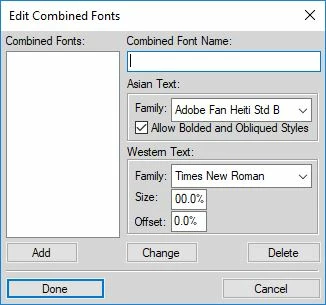
Does anyone have an idea if there is a similar function in InDesign?

Thanks in advance

Daniele
This topic has been closed for replies.
Correct answer madalead

Hi Daniele,

do not know if this would help. A workaround using Marc Autret's FontMixer script:

Indiscripts :: FontMixer | Extend Typefaces in InDesign CS5/CS6/CC

See also into the comments section. Could be, that it would fail in your situation.

Best,
Uwe


Thank Laubender​ for the link that you shared.

It's really interesting and it could be useful to fix other issues (I saved it in my bookmarks) but in this case I think that I'll take another safer way.

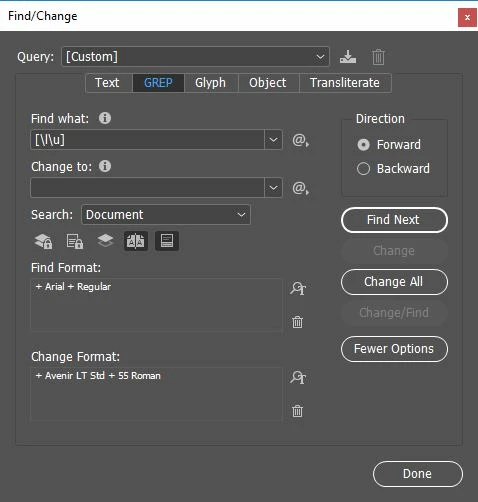
In the Find/Change window (GREP section) I will apply to "Any Letter" and "Any Digit" the proper font.

I will repeat the operation for bold, italics and bold italics.

Unfortunately the white spaces between the Latin words will remain with a different font (Arial) but at the moment it is the better solution that I found.

Regards

Daniele

3 replies

David W. Goodrich
Participating Frequently
June 19, 2018

I believe what the you need are what InDesign calls "Composite Fonts."  A thread from late last year confirms that both ME and CJK versions of ID include the Composite font editor.

Good luck,

David

madalead
madaleadAuthor
Inspiring
June 20, 2018

Thank for your reply David,

but unfortunately it doesn't work for Arabic characters but only with CJK.

As you can see I installed the ME version of InDesign...

... but the only available set of characters are for CJK.

If I click on "Custom..." I cannot chose any kind of Arabic set

As srishtib8795206 suggested to me I'll share this issue to the Adobe InDesign Feedback form hoping that in the future it will be possible to have this function.

Regards

Daniele

Community Expert
June 20, 2018

Hi Daniele,

do not know if this would help. A workaround using Marc Autret's FontMixer script:

Indiscripts :: FontMixer | Extend Typefaces in InDesign CS5/CS6/CC

See also into the comments section. Could be, that it would fail in your situation.

Best,
Uwe

Srishti Bali
Community Manager
Community Manager
June 19, 2018

Hi there,

We are sorry to inform you that we do not have any option to combine fonts in InDesign, however, we still have that option in InCopy.

Install and use fonts in InCopy

If you love this feature and want to raise a feature request, please share it here at our Adobe InDesign Feedback form. This is the best way of communicating with the Engineering and Product Management teams regarding issues and suggestions so they can be implemented in future releases.

Regards,

Srishti

madalead
madaleadAuthor
Inspiring
June 20, 2018

Thank for your reply Srishti.
I will share for sure.

Regards