
Inspiring
December 7, 2018
Answered

Creating a .indb file problems

  • December 7, 2018
  • 2 replies
  • 1800 views

I have 20 .indd files and need to create an.indb file out of these. I create the book and import all my files but I only see the amount of pages in each document not the page numbers of the compiled indd files.

I went into the Book panel options and selected the correct settings. Still the list does not convert to the compiled page numbers.

I even rebooted and created a new Book and imported the documents and still same problem. I have to be missing a step. Any help here?
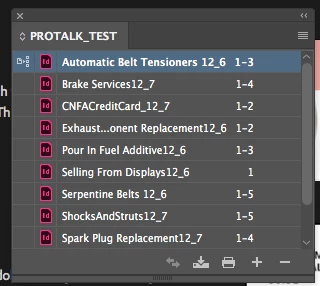
WHAT I SEE
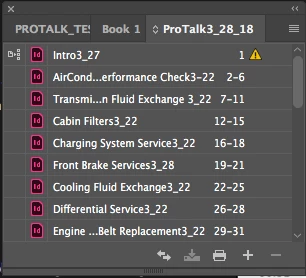
WHAT I SHOULD SEE BUT DO NOT ( ths is from an older book file)
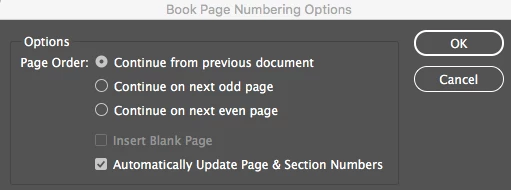
BOOK PANEL OPTIONS

    This topic has been closed for replies.
    Correct answer matthewdee

    Also, matthewdee​, I have found that when I open a book that was started in an earlier version of ID, the chapters come in unsaved and I have to save them all as a one-time thing in the new version. I didn’t check to see if that’s what happened here.

    ~ Jane


    I did some research and realized the same thing as the sections were saved in an earlier version of ID. Once I re saved all the sections and added them to a new book everything worked fine. Thanks again for looking at this for me. M

    2 replies

    Randy Hagan
    Community Expert
    Community Expert
    December 7, 2018

    One more thing to consider, as you check that Page Numbering and Sections dialog box, it usually automatically turns on that Start Page Numbering check box. So if you're diligently checking out your problems with pagination, and don't manually uncheck that box, you will actually introduce the problem into your InDesign book – even if you fix the problem elsewhere.

    Please don't ask me how I know that ... it brings back miserable memories.

    Inspiring
    December 7, 2018

    This is becoming a nightmare as no matter what I try this is not working.

    jane-e
    Community Expert
    Community Expert
    December 7, 2018

    Show your work

    Legend
    December 7, 2018

    Your settings look correct for what you want to happen.

    Have you tried selecting all of the documents (even though your numbering is set to update automatically)

    Or, it could be that each of your sections has Start on Page 1 set in the document.

    Inspiring
    December 7, 2018

    Selected all saved, same problem.

    Where is Start On Page 1 setting in each document?

    Legend
    December 7, 2018

    In the Pages Pallet. Numbering and Section Options.

    Should be set to Automatic.