
Known Participant
May 31, 2024
Answered

[cs6] Colors coverted to CMYK when exporting to pdf with No Color Conversion

  • May 31, 2024
  • 2 replies
  • 648 views

The result is the same whether it's interative or print. The colors get converted to CMYK. I used "High Quality Print" as preset, and when I used the same option from Photshop, the colors are don't change. They are still in RGB. How can I make inDesign export to RGB colors?
This topic has been closed for replies.
Correct answer Brad @ Roaring Mouse

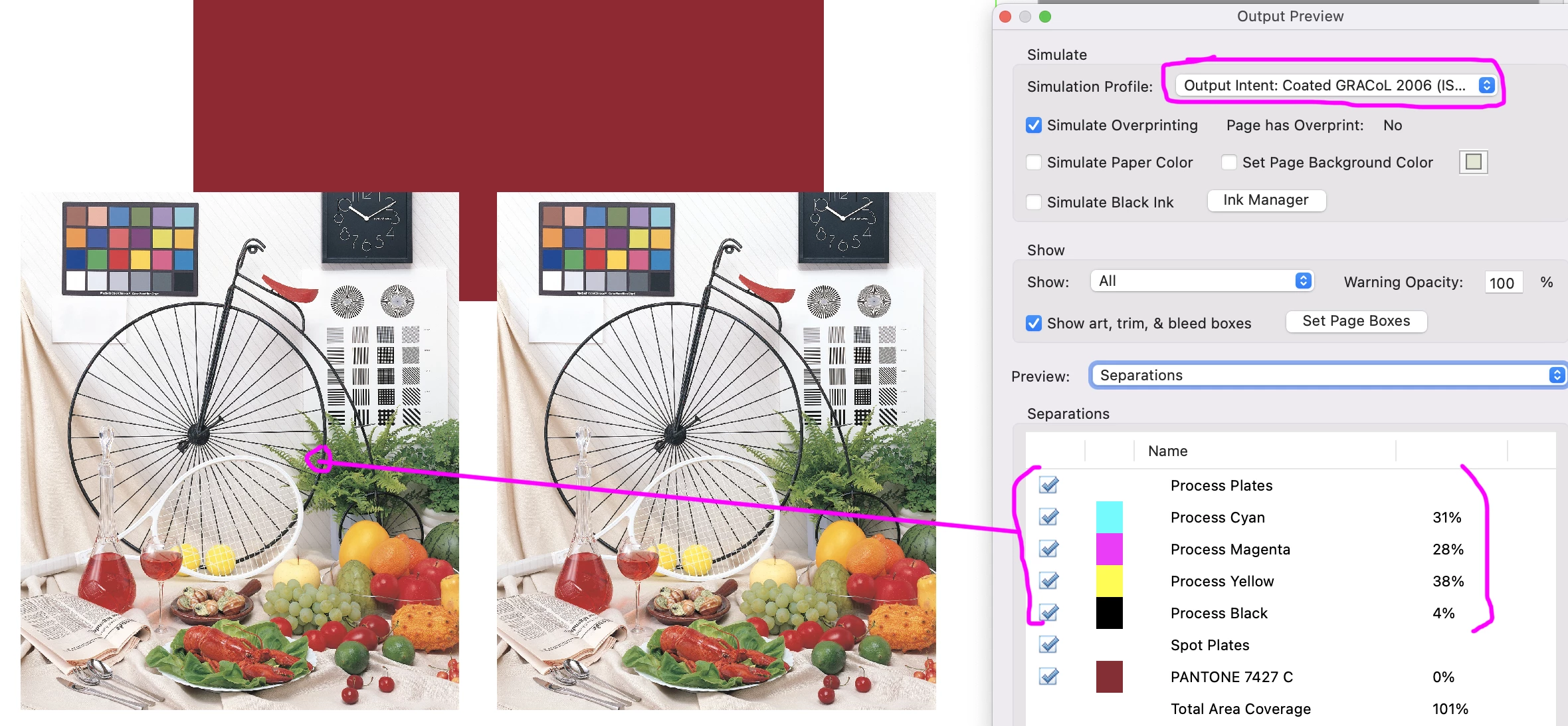
If you are talking about it showing as CMYK in the Output Preview, the values are presented according to what they would be depending to your Simulation Profile (which is usually the Output Intent based on your Colour Setting). In my first example, the photo on the left is RGB, and the right one is CMYK, but a spot picked in the left will show the CMYK values that would output to my Output Intent, a GRACOL profile. Your image is STILL RGB, and you can confirm this by either using the Object Inspector, as in my second example, or by selecting to show only RGB objects, as in my 3rd example, which hides any objects not RGB-based, so in this case will show only the left image.

2 replies

Brad @ Roaring Mouse
Community Expert
Community Expert
May 31, 2024

Where are you seeing that the colours are converted to CMYK?

Cole SlowAuthor
Known Participant
May 31, 2024
quote

Where are you seeing that the colours are converted to CMYK?


By @Brad @ Roaring Mouse

In the pdf file.


I tried other presets with No Color Conversion. The result was the same With Press Quality. However, it worked with PDF/X-1a. It didn't covert colors to CMYK in the pdf file. Do you know why this happens? Also will PDF/X-1a lower the quality of the image?

Community Expert
June 1, 2024
Steve Werner
Community Expert
Community Expert
May 31, 2024

I no longer use InDesign CS6 [positively ancient] but the Export PDF dialog box has not changed since then.


Open up the Export Adobe PDF dialog box > Output and it should look like this:


RGB should stay in RGB, CMYK in CMYK.

Cole SlowAuthor
Known Participant
May 31, 2024

Thanks, but that's exactly the same option I have.