
Inspiring
January 26, 2024
Answered

Dark Mode in Indesign and other Adobe Apps leaves out hamburger menues in window panels

  • January 26, 2024
  • 4 replies
  • 1680 views

Hello,

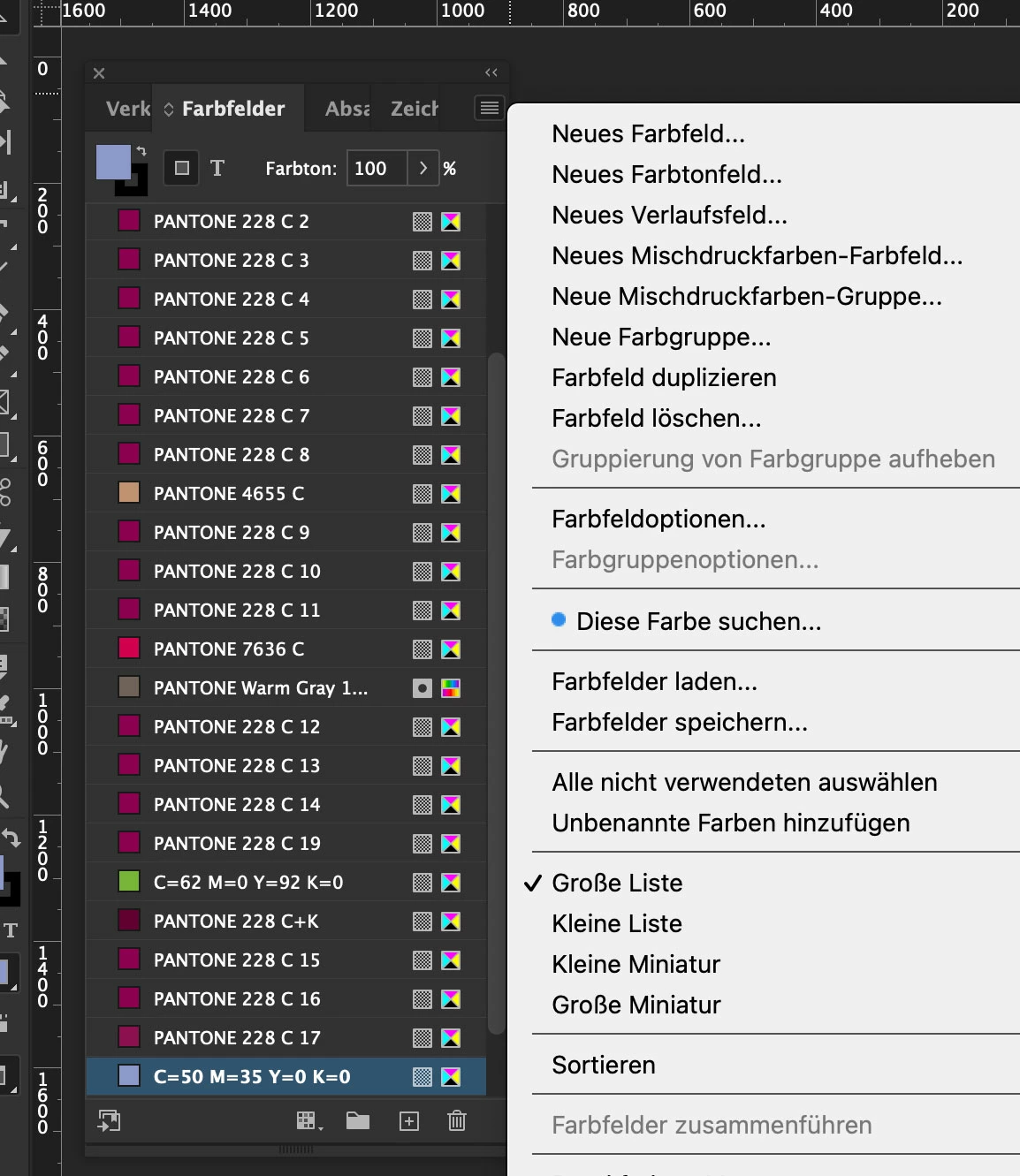
I still haven't found any thread, thematizing the issue above. Maybe one of you knows any workaround, plugin or whatever, to solve this problem.  — Today I contacted Adobe Supprt. They confirm, that there actually is no option within the apps, to display the Hamburger menues in the pallet windows in dark mode. They still appear in white while clicking on them, although the darkest mode in the preferences ist chosen and the user interface generally appears in dark colors (example-image below).

Does anybody have an idea or hint to solve this?

Thank you very much in advance for any help

Frank
 

This topic has been closed for replies.

4 replies

James Gifford—NitroPress
Legend
January 26, 2024

I'd be curious as to version, platform and OS under which this occurs. I've never seen it and my hamburger menus are dark along with the rest of my UI.

ddbxAuthor
Inspiring
January 26, 2024

This is extremely interesting. Would you please show a screenshot, because I've never seen it any other way. Not even in comparison with others. Not even on Windows, etc. Is it the same with your other adobe apps? —
Mine: Adobe InDesign 2024 19.1, on macOS 13.6.3 Ventura, iMac 4,2 GHz Quad-Core Intel Core i7 Radeon Pro 580 8 G, 32 GB 2400 MHz DDR4

James Gifford—NitroPress
Legend
January 26, 2024

NM, I read the discussion as having to do with the icon color, not the menu. Making note to pay closer attention. 🙂

Steve Werner
Community Expert
Community Expert
January 26, 2024

Frankly, I wouldn't hold your breath on getting this implemented. While aesthetically what you're saying is correct, it falls so low in the priority of the functional shorrtcomings of InDesign, I'm sure it will never the level of interest for most users to vote for your request, or  to be fixed by the engineers..

ddbxAuthor
Inspiring
January 26, 2024

Mistake, this is no small thing. Especially because it affects a large number of Creative Cloud apps.
you can also do it from a completely different perspective. Dark mode is not a purely aesthetic topic. Dark mode is equivalent to operating aids that enable or make it easier for people/designers with visual impairments to use Adobe apps.

As a progressive company, Adobe cannot ignore this and will have to step up. Sooner rather than later.


Mike Witherell
Community Expert
Community Expert
January 26, 2024

How does Dark Mode aid visual impairment?

Mike Witherell
100pk
Inspiring
January 26, 2024

There are some flaws in how Dark mode is implemented; I posted about this earlier: 

https://community.adobe.com/t5/indesign-discussions/anywone-bugged-by-titlebar-color-and-size/m-p/13315964#M500484

Bill Silbert
Community Expert
Community Expert
January 26, 2024

Since this appears to be the way that the program is supposed to be at this point you might want to log the issue as a feature request. You can do so at: https://indesign.uservoice.com/forums/601021-adobe-indesign-feature-requests.

ddbxAuthorCorrect answer
Inspiring
February 2, 2024