Participating Frequently
August 14, 2019
Answered

Data merge: Clear space of empty images

  • August 14, 2019
  • 3 replies
  • 2894 views

Hello everyone,

after a lot of research, I still couldn't find a viable solution to a problem. I want to stack a couple of images in a text frame. The images are selected via data merge.

Now my problem is that empty images will still take space and don't collapse:
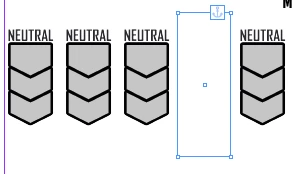
Each image here comes from a separate column in the dataset:

@7245110@img2@img3@img4@img5
neutral.pngneutral.pngneutral.pngneutral.png

What I want is that if one or more images are not set, everything aligns to the left. But I couldn't find a way to collapse empty frames or scale the frame to a smaller image (a blank.png of sorts).

I'm running out of ideas so I'm starting to think I'll have to resort to a script, which I'd prefer to avoid since then previewing the merge will not look correctly.

Has anyone ever managed to solve this problem? This is the second time I'm running into it, already. Last time I solved it with a complex excel formula to automatically sort the columns.

This topic has been closed for replies.
Correct answer DBLjan

this may work


My tabbed text file:

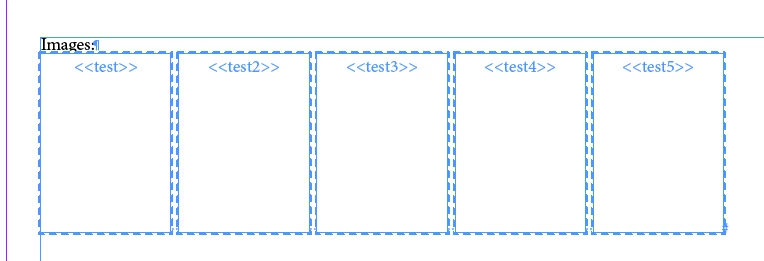
@test @test2 @test3 @test4 @test5

/Users/JK/Desktop/normal.png /Users/JK/Desktop/small.png /Users/JK/Desktop/normal.png /Users/JK/Desktop/normal.png /Users/JK/Desktop/normal.png

It works, but be careful:

What doesnt work, is preparing the boxes with auto-adjust options. They will be overwritte i guess by the data-merge options.

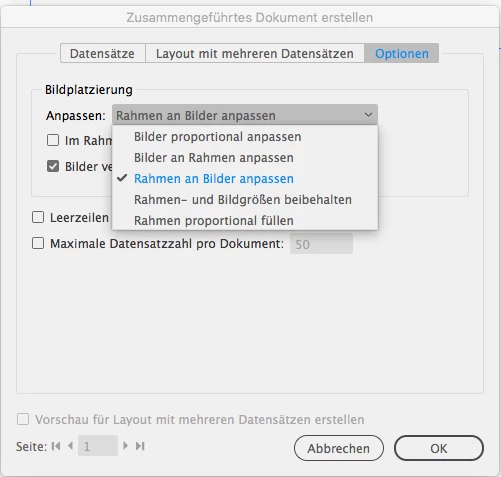
I choose "fit frame to content", which works in my example. I took a 200px width screenshot (gray color) and a red pixel thingy image.

But there will be a problem, if your actual images, because of resolution, blow up the imagebox. You could batch-convert the images to output size tho then.

3 replies

Colin Flashman
Community Expert
Community Expert
August 15, 2019

Hello there.

I would use a solution quite similar to the method outlined by DBLjan, relying on empty results being assigned an image that is really tiny and called something like blank.pdf,  data merge's frame fitting options are set to fit frames to images, and the images being placed as inline graphics next to each other. I've written more about this in a piece I wrote for InDesign Magazine issue 52 https://indesignsecrets.com/issues/issue-52-data-merge . I've used this technique in real-world examples as well.

Here's how it works:

The way to solve this is to make the image frames shrink to an almost unnoticeable size. This is done by creating "blank.pdf" in Illustrator – a blank page with only one object in it measuring 0.001mm square with no fill or stroke.

Before beginning the merge, place the blank.pdf into InDesign making sure the show import options checkbox is checked. When the options appear, select Art from the dropdown menu.

This will mean that any PDFs linked via the data merge will also use this option, so the incoming graphics must be the correct size prior to the merge.

Lastly, the Fit Frames To Images setting in the content placement options needs to be selected.

In the database, and making sure any missing image data is replaced with the blank.pdf link.

The advantage is that this will work whether the graphics need to be aligned to the left, right, or center.

The alternate way that will work if left aligning only:

This still relies on the data merge placeholders being inline graphics placed next to each other, but doesn't require a blank.pdf.

Take a database like this in Microsoft Excel. The columns represent each placeholder:

It's obvious I want it to be more like this:

To do this, all the blank cells need to be selected and deleted, with the content shifting to the left. To do this, highlight all the data and in Excel, go Edit, Find, Go to... and in the next dialog box, click the Special... button and then select blanks and click OK.

This will highlight all blank cells.

You can now right-click on a highlighted cell and click delete, and in the next dialog, click shift cells left

This way, you don't have to make a blank.pdf and the images will still align to the left. hope this helps

If the answer wasn't in my post, perhaps it might be on my blog at colecandoo!
Legend
August 15, 2019

Doh! I should not get tired of referring to Colin Flashman​ as expert for DataMerge – which i did not this time, but he is – as you see above. Im just a guy with ideas.

But I think both of these ways are not perfect: My problem is, that I have to hard-limit/photosphop-batch the dimension of my images upfront, before I let InDesign fit frames to images » its only applicable to the blank.pdf because its small, but most of our hi-res-images fall short with this method, resulting in vast image-boxes.

MW Design
Inspiring
August 14, 2019

The only way I know of would be via a data merge plug-in such as the one I use by Em Software. I suspect catalog plug-in can as well (but I believe are a more costly option).

As mentioned, it can likely be scripted that can detect if a frame is empty and remove it. You could inquire in the scripting forum.

Mike

Legend
August 15, 2019

Heres an idea:

Set the image-container to auto-adjust and instead of using none image, create a placeholder with 1 pixel image.

DBLjanCorrect answer
Legend
August 15, 2019

this may work


My tabbed text file:

@test @test2 @test3 @test4 @test5

/Users/JK/Desktop/normal.png /Users/JK/Desktop/small.png /Users/JK/Desktop/normal.png /Users/JK/Desktop/normal.png /Users/JK/Desktop/normal.png

It works, but be careful:

What doesnt work, is preparing the boxes with auto-adjust options. They will be overwritte i guess by the data-merge options.

I choose "fit frame to content", which works in my example. I took a 200px width screenshot (gray color) and a red pixel thingy image.

But there will be a problem, if your actual images, because of resolution, blow up the imagebox. You could batch-convert the images to output size tho then.

Anna Lander
Inspiring
August 14, 2019

so, you have empty cells here and there in different records, and can't predict how many empty fields you will have finally, right?

In this case yes, you will need a script to not adjust this manually.

To collapse the gap, you have to remove the image field from layout or change its properties. But Data Merge is designed to fill the ready containers with needed content, not to change the containers themself. You could expect that the omages would behaviour like text symbols (if the field empty, there is nothing in its point). But inline graphics is still graphics, its frames can't disappear such simply