
Participant
July 10, 2023
Question

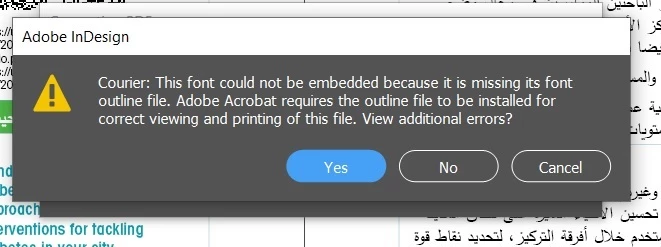
Error while exporting a PDF from the InDesign related to embedded fonts.
  • July 10, 2023
  • 3 replies
  • 240 views

\


Hi all, 

This issue appears whenever I try to export a PDF from the Indesign file - or to package it. 

Does anyone know how to solve that?

Thanks


<Title renamed by moderator>

This topic has been closed for replies.

3 replies

Brad @ Roaring Mouse
Community Expert
Community Expert
July 10, 2023

You appear to be on a PC, and the font Courier was originally the default PostScript Type 1 printer font more prevalent on Macs. Even on Macs, that had been replaced by a TrueType version thereof more than 20 years ago. If this is an old file that you've recently migrated over, there's a good chance Courier wasn't actually being used but might be "leftover" in a hidden character or unused Style.

If you ARE using Courier on purpose, I suggest you do a search and replace and switch it for Courier New, which is Windows' equivalent.

Brad @ Roaring Mouse
Community Expert
Community Expert
July 10, 2023

btw: If you still get a PDF after the error message, you can probably ignore it. Traditionally. Courier was never needed to be embedded since it was always the default font of most every (certainly PS) printer anyway.

Peter Spier
Community Expert
Community Expert
July 10, 2023

It would help if you told us your OS and version of InDesign.

The mention of font outlines file being missing makes me think this might be a Type 1 Postscript version of Courier which would no longer be supported by the most recent versions of InDesign or possibly the OS.

Have you run Find Font to see where this Courier is used and to identify the font type and file names asscoicted with it?

HARSHIKA_VERMA
Community Manager
Community Manager
July 10, 2023

Hi @Amr Sherif30982276dooi,


Thank you for reaching out, and sorry for the trouble. Would you mind checking this post: https://community.adobe.com/t5/indesign-discussions/how-do-you-embed-fonts-in-an-indesign-document/td-p/3709997, which might help you?


I am also keeping the discussion open for our experts, who might have more suggestions for you.


Hope it helps.


Thanks,

Harshika