

Johnathan Montelongo
Participant
January 21, 2022
Question

Font export glitch: Inter Light colon ':'

  • January 21, 2022
  • 1 reply
  • 314 views

This is weird, right.


I'm creating a 60 page, bilingual document. English in sans serif, Inter Light, Welsh in serif, Crimson Pro Reg.


When I export for print or as an interactive PDF, the colon of the English translation appears as a kind of hamburger menu or server icon. Observe:



After much testing and headscratching, I've cracked it. But it doesn't make any sense and I'd like to learn from this if I can.


By highlighting and hovering over the offending glyph in the Id doc, you get a choice:
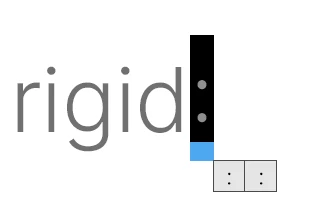


Of course, they look identical and hovering over each one doesn't trigger a popup label.


Looking at the Inter webpage > Glyphs (of which there are 2.5k), I can see there are no less than three colons in the set.



These do have unique labels, but they don't mean anything on the face of it and you can't see them in the document while working. Note you can see them in the Glyphs library under Type in Id:
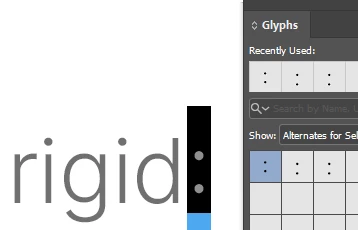
 

Can someone please tell me if there's something to learn here? Or perhaps it's a glitch that the devs need to iron out. It's definitely robbed me of some good ol' fashion just-trying-to-get-the-work-done-ahead-of-deadline time!


Any helpful feedback or shared experience gratefully received!


This topic has been closed for replies.

1 reply

Community Expert
January 21, 2022

Hi Jonathan,

what you see in the exported PDF is a non-def glyph glyph.

And it is a bug with InDesign 17.0 on Mac OS only, I think.

Never saw this on a Windows machine.


I compiled a growing list of similar cases discussed in the forum:


Blank box over colon when exporting PDF from Indesign

https://community.adobe.com/t5/indesign-discussions/blank-box-over-colon-when-exporting-pdf-from-indesign/m-p/12640595#M460386


You may be able to solve the issue in three ways:

[1] Make the font available through the Fonts folder of the InDesign's Application folder.


[2] Export to PDF/X-1a with a transparency reduction preset that converts text to outlines. Details in this thread:

Indesign '22 does not export the semi-court stroke for the fonts "Robot Slab" and "Montserrat"
pmfh, Jan 19, 2022

https://community.adobe.com/t5/indesign-discussions/indesign-22-does-not-export-the-semi-court-stroke-for-the-fonts-quot-robot-slab-quot-and-quot/td-p/12693068


[3] Use a specific prerelease version of InDesign ( version 17.1.0 ), that hopefully will soon be released to the public.

How to join InDesign Prerelease:

https://www.adobeprerelease.com/beta/C6DFA254-C40C-4EEB-8F6D-F4AEDA2E6171


More on Adobe Prerelease programs:

How to Join Creative Cloud Prerelease Programs
Erin Finnegan, Oct 18, 2019, UPDATE July 24th
https://medium.com/adobetech/how-to-join-creative-cloud-prerelease-programs-ccecc10ae7d3


Hm. Maybe a fourth way: Reinstall the fonts.


Regards,
Uwe Laubender

( ACP )