



Copy link to clipboard
Copied
Hi !
I have got a ind file with a size of 70Mo.
When I delete pages, the size of the document doesn't change
Even worse, when I delete some heavy images, the size of the ind file becomes higher.
I have change my import from AI to Pdf .. and it has risen the total size of the ind file. I get crazy.
Please could you explain me what is the best way to reduce a ind file.
Thank your very much.


 3 Correct answers


Do is a Save As as keep the same file name. Note the file size before and after.
~ Jane


Dans ce cas, la solution est d'exporter d'abord la moitié du fichier : si l'export ne se fait pas, on redivise cette moitié jusqu'à trouver l'origine du problème (mais on est bien d'accord que le poids du fichier n'a pas de rapport).
In this case, try to export half of the file: if it fails, divide this half until you find the cause of the issue (but the size of the file has no impact)
Il faut entrer les numéros de pages dans le champ où il est écrit « toutes les pages » : 1-31, par exemple.
 22
Replies
22
22
Replies
22

Copy link to clipboard
Copied
Do is a Save As as keep the same file name. Note the file size before and after.
~ Jane
Copy link to clipboard
Copied
Before and after what ?
I don't get what I have to do.
Copy link to clipboard
Copied
What Jane advises is to “save as” your file, with the same name. You will see that the size of the file will considerably reduce.
Copy link to clipboard
Copied
Thank you. Indeed It reduces the size of the file from 70 Mo to 62 Mo.
However I still need to reduce it dramatically.
Copy link to clipboard
Copied
It reduces the size of the file from 70 Mo to 62 Mo
Only? That's weird… Generally, the difference is more important.
Copy link to clipboard
Copied
Can you show your Links panel so we can see your assets and that they are properly linked? The Save As should have done it. Resize the panel taller and wider so we can see all of it.
And sorry, I meant before the Save As and after the Save As. As @jmlevy , it should have been more dramatic with all the deleting you did.
Saving as .idml might work, then resave as .indd, but don't do that yet. There may be an issue with your links.
~ Jane
Copy link to clipboard
Copied

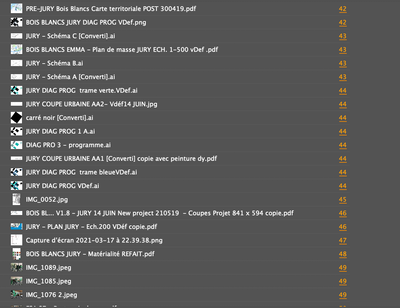
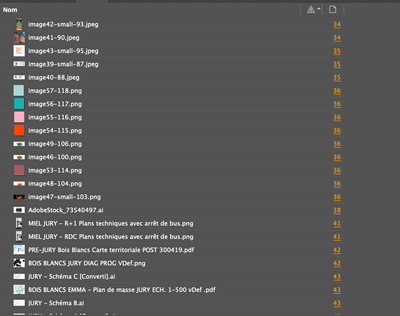
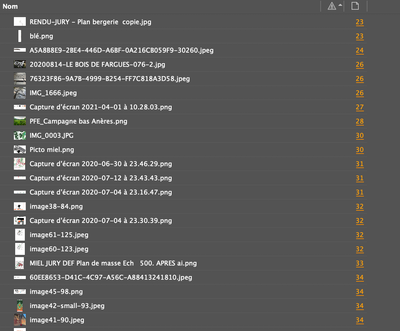
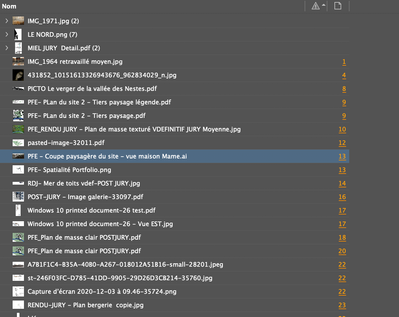
Here is the link panel
Copy link to clipboard
Copied
I have got also an another problem with this file: When I generate a PDF file, I get a "zero octet" and this sentence "Les profils ICC version 4 ont été convertis en profils ICC version 2 pendant l'exportation du fichier PDF.Impossible d'exporter le fichier PDF" which means "the 4. version ICC profile have been converted to 2. version ICC profile during the exportation of the PDF file. Impossible to export the PDF file".
I don't know if there is a linek between the size problem.
Copy link to clipboard
Copied
Du coup, je continue en français…
Il y a combien de pages et combien d'images dans ce fichier ?
Et le message à propos de la version de profils ne devrait pas empêcher la génération du PDF. Il y a un problème ailleurs. Essaie de faire un export en idml, d'ouvrir le fichier idml, de le réenregistrer en indd, puis de retenter l'export en PDF.
Copy link to clipboard
Copied
Ha ok, oui ce sera plus simple en français.
Le document comporte 62 pages et 104 liens.
Quand j'exporte en IDML et je re-enregistre en INDD.
L'export PDF ne marche toujours pas.
Je ne comprends pas.
Copy link to clipboard
Copied
Je ne parle pas le Français. 🙁
Open Preflight panel (Window menu or Status bar). Do you have any errors?
~ Jane
Copy link to clipboard
Copied
This is a portfolio with images.
The document contains 62 A4 pages and 104 links
Exporting as IDML and then open it and save as IND.
And then trying to export as PDF doe not work neither.
Copy link to clipboard
Copied
Dans ce cas, la solution est d'exporter d'abord la moitié du fichier : si l'export ne se fait pas, on redivise cette moitié jusqu'à trouver l'origine du problème (mais on est bien d'accord que le poids du fichier n'a pas de rapport).
In this case, try to export half of the file: if it fails, divide this half until you find the cause of the issue (but the size of the file has no impact)
Copy link to clipboard
Copied
Copy link to clipboard
Copied
Il faut entrer les numéros de pages dans le champ où il est écrit « toutes les pages » : 1-31, par exemple.

Copy link to clipboard
Copied
What is the need to reduce the file size? (I'm assuming the Mo. is MB or megabytes.)
A file size is determined on how much content you have in it--be it graphics or large page count. I have InDesign files that are over 350 MB just because they are hundreds of pages with lots of tiny icons throughout. It was about 510 MB before a save-as.
Copy link to clipboard
Copied
This is a portfolio with images.
The document contains 62 A4 pages and 104 links
70MB before saves - 62 MB afterwards.
I managed to reduce it to 45MB by retreating each heavy link (but as consequence, I have lost a bit of image quality)
Now I can't manage to export as a PDF

Copy link to clipboard
Copied
For a file as image heavy as yours, 70MB is not at all unusual, in fact I think it's quite small. I have a photo-heavy 12-page document in front of me right now that is 25MB currently, and my output PDF for press from that file is even larger than that.
So, I agree with the question: Why are you concerned about the size of your INDD file?
Copy link to clipboard
Copied
The portfolio of an architect must be around 10MB. (to apply for a job)
Some professionnals even ask for 4MB.
I managed to reduce it to 45MB by retreating each heavy link (but as consequence, I have lost a bit of image quality)
And with also withe the "save as" metod.
Copy link to clipboard
Copied
Did you succeed to generate the PDF? What is its size?
Copy link to clipboard
Copied
If I understand (first) problem correctly, your concern should be the size of the PDF, not the InDesign file.
Copy link to clipboard
Copied
@Emmanuelle15C2 wrote:
I managed to reduce it to 45MB by retreating each heavy link (but as consequence, I have lost a bit of image quality)
And with also withe the "save as" metod.
If the PDF needs to be 10 mg and they are only getting the PDF and not the InDesign file, one thing you can do is:
- keep the images at high-res in InDesign
- when you export to PDF, go to the Compression tab. The default for some of the joboptions is:
if the images are over 450 ppi, reduce them to 300 ppi.
This can be changed for PDF that is currently being exported so that your original images always stay the same.
~ Jane


Get ready! An upgraded Adobe Community experience is coming in January.
Learn more
 AdChoices
