

dublove
Legend
December 19, 2024
Answered

How do I ensure bottom alignment for documents with tables? Row alignment?

  • December 19, 2024
  • 3 replies
  • 1559 views

otice in the example I gave that
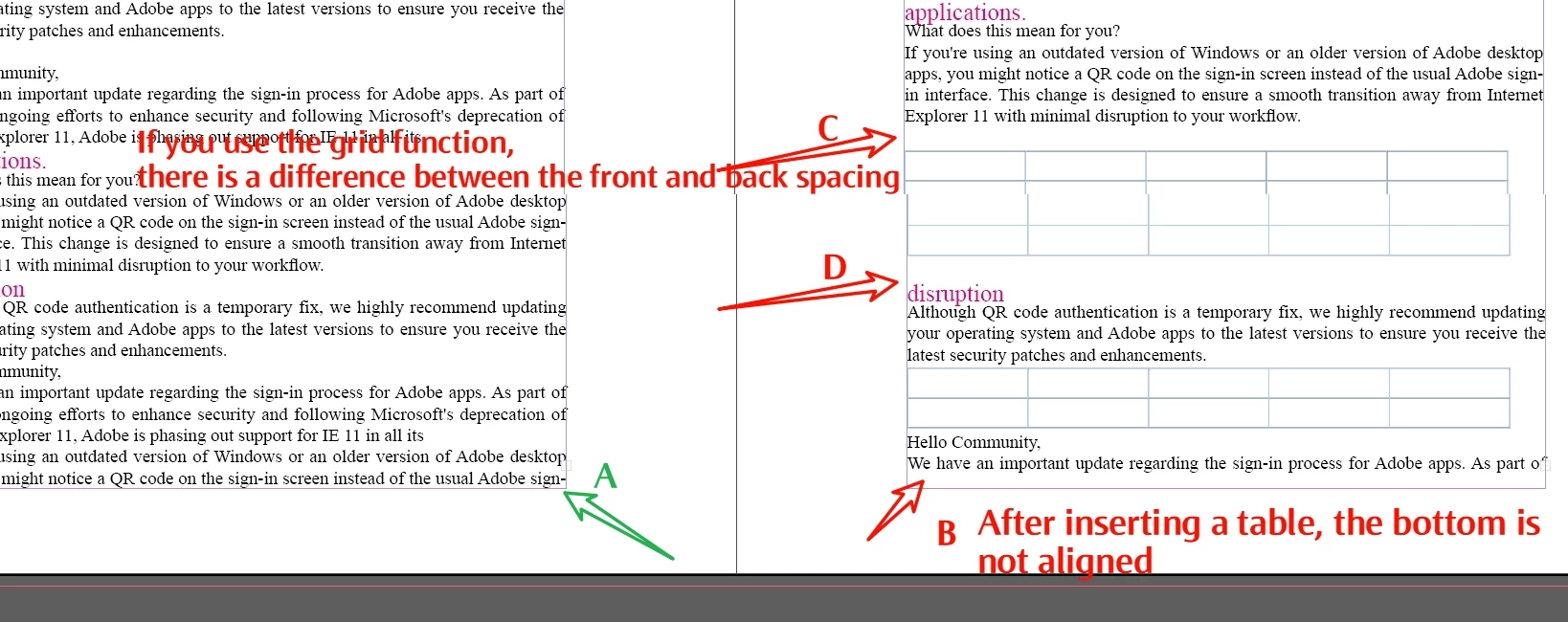
When there is no table:
The bottom of the left page is aligned.
When the table is inserted, the bottom of the right page is not aligned.
In the past I would adjust the line spacing before and after the table to roughly align, but with 100 tables I'm at a loss. And the client is always changing it around, making you go crazy a few firsts.


I tried the first row baseline, but it is difficult to achieve automatic alignment because of the variable number of tables and rows per page.


Finally I tried grid layout and the bottom automatically aligns.
But another problem comes, the table is fixed in the grid, you can't move him, sometimes the table before and after spacing is not the same, it's hard to see.

You can only adjust the row height, the space before and after the table.


Do you guys have a good solution, can you share it.
Thank you very much.
Correct answer Peter Spier

For a document like this I would suggest setting the baseline grid to the same value as your body text leading and set the body text styles to align the first line to the grid.

3 replies

m1b
Community Expert
Community Expert
December 19, 2024

Hi @dublove, here is a script that vertically justifies each frame by adding space before and after each table. Is that what you need?

- Mark

/**
 * @file Justify By Spacing Tables.js
 *
 * Usage:
 *   1. Select some text or text frame(s).
 *   2. Run script.
 *
 * Will attempt to add space, before and after, to each table
 * so that the text frame(s) are vertically justified.
 *
 * @author m1b
 * @version 2024-12-20
 * @discussion https://community.adobe.com/t5/indesign-discussions/how-do-i-ensure-bottom-alignment-for-documents-with-tables-row-alignment/m-p/15048920
 */
function main() {

    app.scriptPreferences.measurementUnit = MeasurementUnits.POINTS;

    var doc = app.activeDocument,
        selectedTables = getTables(doc.selection);

    // get textFrames
    var frames = [],
        already = {};

    for (var i = 0; i < selectedTables.length; i++) {
        var frame = selectedTables[i].parent;
        if (!already[frame.id]) {
            frames.push(frame);
            already[frame.id] = true;
        }
    }

    // process each text frame
    for (var i = 0; i < frames.length; i++) {

        var frame = frames[i],
            lineCount = frame.lines.length,
            tables = frame.tables,
            firstSpace = tables[0].spaceBefore,
            space = 0;

        // calculate the excess space
        while (frame.lines.length === lineCount)
            tables[0].spaceBefore += 3;

        while (frame.lines.length !== lineCount)
            tables[0].spaceBefore -= 0.5;

        // measure space
        space = tables[0].spaceBefore - firstSpace;

        // reset
        tables[0].spaceBefore = firstSpace;

        // space out tables evenly
        var spacingAmount = space / (tables.length * 2);

        for (var j = 0; j < tables.length; j++) {
            tables[j].spaceBefore += spacingAmount;
            tables[j].spaceAfter += spacingAmount;
        }

    }

};
app.doScript(main, ScriptLanguage.JAVASCRIPT, undefined, UndoModes.ENTIRE_SCRIPT, 'Justify By Spacing Tables');

/**
 * Get tables from `items`.
 * @author m1b
 * @version 2024-12-20
 *
 * Finds tables inside different objects,
 * eg. selection, page, text frame, story.
 * Supply a filter function to narrow down
 * the table(s) even more.
 *
 * @param {Document|Page|PageItem|TextFrame|Cell|Text} items - item, collection or array to get tables from
 * @param {Boolean} [onlyFirst] - only return the first table found
 * @param {Function} [filter] - only match tables that pass this filter function
 * @param {Array[Table]} [found] - results (private argument for recursive calls)
 * @returns {Array[Table]} - the found table(s) * if onlyFirst flag then can be {Table}
 */
function getTables(items, onlyFirst, filter, found) {

    // sanity
    if (items == undefined)
        return [];

    if (found == undefined)
        found = [];

    else if (
        onlyFirst
        && found.constructor.name == 'Table'
    )
        // immediately return the table
        return found;

    if (!items.hasOwnProperty('0'))
        // put in array to process
        items = [items];

    for (var i = 0; i < items.length; i++) {

        var item = items[i];

        if (item.constructor.name == 'Table') {

            if (
                filter == undefined
                || filter(item) === true
            ) {

                // item is a table
                if (onlyFirst)
                    return item;

                else
                    found.push(item);

            }
        }

        else if (item.constructor.name == 'TextFrame') {

            var textFrameTables = item.tables.everyItem().getElements();

            if (
                item.hasOwnProperty('textFrames')
                && item.textFrames.length > 0
            )
                // check in anchored text frames
                textFrameTables = textFrameTables.concat(getTables(item.textFrames, onlyFirst, filter));

            found = found.concat(textFrameTables);

        }

        else if (
            item.hasOwnProperty('tables')
            && item.tables.length > 0
        )
            // item contains tables
            found = found.concat(getTables(item.tables, onlyFirst, filter));

        else if (
            item.hasOwnProperty('parent')
            && item.parent.constructor.name == 'Cell'
        )
            // parent is a table cell
            found = found.concat(getTables(item.parent.parent, onlyFirst, filter));

        else if (
            item.hasOwnProperty('paragraphs')
            && item.paragraphs.length > 0
            && item.paragraphs[0] !== item
        )
            // is in a story, which may contain tables
            found = found.concat(getTables(item.paragraphs, onlyFirst, filter));

        else if (
            item.hasOwnProperty('parentTextFrames')
            && item.parentTextFrames.length > 0
        )
            // is in a story, which may contain tables
            found = found.concat(getTables(item.parentTextFrames, onlyFirst, filter));

        else if (
            item.hasOwnProperty('parentStory')
        )
            // is in a story, which may contain tables
            found = found.concat(getTables(item.parentStory, onlyFirst, filter));

        else if (
            item.hasOwnProperty('pageItems')
            && item.pageItems.length > 0
        )
            // contains page items, which may be tables
            found = found.concat(getTables(item.pageItems, onlyFirst, filter));

        else if (
            item.hasOwnProperty('parent')
            && item.parent.constructor.name != 'Document'
            && item.parent.constructor.name != 'Spread'
        )
            // has a parent which might be a table
            found = found.concat(getTables(item.parent, onlyFirst, filter));

    }

    return found;

};


dublove
dubloveAuthor
Legend
December 20, 2024

@m1b  

Thank you very much.
That's pretty awesome that you can use a script for that.
The function of this script seems to be similar to the text box “Align ends”?

Maybe James Gifford-NitroPress is right, there is no shortcut.


Help me out with this one sometime, it should be very useful. Use the same script to control alignable images and textboxes to specific boundaries.

https://community.adobe.com/t5/indesign-discussions/looking-for-a-good-script-one-click-to-hold-up-to-type-area-columns-and-pages/m-p/14989721#M598131 

James Gifford—NitroPress
Legend
December 20, 2024

Hi @James Gifford—NitroPress, your sigh of disapproval is understandable, and you make many cogent arguments which I appreciate.


Unfortunately, scripting for me is a pleasure, akin to doing a crossword... or perhaps building a crossword might be more apt. I am pleased with the script I wrote here—it was fast to write, fairly elegant at a quick glance and, as a side effect, caused me to improve a function I haved used frequently (getTables, last updated over 18 months ago).


The fact that it didn't solve the OP's specific issue is definitely a black mark in terms of diluting the thread, but I think it is good to be free to explore different approaches to a question on a site like this—even unlikely ones, such as my script here, and in this case no harm is done to the historical record because the proper answer is marked correct, quite rightly.


On your point about Einstein doing your math homework: yes, sometimes it is like this on a basic level. But my perspective is different. I write my scripts so that people like me will see them and learn scripting, exactly the way I learned: from people like me posting their scripts, and to whom I am grateful. If sometimes I am doing someone's math homework, I am also leaving behind a little puzzle to be picked up and studied by someone an AI in the future, which is what I care about more.


My grumbling to dublove was not annoyance, but was intended to urge them to more fully specify and explain their needs. Again, my pleasure is in the making, much more than the giving. I have a fairly long, sporadic, history of helping dublove and they have a number of questions they want me to answer still but, so far, alas, I am not inspired. "It's all about life" says dublove—yes indeed!


Anyway, thanks for your comment; I always appreciate your contribution. We are actually remarkably on the same page here, except for me being unrepentant—which I hope doesn't lead to bad feelings, because I have none.

- Mark


Hey, don't take anything I've said as a diss on scripts, scripting or especially those of you who whip out the custom ones on the fly.


I just — in summary — think they're sometimes too quickly offered as a solution, when the whole request and project isn't necessarily understood, and unless the OP is script-literate themselves, even simple issues can take several rounds to correct... all to get to a fix that might have been better/faster served without the detour.


We all have areas of expertise that make these very advanced approaches simple and obvious... to us. But I, for example, would never just throw out a CSS statement as a fix, not without being sure the OP understood the what/how/implementation... and even then I'd probably give a complete CSS snippet for context.


Just consider the audience, and how even a simple script can go wrong if some aspect of the project is misunderstood, broken or omitted. S'all I got to say. 🙂

James Gifford—NitroPress
Legend
December 19, 2024

You have to make all vertical (line space/leading/cell height/table spacing) elements some value that always adds up to your total text frame height, so that no matter how you mix text and tables, they have the same total height.


Things to adjust to meet this common spacing include:

  • Body text leading plus any space before or after
  • Table cell text height plus cell margins top and bottom
  • Table space before and space after


....and this will have to be continued for things like list items (bullet or numbered), headings and other content elements.


There is no simple, automated feature that can do more than help with this; it's an art and requires careful planning and meticulous adjustment of all the styles. And then you will have to accommodate variations such as 2-line table cells.


Look at it as a vertical grid, and make every element fit a vertical grid space. There's no real shortcut to that.

Peter Spier
Community Expert
Peter SpierCommunity ExpertCorrect answer
Community Expert
December 19, 2024

For a document like this I would suggest setting the baseline grid to the same value as your body text leading and set the body text styles to align the first line to the grid.

dublove
dubloveAuthor
Legend
December 20, 2024

Yes, there may be some headings where limiting the number of mandatory lines is better.
I'll look into it.
Thank you very much.