


TypoMan23
Known Participant
October 22, 2022
해결됨

How to get rid of dozens of irrelevant fonts in the font menu?

  • October 22, 2022
  • 4 답변들
  • 5785 조회

I am new-ish to CC, and I noticed that I now have dozens of irrelevant fonts in my menu bar. Fonts I will never ever use. They only clutter up the menu.

In my work I use only 3-4 type families, and have no need for all these other fonts that seem to have been installed on my system since upgrading from CS3 to CC, and from OSX to Monterey.


Is there any way to get rid of all these fonts I will never use, so that my font menu will only show the ones that I need?


Thank you for any help. 
최고의 답변: Barb Binder

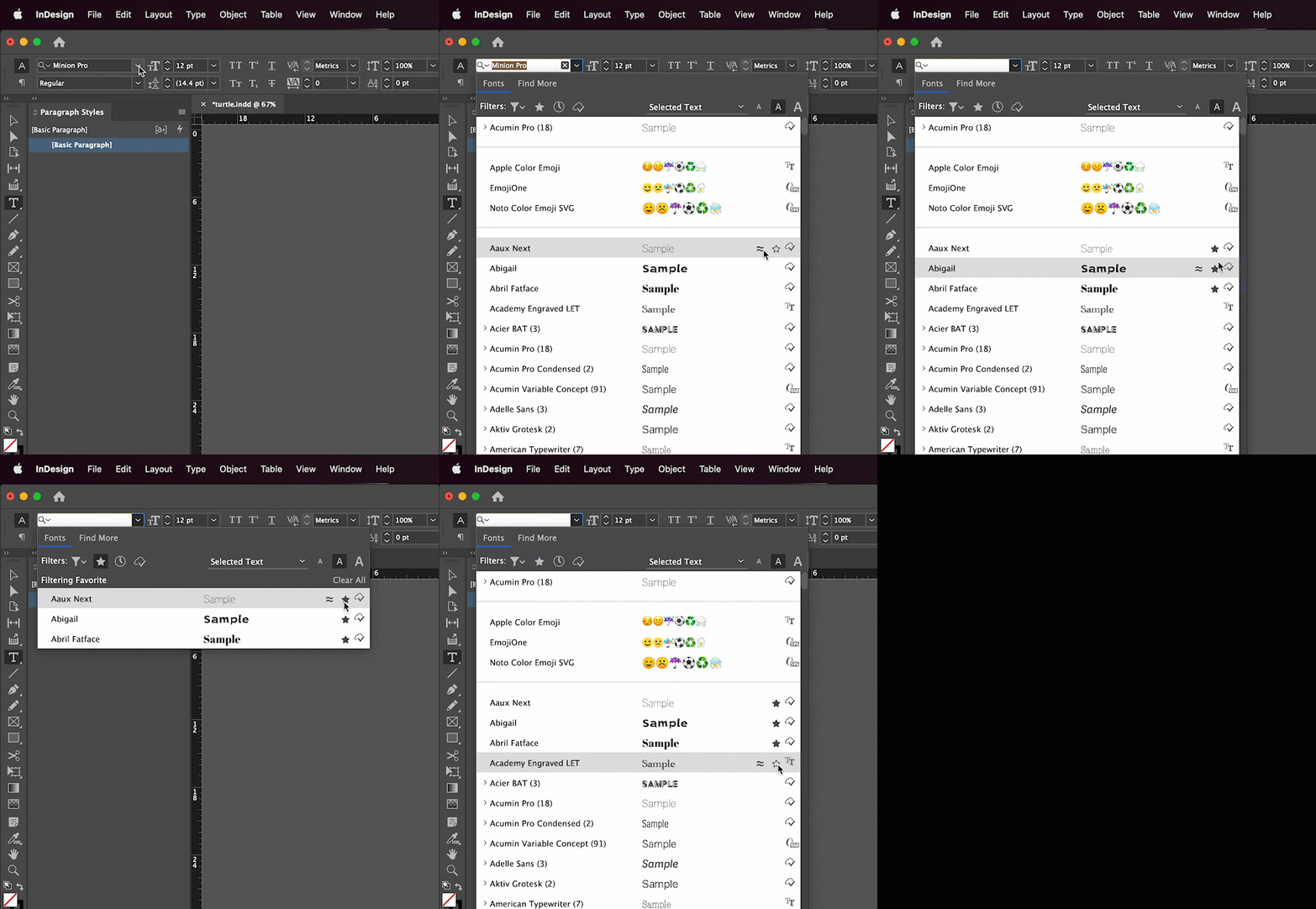
I think working with the Favorites filter as per @Willi Adelberger may be the easiest. 


~Barb

4 답변

Barb Binder
Community Expert
Community Expert
October 22, 2022

I think working with the Favorites filter as per @Willi Adelberger may be the easiest. 


~Barb

~Barb at Rocky Mountain Training
Kelly5C2A
Known Participant
September 17, 2023

Marking all the non-NOTO fonts as Favorites would not only be a serious chore, but then I can't use the Favorites feature to narrow in on fonts to choose from on a particular project, etc -- the way one is supposed to be able to use a Favorites feature... Why is this so ridiculously cumbersome? Just a file we could put never-used default faunts into and not show them - it wouldn't have to impact the system at all, just an adjustment to our display interface.  Does anyone know why Aobde won't do this simple yet INCREDIBLY CONVENIENT thing?

Inspiring
November 8, 2023

I'd have to agree with this. We edit documents coming from many customers and projects, and the "favorites" vary nearly every time we open a document to make changes. What I'd really like to do is tuck away those we never use--put them out of immediate sight in the Character and Find Font palettes, if not out of system.  Examples are all the Notos, STYX, and asian fonts. The long list seems especially cumbersome in Find Font, as the order in which substitutes are presented is often mysterious to me and I tend to initially slide past the font I'm looking for.


I'm guessing what seems simple to our eyes may be more difficult on the Adobe programming side, but I'll still echo this request.

Willi Adelberger
Community Expert
Community Expert
October 22, 2022
  1. Uninstall all fonts you do not need and the OS does not need.
  2. Make in InDesign Favorits and klick on the star to show only favorit fonts.
TypoMan23
TypoMan23작성자
Known Participant
October 25, 2022

Thanks. But the real question is how to know which out of 339 fonts MacOS does not need. Deleting such fonts can cause chaos on the iMac...

Abambo
Community Expert
Community Expert
October 25, 2022

You should ask that in an Apple forum. The beauty of the Adobe system is, that you keep control on the fonts. 

ABAMBO | Hard- and Software Engineer | Photographer
Abambo
Community Expert
Community Expert
October 22, 2022

What about uninstalling the fonts? If the fonts are from https://fonts.adobe.com, use that site to uninstall all unused fonts. As for other fonts coming with older application and being installed on your system, you will need to use the system provided tools to uninstall those. You have to be careful not to uninstall the system required fonts, however. 


I define my paragraph and character styles and rhen I rarely need to go back to the fonts menu. So that too, may be an ekegant manner to simply ignore those fonts.


BTW: Keeping the font list small will improve the system performance.

ABAMBO | Hard- and Software Engineer | Photographer
TypoMan23
TypoMan23작성자
Known Participant
October 22, 2022

Thanks for the reply.

Tbh I have no idea why they all came from. They seem to have appeared since I upgraded to CC from CS3. 

TypoMan23
TypoMan23작성자
Known Participant
October 22, 2022

...and from upgrading from OSX to Monterey.

Community Expert
October 22, 2022

The only way that I can think of would be uninstall the local fonts and for Adobe Fonts you can deactivate them. See the following article for Adobe Fonts.

https://helpx.adobe.com/in/fonts/using/managing-fonts.html

-Manan

-Manan