


TypoMan23
Known Participant
October 22, 2022
해결됨

How to get rid of dozens of irrelevant fonts in the font menu?

  • October 22, 2022
  • 4 답변들
  • 5815 조회

I am new-ish to CC, and I noticed that I now have dozens of irrelevant fonts in my menu bar. Fonts I will never ever use. They only clutter up the menu.

In my work I use only 3-4 type families, and have no need for all these other fonts that seem to have been installed on my system since upgrading from CS3 to CC, and from OSX to Monterey.


Is there any way to get rid of all these fonts I will never use, so that my font menu will only show the ones that I need?


Thank you for any help. 
최고의 답변: Barb Binder

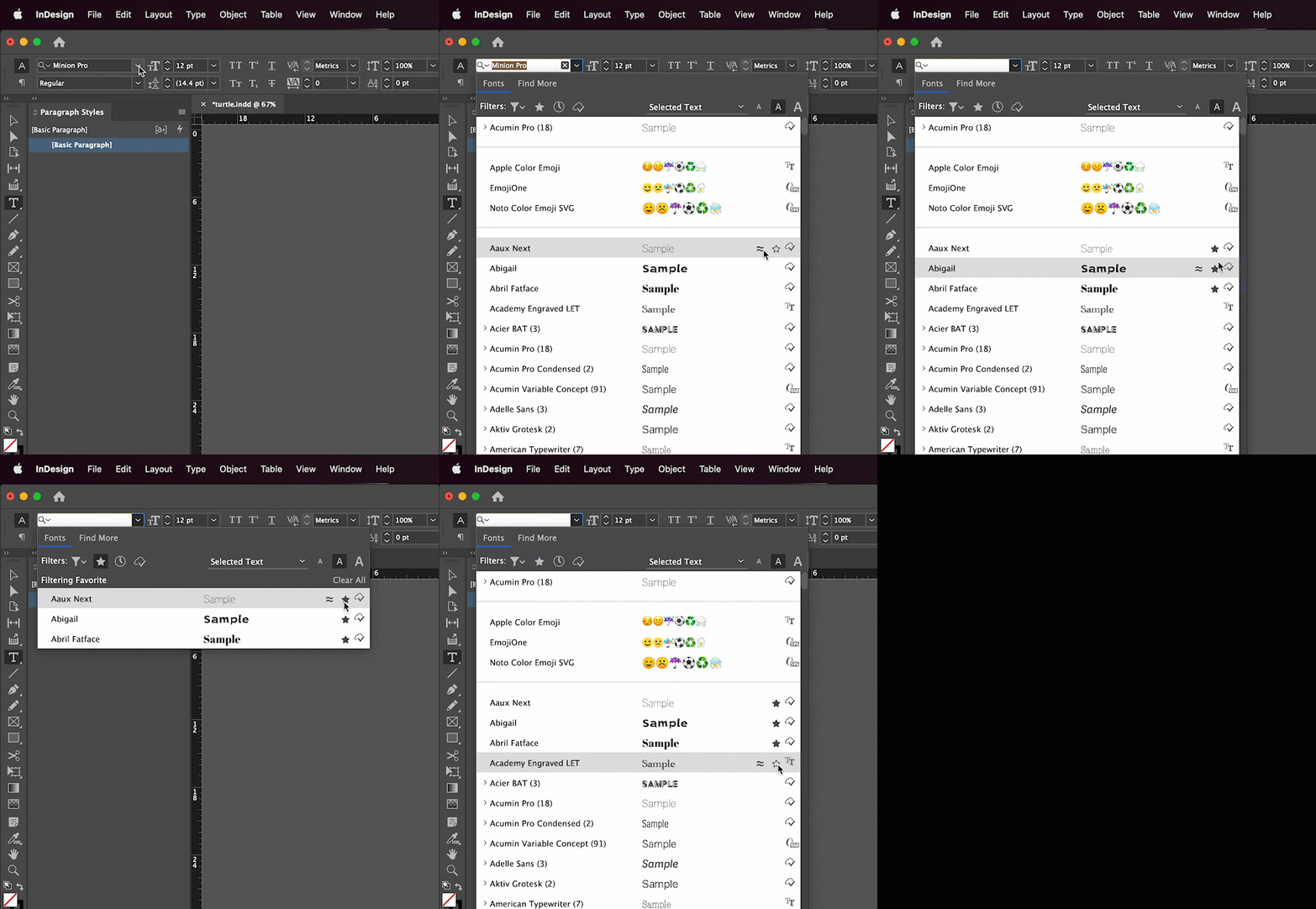
I think working with the Favorites filter as per @Willi Adelberger may be the easiest. 


~Barb

4 답변

Barb Binder
Community Expert
Community Expert
October 22, 2022

I think working with the Favorites filter as per @Willi Adelberger may be the easiest. 


~Barb

~Barb at Rocky Mountain Training
Kelly5C2A
Known Participant
September 17, 2023

Marking all the non-NOTO fonts as Favorites would not only be a serious chore, but then I can't use the Favorites feature to narrow in on fonts to choose from on a particular project, etc -- the way one is supposed to be able to use a Favorites feature... Why is this so ridiculously cumbersome? Just a file we could put never-used default faunts into and not show them - it wouldn't have to impact the system at all, just an adjustment to our display interface.  Does anyone know why Aobde won't do this simple yet INCREDIBLY CONVENIENT thing?

BobLevine
Community Expert
Community Expert
November 28, 2023

Yes yes and YES.  Crazy how backwards things have gotten since the simple old days of Now Utilities Fonts and You Control Fonts. Why Adobe can't fix this, who knows. Apple is part of the reason with all the sandboxing. So I guess it's up to Adobe to Sandbox within their apps and make life WAY more enjoyable.  Newer designers just haven't seen how great it used to be for Font menus. Sometimes the reason great ideas don't get upvoted is people never had it that good. Now Utilities was bang on.  You could moved fonts on the menu where every you wanted and you could even colour code them. I had my serif fonts together and coloured blue - san-serif: red - Script green etc.  Nice easy list. The font menu was also in the menu bar and it was REALLY quick to slide your mouse down as far on the screen to where you 'habitiually" learned where that font was.  Zip done. The font menu in Indesign in the tool bar is in a great spot. No need to move it back to the menu bar.  The favourites idea works better than nothing but it's still not great. The small arrow button is a bit harder to hit but the main thing is the font you have selected is on the list when you pull up the font menu, instead if it starting at the top every time - if you know what I mean.  We really shouldn't have to have 573 fonts on a menu.  REally we should have a list that fits on the screen, perhaps. Then be able to perhaps push a short cut key to open up more fonts.  Just an idea. 


I for one do NOT long for the old days. Is the current system perfect?


Most certainly no; but to think things were better in the days of 256 glyphs and separate fonts for small caps, etc, is a bit of a stretch. While I've given up on them, there are font managers that can help ease some of the pain.


As far as the features you're talking about, that was never an InDesign feature, and while it may or may not have been built into the operating system or a third-party font manager it has nothing at all to do with InDesign. The fact is we have way more features and way more flexibility today and that does come with a price.


BTW, it's not just fonts that are better; you refer to a list that fits on the screen...how big would that screen be? What would resolution of that screen be? It's a lot more complicated than you're making it out to be.

Willi Adelberger
Community Expert
Community Expert
October 22, 2022
  1. Uninstall all fonts you do not need and the OS does not need.
  2. Make in InDesign Favorits and klick on the star to show only favorit fonts.
TypoMan23
TypoMan23작성자
Known Participant
October 25, 2022

Thanks. But the real question is how to know which out of 339 fonts MacOS does not need. Deleting such fonts can cause chaos on the iMac...

Abambo
Community Expert
Community Expert
October 25, 2022

You should ask that in an Apple forum. The beauty of the Adobe system is, that you keep control on the fonts. 

ABAMBO | Hard- and Software Engineer | Photographer
Abambo
Community Expert
Community Expert
October 22, 2022

What about uninstalling the fonts? If the fonts are from https://fonts.adobe.com, use that site to uninstall all unused fonts. As for other fonts coming with older application and being installed on your system, you will need to use the system provided tools to uninstall those. You have to be careful not to uninstall the system required fonts, however. 


I define my paragraph and character styles and rhen I rarely need to go back to the fonts menu. So that too, may be an ekegant manner to simply ignore those fonts.


BTW: Keeping the font list small will improve the system performance.

ABAMBO | Hard- and Software Engineer | Photographer
TypoMan23
TypoMan23작성자
Known Participant
October 22, 2022

Thanks for the reply.

Tbh I have no idea why they all came from. They seem to have appeared since I upgraded to CC from CS3. 

TypoMan23
TypoMan23작성자
Known Participant
October 22, 2022

...and from upgrading from OSX to Monterey.

Community Expert
October 22, 2022

The only way that I can think of would be uninstall the local fonts and for Adobe Fonts you can deactivate them. See the following article for Adobe Fonts.

https://helpx.adobe.com/in/fonts/using/managing-fonts.html

-Manan

-Manan