

Known Participant
September 25, 2020
해결됨

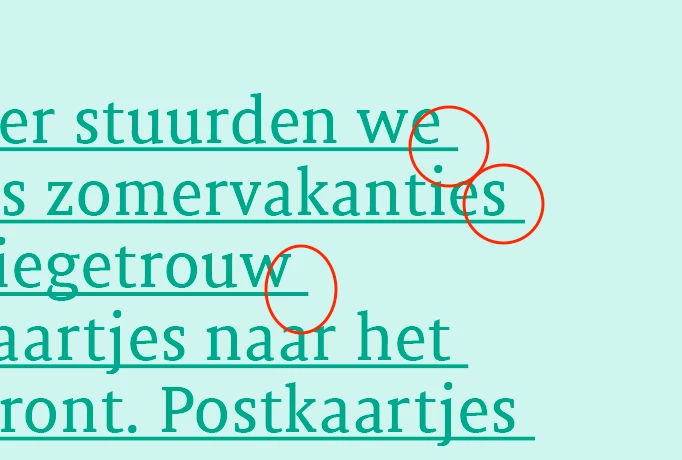
I want when the line breaks, the space at the end of the line is not underlined... Indesign CC
  • September 25, 2020
  • 3 답변들
  • 2452 조회

이 주제는 답변이 닫혔습니다.
최고의 답변: Jens Trost
Yes I do… ‘NEW.jsx’

The ‘underline_ski… file is visible though (but doesn’t work) …


[cid:aa82dfce-4392-45a5-adbd-d9e187c2d97b@eurprd04.prod.outlook.com]
[cid:0ef19b29-c4a1-4c0d-b0b0-e086e5fdd61d@eurprd04.prod.outlook.com]

Vriendelijke groeten,
Eva Goethals

T +32 485 31 37 91
https://www.evagraphics.com
https://www.linkedin.com/in/eva-goethals-61b5a3108/

Try this, "char" is a reserved word you can't use as variable name

app.doScript(main, ScriptLanguage.JAVASCRIPT, undefined, UndoModes.ENTIRE_SCRIPT, "Revert underlining");

function main () {
var story = app.selection[0].parentStory;
var lines = story.lines.everyItem().getElements();
for (var i = 0; i < lines.length; i++) {
    var c = lines[i].characters[-1];
    if (c.underline && c.contents == " ") {
      c.underline = false;
   }
}
}

Also, I added a undo 🙂

3 답변

Jens Trost
Inspiring
September 28, 2020

Not sure why you wanna use a script for that... a simple GREP within the paragraph style does it:

\s(?=\n|$)


Jens Trost
Inspiring
September 28, 2020

Posted the wrong screenshot, here you actually see it working:

evagoethals작성자
Known Participant
September 28, 2020
Hi Jens thanks!
How come your text is underlined while ‘underline’ is checked out… ?


Vriendelijke groeten,
Eva Goethals

T +32 485 31 37 91
https://www.evagraphics.com
https://www.linkedin.com/in/eva-goethals-61b5a3108/
brian_p_dts
Community Expert
Community Expert
September 25, 2020

With your text cursor selected into the text: 


var story = app.selection[0].parentStory;
var lines = story.lines.everyItem().getElements();
var char;
for (var i = 0; i < lines.length; i++) {
    char = lines[i].characters[-1];
    if (char.underline && char.contents == " ") {
      char.underline = false;
   }
}


Of course, this is pretty risky if the text flow changes. 


If there was no hyphenation or other cause to ensure the last character in a line was a space, you could just make it a one-liner: 

app.selection[0].parentStory.lines.everyItem().characters.lastItem().underline = false;

evagoethals작성자
Known Participant
September 26, 2020

Hi Brian! Thanks! I actually don't really know how the handle or use this script - as I am not really used to do so... Could you tell me where to put or copy-paste it? Thanks! 


brian_p_dts
Community Expert
Community Expert
September 26, 2020

https://indesignsecrets.com/how-to-install-a-script-in-indesign-that-you-found-in-a-forum-or-blog-post.php


Click in your text with your text tool then run the script. It will work on all linked text frames for that story.

Randy Hagan
Community Expert
Community Expert
September 25, 2020

You may not like this answer, but if you don't want the underline to carry over into the space when underline an entire paragraph, you need to remove the current underlining and then redo it individually for each line of the paragraph.


Wish I had better news for you,


Randy

evagoethals작성자
Known Participant
September 25, 2020
Dont you think there would be a script for that?
Thanks a lot for your reply! Eva

Sent from my Phone
Randy Hagan
Community Expert
Community Expert
September 25, 2020

I frankly don't know.


But if you define the underline by a script, it's going to have to be pretty savvy to re-define the fix if there are any copyfit changes. At least if you do it by hand, it can be pretty easily fixed/changed by hand if it's needed.
