
Known Participant
March 6, 2025
Answered

(Windows and Mac) Grey Lines and Discoloration Appear on Imported JPEGs in InDesign
  • March 6, 2025
  • 13 replies
  • 9109 views

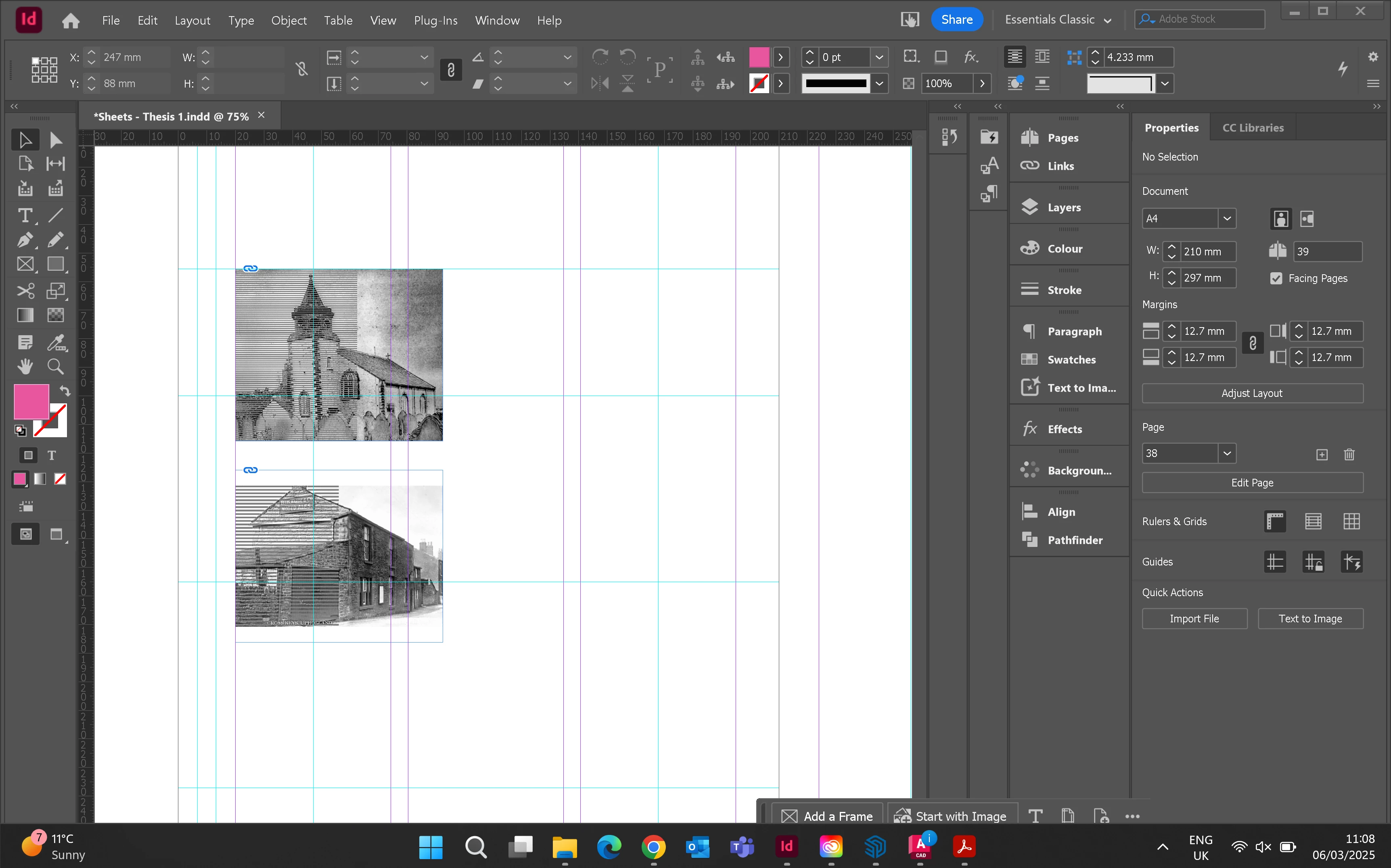
Hello. When I place jpegs into frames grey lines appear over half the box. I have the highest quality view setting on. Has anyone experienced this before? 


<Title renamed by MOD>

Correct answer gordonm83621500

I had the same issues. The workaround is to open the image through reveal in finder, then open in preview(mac) then resave  the image.

13 replies

Participating Frequently
October 20, 2025

For what it's worth, I had a similar problem over the weekend, but in rather different circumstances and not in the current CC versions.


Couldn't find a photo of mine, so had to resort to downloading a version from my Facebook gallery. Opened in my dinosaur PS CS5 and had the "purple/green filter, horizontal bars across the lefthand side" effect. Looked fine in Windows preview, but resaving it changed nothing until I cropped it slightly before resaving.


I'll check the colour profile attached to it after work today, and copy the image to my work machine so I can check it in CC as well.

Participating Frequently
October 19, 2025

Will this EVER been fixed? At the moment if i download (rightclick, save) any picture from facebook it is always blue, grey destroyed.. i have to open it in Irfan View (Open Source) and save it again, to open it in Photoshop. For example today again with this picture https://www.facebook.com/photo?fbid=1102406561885843&set=a.500361232090382 so would be good if Photoshop would be able to open jpgs like a open source tool or windows viewer can....

rob day
Community Expert
Community Expert
October 19, 2025

Will this EVER been fixed?


Hi @Friendly_Unicorn5089 , Your Facebook example also has the problematic uRGB color profile embedded—see my replies below. If I strip the profile before opening into Photoshop or placing in InDesign the lines are not there. OSX includes an AppleScript droplet that will strip a profile, which works for me:


Participating Frequently
October 19, 2025

Well, for me its a Adobe bug, as every other tool loads the saved jpgs fropm Facebook correctly. I know there are workarounds, but why does photoshop load that even wrong? or better, why does facebook alter those jpgs all the time?


gordonm83621500Correct answer
Participant
June 23, 2025

I had the same issues. The workaround is to open the image through reveal in finder, then open in preview(mac) then resave  the image.

Abhishek Rao
Community Manager
Community Manager
June 17, 2025

Hi everyone,


Thanks again to all of you for continuing to share your findings and examples around this JPEG import issue in InDesign. 

We're currently working with the product team to investigate this further and would like to gather a bit more information to assist in our analysis:

Are you seeing this behavior with any other image assets (besides the ones already shared)? If yes, please upload a few additional examples to this thread so we can compare and test them.

In the meantime, as mentioned earlier, a temporary workaround is to open the affected JPEGs in Windows Photos (or Preview on macOS) and re-save them as .TIF or .PNG. This should help eliminate the display issues in both Photoshop and InDesign.


We really appreciate your cooperation and will keep you posted as we learn more.

Abhishek

rob day
Community Expert
Community Expert
June 17, 2025

Hi @Abhishek Rao , I’ve only seen 2 or 3 samples, but they all have the uRGB RGB profile assigned. Curious if that is common to all of the corrupted files?

Participant
June 13, 2025

Jpg placed into InDesign has horizontal lines through left side of the photo. This has been happening more recently, is it because of the size of photos from phones now? How can I fix this issue?

kglad
Community Expert
Community Expert
June 13, 2025

in the future, to find the best place to post your message, use the list here, https://community.adobe.com/

p.s. i don't think the adobe website, and forums in particular, are easy to navigate, so don't spend a lot of time searching that forum list. do your best and we'll move the post (like this one has already been moved) if it helps you get responses.


<"moved from using the community">
Participant
May 30, 2025

I am trying to import this image in to InDesign and it is importing with these weird horizontal lines on only half of the image. The image is normal when opening it normally from the folder and shows no issues. It is a JPG and dosen't have any effects on it.


I have attached a screenshot of the issue as well as the original image for reference. 

rob day
Community Expert
Community Expert
May 30, 2025

Hi @leo.r , This doesn’t seem to be related to the InDesign GPU Preview problems—the lines are pixels in the Photoshop file not InDesign preview artifacts.


One thing to note for all the forum threads, if I download the posted named RGB files (click the download icon rather than right click the image and Saving Image As) I get files with an embedded RGB profile named uRGB. I’ve never seen that RGB profile and can’t find any info on it, but if I right click to open the image I get AdobeRGB and the full resolution as I’m showing in my last post.


Abhishek Rao
Community Manager
Community Manager
May 20, 2025

Hi @Alice373165806dlw and everyone following this thread,


Thank you so much for reporting this and for all the additional details shared.

I reached out to the product team regarding this issue, and after reviewing the JPEG file shared here, they were able to reproduce the problem on their end. This behavior appears to be a long-standing issue, as the issue was observed even in earlier versions like InDesign 17.4.2. 

Workaround: As some of you have mentioned, opening the image in the Windows Photos app or Preview on Mac and then resaving it as a .TIF or .PNG resolves the issue. We'd recommend continuing with this workaround for now.


I’ll go ahead and log a formal bug report for the team to track this. If any of you have additional JPEG files showing similar behavior, please feel free to share them here or via direct message, as these would be helpful for further investigation.


Thanks again for bringing this up and for your patience as we work toward a resolution!

Abhishek

Participant
June 4, 2025

rob day
Community Expert
Community Expert
June 4, 2025

Hi @dennae_8810 , Can you open the image in Photoshop and let us know what color profile is assigned (Edit>Assign Profile)?

Known Participant
May 20, 2025

When I am importing sample images (JPGs pulled from the web) into image frames created in an InDesign document they are appearing with parrallel grey lines over the left half of the image, and the image itself is not showing in the correct colours. Any ideas what's happening here?

Known Participant
May 20, 2025

The exact same thing happens if I open the file (saved on the Desktop) into Phtoshop.

Participant
May 6, 2025

I have a set of photos I'm trying to use for a publication I am designing, but when I bring them into InDesign, they break and looking nothing like they should. I've attached a screenshot as reference. This has only ever occured with these photos, so I imagine the issue is them. Could someone help me maybe bring there proper color data back or will I need the client to provide a substitute photo.

Legend
May 6, 2025

Please have a look at the File Info / XMP metadata, e.g. from the Links panel fly-out menu, maybe there is a hint on what tool was used to achieve that "effect".

Leaving the task to repair to others.

Participant
March 21, 2025

Has anyone encountered this issue with images pulled into Indesign from photos saved off Facebook. Its just started recently and its happeneing with the majority of photos I save from Facebook. Any help would be greatly appreciated - it is adding a ton of time having to screenshot and then insert them and I never know if they are going to corrupt or not - some images are fine and others not. 

leo.r
Community Expert
Community Expert
March 21, 2025

Interesting. The exact same issue was reported just recently by another user. I'll need to look it up. As far as I remember, this issue affected certain JPEGs when viewing them in InDesign and Photoshop, but not in Preview (if you're on Mac). The solution was to resave such images as TIFF or PNG (if, again, I recall correctly).

leo.r
Community Expert
Community Expert
March 21, 2025