
Exit
  • Global community
    • Language:
      • Deutsch
      • English
      • Español
      • Français
      • Português
  • 日本語コミュニティ
  • 한국 커뮤니티
0

Import Photoshop layered file into indesign removes transparency

Explorer ,
Apr 27, 2022 Apr 27, 2022

I've just updated InDesign to 17.2.1.105. I Place a transparent layered PSD into InDesign and the layer ignores the transparency and turns white. If I drag the PSD into InDesign from the desktop, it keeps the transparency. Help, please - this seems like a bug!


TOPICS
Bug , Import and export
1.0K
Translate
Report
Community guidelines
Be kind and respectful, give credit to the original source of content, and search for duplicates before posting. Learn more
community guidelines

correct answers 1 Correct answer

Community Expert , Apr 27, 2022 Apr 27, 2022

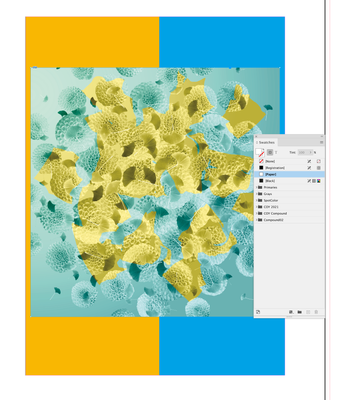
Make sure the parent frame‘s fill is [None] and not [Paper]:
Screen Shot 34.png


Screen Shot 32.png

Screen Shot 33.png

Translate
Community Expert ,
Apr 27, 2022 Apr 27, 2022

Hi perfectamundo,

could you post a sample PSD file so that we can have a look?

Do you have Overprint Preview enabled when you see this issue?


Thanks,
Uwe Laubender

( ACP )

Translate
Report
Community guidelines
Be kind and respectful, give credit to the original source of content, and search for duplicates before posting. Learn more
community guidelines
Explorer ,
Apr 27, 2022 Apr 27, 2022

Hi, here you go. Overprint preview is off.

Translate
Report
Community guidelines
Be kind and respectful, give credit to the original source of content, and search for duplicates before posting. Learn more
community guidelines
Community Expert ,
Apr 27, 2022 Apr 27, 2022

I Place a transparent layered PSD into InDesign


Are you placing directly on the page or is there a frame selected?

Translate
Report
Community guidelines
Be kind and respectful, give credit to the original source of content, and search for duplicates before posting. Learn more
community guidelines
Explorer ,
Apr 27, 2022 Apr 27, 2022

I'm using the Selection Tool (v) to select a JPG image, then swapping it by Placing the PSD.

Translate
Report
Community guidelines
Be kind and respectful, give credit to the original source of content, and search for duplicates before posting. Learn more
community guidelines
Explorer ,
Apr 27, 2022 Apr 27, 2022

Also, InDesign recognises the PSD has transparency as the settings are greyed-out on import.

Translate
Report
Community guidelines
Be kind and respectful, give credit to the original source of content, and search for duplicates before posting. Learn more
community guidelines
Community Expert ,
Apr 27, 2022 Apr 27, 2022

Make sure the parent frame‘s fill is [None] and not [Paper]:

Screen Shot 34.png


Screen Shot 32.png

Screen Shot 33.png

Translate
Report
Community guidelines
Be kind and respectful, give credit to the original source of content, and search for duplicates before posting. Learn more
community guidelines
Explorer ,
Apr 27, 2022 Apr 27, 2022
LATEST

Thank you so much - that resolved it!


Ali

Translate
Report
Community guidelines
Be kind and respectful, give credit to the original source of content, and search for duplicates before posting. Learn more
community guidelines
