


- Home
- InDesign
- Discussions
- Re: inconsistent double primes on linked Excel tab...
- Re: inconsistent double primes on linked Excel tab...

Copy link to clipboard
Copied
I am building a product catalog for my employer. I am using linked Excel spread sheets to create tables showing fitment, tubing inch sizes and related part numbers. I find that some of the sheets show the straight quotes and some show the correct curly quotes (double primes).
I have checked the original Excel sheets and the cell format is Number _ General and font is Calibri Regular 9 pt. for all of the sheets. I can't figure out why the linked files are showing two different ways in InDesign. I have tried doing a GREP in Paragraph Styles but either I did it wrong or it doesn't work on linked files. Being a total newbie with InDesign, I never even heard of GREP before today and I've never really worked with Paragraph Styles. I am the one who has created all of the Excel sheets and InDesign pages so we can toss out any thoughts that someone did something different on their setup. What am I missing here?


 1 Correct answer


I just tried to replicate the fault by making a new Excel file, with the word “test” in cell A1 and the word "test" in cell B1 and saved as an XLSX file. Upon trying to import the file into InDesign, I clicked the options button and made sure to show import options, and then selected the XLSX file and clicked OK. I was then presented with the following dialog box, and made sure the "use typographer's quotes" was turned off:

However, I still encountered the error that the OP experienced!

Even turni
...
 4
Replies
4
4
Replies
4

Copy link to clipboard
Copied
I just tried to replicate the fault by making a new Excel file, with the word “test” in cell A1 and the word "test" in cell B1 and saved as an XLSX file. Upon trying to import the file into InDesign, I clicked the options button and made sure to show import options, and then selected the XLSX file and clicked OK. I was then presented with the following dialog box, and made sure the "use typographer's quotes" was turned off:
However, I still encountered the error that the OP experienced!
Even turning off the "use typographer's quotes" in the preferences of InDesign did not help 
But, I was able to import the file successfully after several goes, the difference was to save the Excel file as an XLS (Microsoft 97-2004) and (still making sure the import options were the same) the straight quotes imported correctly.
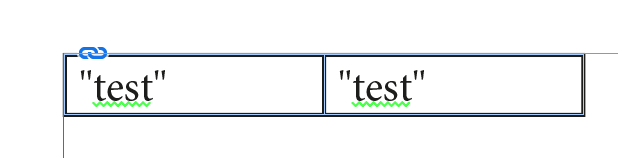
I suspect this is an import bug specifically relating to Microsoft XLSX files but can't be sure until other users attempt to replicate the fault. It would be good if anyone reading this could try to replicate this fault and - if successful, post so in the comments so that a bug report can be filed.
Anyway, it looks like it's too late for the OP to reimport the excel files now. It would be a case of find and replace to change the curly quotes into straight quotes, a straightforward find/change request if being selective about what is being changed and what is not. If the quotes are always in a specific pattern (i.e. the quote is ALWAYS after a number) then a GREP search will make the replacements easier to make.


Copy link to clipboard
Copied
Colin, your top image does not show an error. The quotes (not 'primes' as OP calls them) are different only because the fonts are different. Left is Calibri, right is Times New Roman. Both have correct curly double quotes.
The good news is that you don't need GREP or a very advanced search-and-replace to fix this in InDesign. By default, when searching for a double quote, InDesign finds straight as well as open and close quotes when searching for ' or ". Also by default, when replacing, InDesign automatically applies the correct form for open and close.
That means all you have to do is change " to ". Per the above, all quotes will get fixed automagically.
Copy link to clipboard
Copied
G'day Jongware.
I think there's a little confusion here. In my control setup in Excel, I'd made two cells, one with test with typographer's quotes, and one with straight quotes, both in Excel. When imported as an XLSX into ID, both sets of quotes came out as typographer's quotes, despite the options to not change them. I think the OP is using the straight quotes to denote inches, so straight quotes will be required (I'm sure I'll be told if I'm wrong by my North American friends  ).
).
Could easily be solved if metric/SI units were being used, like they do in Australia and the Netherlands.
Copy link to clipboard
Copied
I am using Excel 2007 and the file type is shown as "Microsoft Office Excel Worksheet", but I believe they are .XLS.
I used the GREP that Colin Flashman showed above and that fixed everything.
I can now mark my calendar that "I learned something new today". Thanks all!


Get ready! An upgraded Adobe Community experience is coming in January.
Learn more
 AdChoices