
Known Participant
November 18, 2021
Question

InDesign 2022 / 17.0.1 Display is glitchy

  • November 18, 2021
  • 7 replies
  • 7450 views

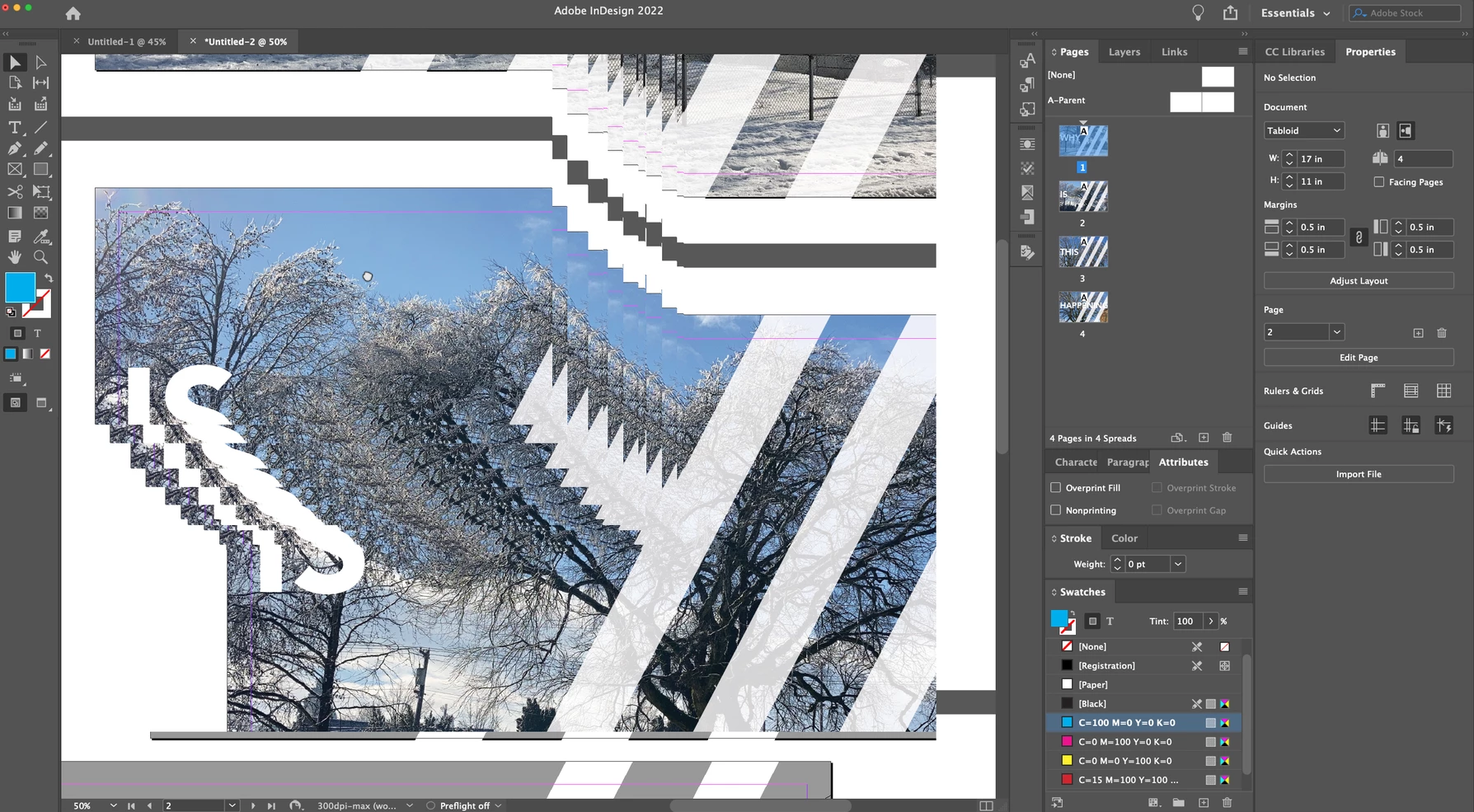
I'm having an issue where the screen doesn't refresh right, whenever the view is changed everything gets glitchy. This is running InDesign 2022 /17.0.1 on a Macbook Pro with macOS Monterey 12.0.1. This seems to happen regardless of if the GPU performance is checked in the Preferences or not. This happends on an external monitor (an Apple Thunderbolt display through a Thunderbolt 3 (USB-C) to 2 Adapter) I've restarted everything. Screenshot attached. 


There's a video I made here as well that shows what goes on: https://vimeo.com/647118843


7 replies

Printdevil
Inspiring
May 17, 2023

I'm also experiencing this problem on my Mac Studio and iMac both with second Apple displays. My UI setting is already at the minimum (Small) so I can't scale it down any more. I've also reset my cache and that hasn't helped either so I'm not sure what else I can try?


David

Baroness
Participating Frequently
December 20, 2021

Thank you Thank you!

Been trying all kinds of things, including downgrading to 2021.

This worked, when nothing else did.

I use have a 27-inch 4K monitor  (non-Apple) and a secondary 16-inch 4K monitor (yes, I know - that's why I wanted to use the UI scaling, thing), but it turns out this new 'feature' from Adobe was the cause of all the problems.


Participating Frequently
December 9, 2021

I'm having issues (using on a Dell, not MAC) but a slightly different glitch. My problem is within the various boxes (text or object). Sometimes text gets cut off. Sometimes an object box's frame shape is off. It's bizarre and totally random. I'm attaching a sample of a text issue. I drew yellow arrows to point out the issues. The text in the white area is all in the same text box with columns. The issue in the yellow box is a completely seperate text box but still glitchy. If I scroll down to the next page and come back up, it sometimes fixes it but not always. Or it'll fix the original problem but there will be a new glitch in a new area. It's driving me nuts and I'm thinking about just going back to InDesign 2021 until this is fixed. I need to know that what I'm looking at is in the right place and looks correct. Sigh.

Participating Frequently
December 9, 2021

That definitely looks like a similar display glitch we have been encountering. It may be a specific issue with Dell displays or Dell display manger as others have mentioned these monitors, and my issue was with a Dell U4021 on a Mac mini. If I didn't find this thread that solved the issue for me, I would have reverted back to an earlier version of InDesign, as the issue is maddening. Waiting for an InDesign update might be the easiest solution that doesn't waste any more time hunting for a fix.

AudioControl
Participating Frequently
November 19, 2021

Hey, everyone. Check the User Interface Scaling under Preferenes. I just notice when viewing actual size (100%) my project was not represensted at the correct size - it was too large. I turned on the ruler and noticed, yup, things are scaled here; the inches are very large inches.


I moved the UI scale to the smallest setting (probably meaning no scaling) and the project now displays 1:1 on my screen (as measured by my handy ruler), and the glitchyness seems to be gone. In fact, everything looks as it should now.


Odd, though, as in Illustrater (v26.0.1), the UI scaling is not at the smallest setting, and the ruler scale is correct, 1:1 on the screen. Plus no glitching. (shrug).


mikes38487167
Participating Frequently
November 19, 2021

Cautiously optimistic, but that seems to have fixed things (at least for now). Thanks for the info!

barryaAuthor
Known Participant
November 19, 2021

I can report that I resolved this issue for me (in the easiest way possible, too). I rebuilt the cache and preference files by restarting InDesign and holding down Shift-Option-Command-Control. Of course lost all my preferences but gained a non-glitchy artboard, but I'll take it!

AudioControl
Participating Frequently
November 19, 2021

Hey, thanks for that. That's a bit embarrassing to be reminded of something I should have thought of (troubleshooting basics). I'll give that a try and report back.

mikes38487167
Participating Frequently
November 19, 2021

I, too, am having the same issue! M1 Mac mini, latest macOS Monterey, inDesign 17.0.1 running a Dell 42" monitor. Currently unusable for me. I have had to use my Intel MacBook to drive the monitor (works fine) in order to get my conference brochure out last night. Would love a resolution to this.


Mike

AudioControl
Participating Frequently
November 19, 2021

I am having the SAME issue.


Running InDesign 2022 / 17.0.1 on a MacBook Pro (16-inch, 2019) with macOS Big Sur Version 11.6. I though I could do with a reboot, but this didn't help. I'm running through an external disaply as well (DELL UP3216Q) via USB-C to miniDP. 


Screenshot atached.