
Participating Frequently
July 26, 2022
Answered

InDesign 2022 17.3 - HIGH CPU when idle

  • July 26, 2022
  • 4 replies
  • 9529 views

I'm using a 16" M1 Max MacBook Pro with 32GB of ram and 2TB SSD. When InDesign is idle, it uses 30-40% doing absolutely nothing and hidden in the background. It's also like this on my other Mac. Any ideas?
This topic has been closed for replies.
Correct answer cadispraha

Hi, I followeed link from above and problem looks like solved (windows 11). I don't have any ...\AppData\Local\Adobe\Creative Cloud Libraries\ but only ...\roaming\... So I created it and now CPU load is about 1-1,5 %. I am not so sure if this is right one solution, but for me helps. Before idle Indesign 2022 took about 10-16 %. 

4 replies

Participant
October 13, 2023

Hello, unfortunately I have this problem too, it constantly uses 30% of the processor when idle, I tried everything, but the problem is completely related to the new indesign versions. Adobe has not made a fix on this issue yet, when will you fix it, Adobe?

I never experienced this problem in old versions. This problem is valid for 2021-2022-2023-2024 versions.

Rishabh_Tiwari
Community Manager
Community Manager
January 10, 2024

Hi,


Sorry for the delay in response. Are you still experiencing the issue? If yes, please try the suggestions shared in this article and let us know if this helps or if you need further assistance.


Thanks

Rishabh

Known Participant
August 22, 2022

exactly same problem with windows

Rishabh_Tiwari
Community Manager
Community Manager
August 23, 2022

Hi,


Sorry to hear about the trouble. Could you please launch Task Manager, go to the Processes tab, and check whether the CEPHtmlEngine Helper process is causing high CPU usage? If yes, please try the suggestions shared here https://helpx.adobe.com/x-productkb/global/high_cpu_usage_cephtmlengine.html 

If this doesn't help, please confirm the version of InDesign & screenshot of the Task Manager capturing the InDesign process, we'll try our best to assist you with this.


Regards

Rishabh
 

Inspiring
January 5, 2023

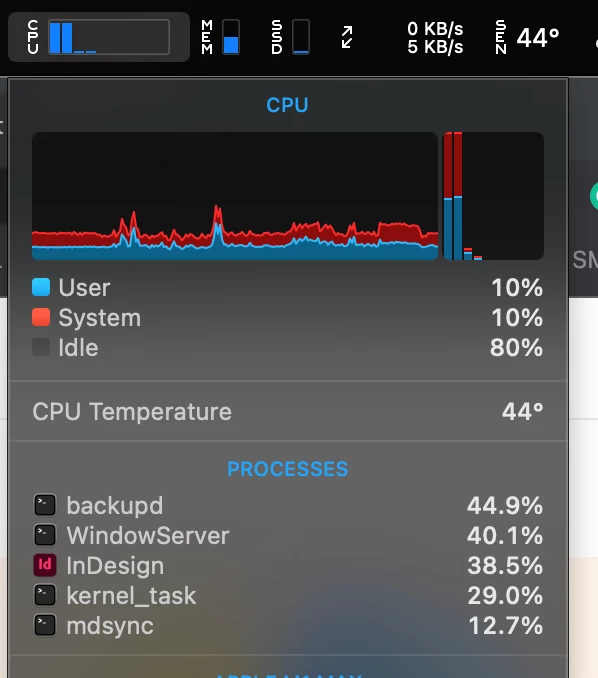
It seems iStat menus (in the previous screenshot) merges subprocesses into the parent process when displaying the list. Activity Monitor was showing that around half of the cpu usage coming from indesign was coming from CEPHtmlEngine, so I tried renaming 


/Applications/Adobe InDesign 2022/Adobe InDesign 2022.app/Contents/MacOS/CEP/CEPHtmlEngine


Doing this seems to have stopped the high cpu usage for now, but presumably that's something that indesign needs to work correctly?


Huge thanks for this tip, it finally stopped the CPU usage on both my computers. I'll wait for another point release or two before trying 2023 version. On my Mac Pro 6.1 it was around 18% usage all day long, and a Mac Studio Ultra around 40%, both running macOS 12.6.2.


Another byproduct of InDesign running away was it would then start Bridge using anywhere from 98-200% of my CPU as well. That hasn't happened since disabling that CEPHtml folder.

Legend
July 29, 2022

Open Applications >> Utilities >> Activity Viewer

Select InDesign

From the fly-out menu "(…)" select first action "Analyse Process"

This will basically take snapshots from execution for some thousand times and record the locations within the code - repeats will cause higher numbers, where you can further drill down or collapse irrelevant parts.

InDesign has plenty threads that will just sit around and do nothing waiting on some system call with a high number. Ignore them.

Remaining may be interesting ones that will jump back and forth between multiple code locations (lower numbers each, but not down to 1), you will recognize the pattern.

Since InDesign is nicely split across many internal plug-ins, code locations give a general clue about the component involved - is it fonts, is it some communication, printing?

Copy-Paste that section e.g. into pastebin.com and share the link here.


Note that we above have already ruled out CEP extenions, those would eventually show in other processes.

Legend
July 29, 2022

The following screenshot shows InDesign at very low activity, some CPU cycles used for drawing an icon in response to any event, maybe a mouse move. I used the Sichern... / Save button to produce a text version, matching section below.


+ 49 -[NSApplication run] (in AppKit) + 636 [0x189bb6278]
+ ! 49 -[NSApplication _handleEvent:] (in AppKit) + 76 [0x189fee4f8]
+ ! 41 ??? (in Application UI) load address 0x11a2dc000 + 0x1928b4 [0x11a46e8b4]
+ ! : 37 ??? (in AppFramework) load address 0x119234000 + 0x67868 [0x11929b868]
+ ! : | 37 ??? (in AppFramework) load address 0x119234000 + 0x67c24 [0x11929bc24]
+ ! : | 20 ??? (in Application UI) load address 0x11a2dc000 + 0x1680d0 [0x11a4440d0]
+ ! : | + 20 ??? (in Application UI) load address 0x11a2dc000 + 0x10c890 [0x11a3e8890]
+ ! : | + 20 ??? (in Application UI) load address 0x11a2dc000 + 0x10c268 [0x11a3e8268]
+ ! : | + 20 ??? (in Application UI) load address 0x11a2dc000 + 0x52abc [0x11a32eabc]
+ ! : | + 18 ??? (in Application UI) load address 0x11a2dc000 + 0x52b74 [0x11a32eb74]
+ ! : | + ! 18 DVPanelView::DoPostCreate() (in DV_WidgetBinLib.dylib) + 20 [0x10552d8dc]
+ ! : | + ! 17 DVBasePanelView::DoPostCreate() (in DV_WidgetBinLib.dylib) + 156 [0x105547810]
+ ! : | + ! : 17 DVPanelView::DoPostCreate() (in DV_WidgetBinLib.dylib) + 20 [0x10552d8dc]
+ ! : | + ! : 17 DVBasePanelView::DoPostCreate() (in DV_WidgetBinLib.dylib) + 156 [0x105547810]
+ ! : | + ! : 17 DVPanelView::DoPostCreate() (in DV_WidgetBinLib.dylib) + 20 [0x10552d8dc]
+ ! : | + ! : 13 DVBasePanelView::DoPostCreate() (in DV_WidgetBinLib.dylib) + 44 [0x1055477a0]
+ ! : | + ! : | 13 ??? (in ObjectModelLib.dylib) load address 0x109dbc000 + 0x47310 [0x109e03310]
+ ! : | + ! : | 13 ??? (in ObjectModelLib.dylib) load address 0x109dbc000 + 0x3c358 [0x109df8358]
+ ! : | + ! : | 13 DVPanelControlData::ReadWrite(IPMStream*, IDType<ImplementationID_tag>) (in DV_WidgetBinLib.dylib) + 196 [0x10552c510]
+ ! : | + ! : | 13 AbstractPanelControlData::QueryWidget(IDataBase*, IDType<UID_tag> const&) (in DV_WidgetBinLib.dylib) + 364 [0x1055300a4]
+ ! : | + ! : | 13 DataBase::Instantiate(IDType<UID_tag>, IDType<PMIID_tag>) (in DataBaseLib.dylib) + 180 [0x109005a84]
+ ! : | + ! : | 12 ??? (in ObjectModelLib.dylib) load address 0x109dbc000 + 0x47310 [0x109e03310]
+ ! : | + ! : | + 10 ??? (in ObjectModelLib.dylib) load address 0x109dbc000 + 0x3c358 [0x109df8358]
+ ! : | + ! : | + ! 9 DVIconSuiteBaseView::ReadWrite(IPMStream*, IDType<ImplementationID_tag>) (in DV_WidgetBinLib.dylib) + 116 [0x1055cdad0]
+ ! : | + ! : | + ! : 8 DVIconSuiteView::LoadIcon(unsigned int const&, IDType<PluginID_tag> const&) (in DV_WidgetBinLib.dylib) + 24 [0x105555034]

Rishabh_Tiwari
Community Manager
Community Manager
July 26, 2022

Hi @curious777 ,


Sorry to hear about the trouble. Please try the suggestions shared here https://community.adobe.com/t5/indesign-discussions/re-indesign-cc-2018-high-cpu-usage-on-a-macbook-pro/m-p/9916579#M103727 and let us know if this helps or if you need any further assistance.


Regards

Rishabh

Participating Frequently
July 26, 2022

That did not help.

Rishabh_Tiwari
Community Manager
Community Manager
July 27, 2022

Thanks for trying. Please try turning off GPU performance from InDesign preferences and let us know if that makes a difference.