


- Home
- InDesign
- Discussions
- Re: Indesign CC 2014 crashes when printing
- Re: Indesign CC 2014 crashes when printing

Copy link to clipboard
Copied
Print goes though but crashes every time on multiple files


 1 Correct answer


While we continue to work with EFI to permanently resolve this issue, we have made a workaround available through the following article:
InDesign CC 2014 | Crash while printing to Fiery RIP | Mac OS

 126
Replies
126
126
Replies
126


Copy link to clipboard
Copied
Scott,
thanks for the InDesign fix, but Illustrator CC 2014 still crashing. Is there a plugin fix for this as well? Script only works on InDesign, but Illustrator is an issue with printing to Fiery RIP as well.
thanks,
Kevin
Copy link to clipboard
Copied
As others have noted, this script is only designed to work with InDesign at this time.
When we have more information for an Illustrator fix we will share it as soon as we can.
Copy link to clipboard
Copied
Scott, should we start a new post specifically on Illustrator CC 2014 crashing or can we just follow this discussion and you'll post new info here? thanks for all your hard work and providing the temp fix.
Copy link to clipboard
Copied
Scott, would it make sense to make a new discussion under Illustrator since this thread is under InDesign. That way when there's a fix for Illustrator CC 2014, it will be under the right category?
Copy link to clipboard
Copied
Hello SCHONk, it's certainly an option. Once we have something for Illustrator we will announce it in the Illustrator forum but I'll update this thread either way.
Copy link to clipboard
Copied
Hopefully everyone has had a chance to install the latest updates to both InDesign and Illustrator.
We have included a fix in these latest versions though we'd love to hear back on if this change is working.

Copy link to clipboard
Copied
the new 2014.1 InDesign is working for me printing to fiery printers. As a disclaimer though I did previously install the script you provided to fix it a few months ago. But I uninstalled 2014 and then now reinstalled the new one. I just don't know if the script hung around when I uninstalled it. I am not that techy to know. But it is working.

Copy link to clipboard
Copied
Script in the Kb (shared by Scott) was specific to InDesign CC 2014 and meant to update the plugin which was causing the issue. Updated plugin will be removed along with InDesign CC 2014 uninstall and in no way will cause any conflict with InDesign CC 2014.1 (October update)

Copy link to clipboard
Copied
Both InDesign and Illustrator are printing to our Fiery RIP just fine so far. Thanks!

Copy link to clipboard
Copied
I disabled the Creative Cloud Manager app when I created the package for our users, so can I simply create a new package and overwrite the current CC 2014 apps with the new, updated ones? If I can't, what would be the best way for me to get them updated?

Copy link to clipboard
Copied
We installed the script with InDesign CC 2014 and that worked, now one of our users is having the issue again with the new October release - like before it happens when they press the "Printer" button in the Print dialog. None of our other mac users are in the office today so I don't know if it's affected them yet.
We've un-installed it and re-installed it and it's made no difference. I also tried re-running the patch on the new version which breaks InDesign totally (an error comes up when you try and load it, can't remember exactly what now, something to do with plugin versions). So again we un-installed it and re-installed InDesign, which is at least now working. I've told the user to create PDFs of their InDesign documents and print those for the time being.
I've also tried removing all the printer/fiery drivers and reinstalling them and that's not made a difference either.

Copy link to clipboard
Copied
We did the latest incremental update to InDesign and Illustrator CC2014
earlier this week and have had no issues. Printing to Fiery seems to be
working.
On Tue, Oct 7, 2014 at 1:32 PM, Scott Worthington <forums_noreply@adobe.com>

Copy link to clipboard
Copied
I can print fine now from both InDesign & Illustrator after the update, but my InDesign seems to just randomly crash often now while having the program minimized in my doc. Usually there is no file open when it crashes but the program is open and I am working in Photoshop,Safari, etc.
Mac 10.9.5, 3.5 GHz Intel Core i7, 32 GB 1600 MHz DDR3

Copy link to clipboard
Copied
Hello,
I'm running InDesign CC 2014 version 10.1.0.71 on OX X Yosemitie version 10.10.2 and still crash every time I adjust Fiery print setting and send the job to print. After I run the scrip I am unable to launch InDesign due to this error message, "Cannot load Adobe InDesign CC 2014 because it requires version 10.1 or later of the Application US.InDesignPlugin plug-in. Please contact vendor for compatible version of Application UI.InDesignPlugin." At this point I uninstall InDesign and reinstall it so I can keep working. Has anyone else has encountered this issue? Any help would be appreciated.
Thanks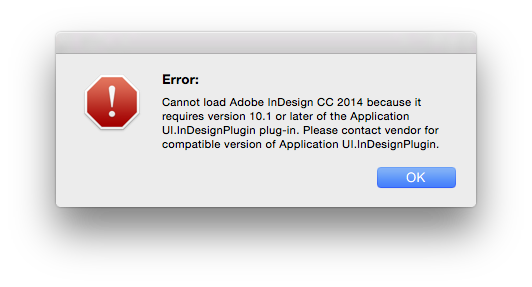

Copy link to clipboard
Copied
Any solution on this? I am getting the same error after running the fix.
Copy link to clipboard
Copied
This doesn't work. After running Scott's suggested fix from Adobe, I now cannot open InDesign at all. I get an error: "Cannot load Adobe InDesign CC 2014 because it requires version 10.2 or later of the Application UI.InDesignPlugin plug-in. Please contact vendor for compatible version of Application UI.InDesignPlugin."

Copy link to clipboard
Copied
Add another to the list here too. Crashes every time after I send job to the printer.
Model Name: iMac
Model Identifier: iMac12,2
Processor Name: Intel Core i5
Processor Speed: 3.1 GHz
Number of Processors: 1
Total Number of Cores: 4
L2 Cache (per Core): 256 KB
L3 Cache: 6 MB
Memory: 16 GB
Boot ROM Version: IM121.0047.B1E
SMC Version (system): 1.72f2
Printing to a Fiery Ricoh 651 printer (size of a small submarine)
I have reinstalled drivers, programs, then programs first then drivers
CC 2014 is broken

Copy link to clipboard
Copied
Lastknight,
Try Scott Worthington's (Adobe staff) fix ...
InDesign CC 2014 | Crash while printing to Fiery RIP | Mac OS
The script fixes your issues for InDesign but we are still waiting for a fix for Illustrator.
Cheers
Copy link to clipboard
Copied
Thank I will!
Copy link to clipboard
Copied
It worked! thanks.

Copy link to clipboard
Copied
The following workaround can be applied to get these older versions of Illustrator and InDesign to print on this newer operating system. I delete these folders and it starts printing...it may last for a few months and start crashing again so keep this list handy!
[Hard Drive]/Library/Printers/PPDs/contents/Resources/en.lproj
[Hard Drive]/Library/Printers/PPDs/contents/Resources/Zh_CN.lproj
[Hard Drive]/Library/Printers/PPDs/contents/Resources/Ja.lproj
[Hard Drive]/Library/Printers/PPDs/contents/Resources/ko.lproj
[Hard Drive]/Library/Printers/PPDs/contents/Resources/Zh_TW.lproj
Copy link to clipboard
Copied
Anyone know if Adobe has released a patch for Illustrator CC 2014 as well?
Copy link to clipboard
Copied
I also would like to know when a patch for Illustrator CC 2014 will be released.
Please?!


Copy link to clipboard
Copied
Even if anyone here actually knew of such a patch they would not be able to tell you before an official announcement from Adobe.

Copy link to clipboard
Copied
Windows 8.1x64 & Indesign 10.1x64 & KM C5501 Fiery X3eTY2 65-55C-KM PS2.0 & OS 8 Release 2
Crashed with invoking the print settings


Get ready! An upgraded Adobe Community experience is coming in January.
Learn more
 AdChoices