
Participating Frequently
October 20, 2017
Answered

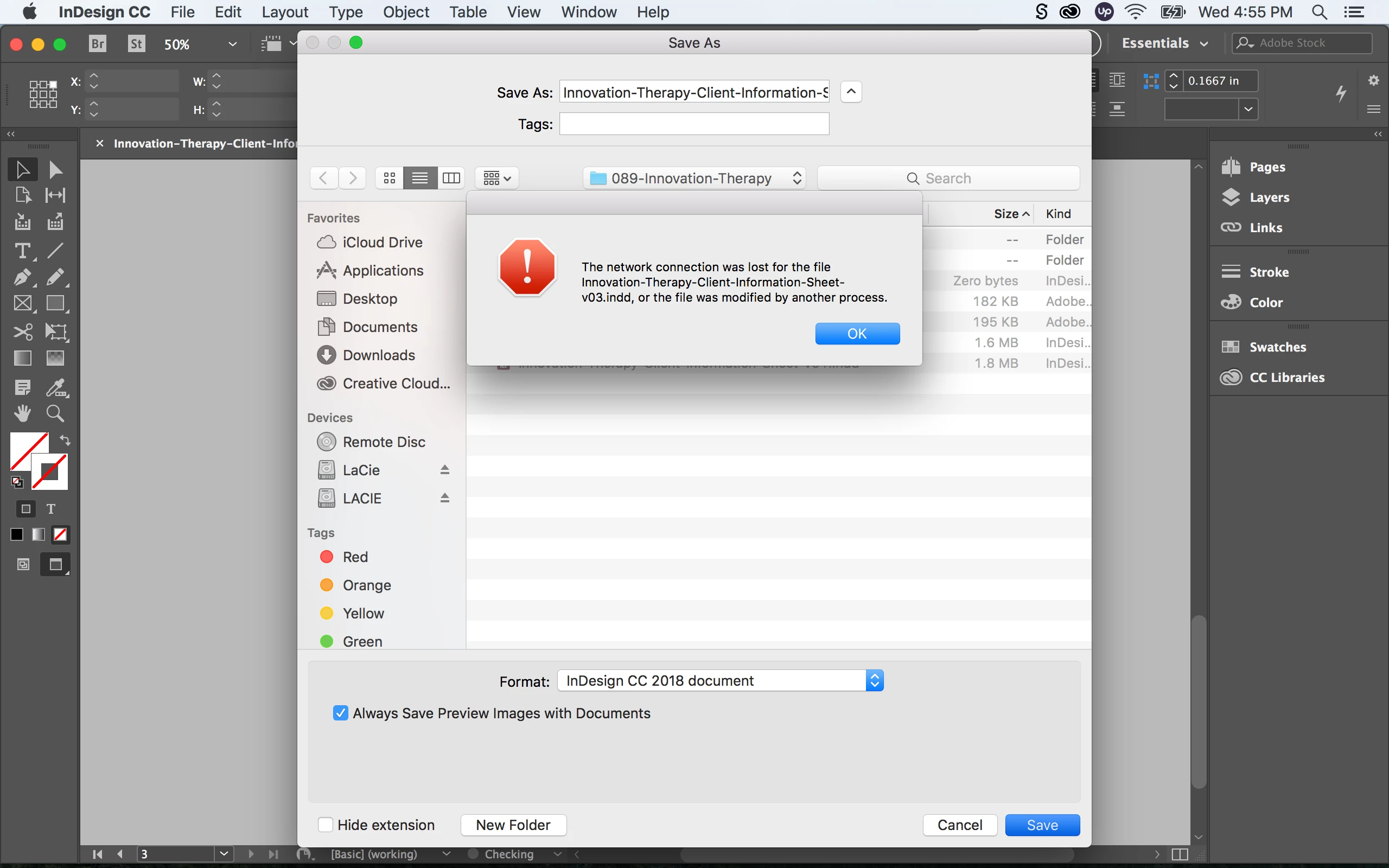
InDesign CC 2018 Crashing: "The network connection was lost for the file"

  • October 20, 2017
  • 28 replies
  • 14413 views

I recently made the update to Adobe InDesign from CC 2017 (12.1.0) to CC 2018 (13.0) and immediately started having issues.

When I open up a pervious InDesign document from my LaCie external hard drive and re-save (Save As) the file, InDesign crashes with the following error: “The network connection was lost for the file _____.indd, or the file was modified by another process”

Followed by another error message: “Error: Adobe InDesign is shutting down. A serious error was detected. Please restart InDesign to recovery work in any unsaved InDesign documents.”

If I re-save the same document on my desktop or internal hard drive I have no issues. It seems like re-saving a document from the external hard drive to the external hard drive is causing major issues with the new InDesign update. Any one having similar experiences with this? Are there any fixes?

Here are my specs:

OS X El Capitan Version 10.11.6

MacBook Pro (Retina, 13-inch, Early 2015)

Processor: 3.1 GHz Intel Core i7

Memory: 16 GB 1867 MHz DDR3

Graphics: Intel Iris Graphics 6100 1536 MB
    Correct answer SanyamTalwar

    Hi,

    We believe we have a fix available for the same. Can you follow the steps mentioned in the following KB document - https://helpx.adobe.com/indesign/kb/crash-save-as-nas-server.html and confirm if it resolves your issue?

    Regards

    Sanyam Talwar

    InDesign Engineering Team

    28 replies

    Participant
    May 5, 2022

    this still happens and so do serious shutdowns. It's only InDesign only and no other programs. I do software and pogram updates, use new documents. Is it my machine?


     Model Name: iMac

      Model Identifier: iMac17,1

      Processor Name: Quad-Core Intel Core i7

      Processor Speed: 4 GHz

      Number of Processors: 1

      Total Number of Cores: 4

      L2 Cache (per Core): 256 KB

      L3 Cache: 8 MB

      Hyper-Threading Technology: Enabled

      Memory: 32 GB

      System Firmware Version: 447.80.3.0.0

      OS Loader Version: 540.100.7~23


      SMC Version (system): 2.34f3


    Participant
    February 16, 2018

    The fix didn't work. Adobe is crashing all the time when saving to the network. It's happening in Photoshop, Illustrator, InDesign..etc. I know adobe recommends saving the file to mac then upload it to the network drive, But in work environment that doesn't work. Is there any solution to this? Adobe cloud storage is over priced for what we need. We need 5TB. If we shared a folder on a mac, will this issue still happen?

    Participant
    February 9, 2018

    I just went from a MACBook Pro Mid 2012, running El Capitan, 2.6 GHz Intel Copre i7, 16GB1600 MHz DDR3 memory...

    To a 2017 MACBook Pro, running High Sierra, 3.1 GHz Intel Core i7, 16 GB 2133 MHz LPDDR3

    The above and all my machines have been maintained for 25 years by a Apple Certified Consultant, ACTC / ACMT / MTC+

    Two days ago I created a simple InDesign file at my home office—no links, just a couple of simple vector logos from Illustrator.

    Yesterday at work I threw the packaged folder on my network. I then went to open it and it read that the file was corrected.

    So I fired up my old laptop and opened the file with no problems.

    Also, yesterday I opened a A7 envelope created in InDesign a few months ago (also on the server) to merge the addresses with a new data source. The file also has no links, just a simple vector logo. I replaced the .TXT file and hit merge and the dreaded "Bad Placeholders" message came up. Fortunately the database was small so I went through it with a fine comb nothing wrong with it. I then created a brand new file, set the mapping files and the merge went fine, no problems.

    I then went back to try to get the old one to work by saving the file as a "Save As," deleting the text box and creating a new one, deleting and relinking the data source, etc.. Never could get it to work. I did not try to save it to the desktop. I will try that later.

    Any thoughts?

    Participant
    January 25, 2018

    Dear All,

    in my case I have 2 mac with High Sierra e Creative Cloud CC 2018 and all data are into nas Qnap with afp protocol.

    The problem is show when open a Indesign files and print into pdf (high res option into print setup) and option "show pdf when the print is finish" is check.

    Infact after 5, 6 print to pdf Adoce Acrobat CC and Indesign appear blocked into activity monitor and appear pinwheels. Before the patch publish january 2, 2018 the only chance was restart my Mac but the pdf files was ok and not corrupt. Now, after patch application,  I can close Acrobat Dc and all is ok. Idem the pdf files.

    The problem not appear if I open a files localy. Any test is ok. So I try to disable check on "show pdf when the print is finish" and reapet the test. The result is that the problem is solved. But is not correct that the open pdf files can create this issue.

    So I ask them if other is oncurred in this problem andsak to Adobe Indesign Ing to investigate on this problem. The network share in very important into dtp working. Thanks to all and I hope to help me about this issue.

    Bye Paolo

    Known Participant
    January 17, 2018

    Thank you for the fix. It works for me on macOS Sierra.

    Participant
    January 15, 2018

    Hello Sanyam,

    I am having the same problem and followed the instructions for the fix. Unfortunately I am working on a PC. Please can you help to fix the problem on my PC...? I cannot open the CopyPlugin_SaveAsFix.app file.

    Much Appreciated!

    Kind Regards

    Annamart

    Participant
    January 18, 2018

    Please let me know if there is a fix available for Windows?

    kjsiemens
    Participant
    December 29, 2017

    Same problem! does any one know if this has been fixed yet?

    Participant
    December 17, 2017

    Had the same problem.

    No possibility to save over Network.

    Now I can.

    I think it's really because of how you mount the network drive.

    First I unmounted the drive.

    Then I remounted the networkdrive with afp://username:password@123.456.7.8/Folder ((123.456 etc being the networkdrive's IP)

    (Could be that you have to try SMB as well )

    I'm on Sierra 10.13.2 with Indesign 13.0.1 (CC 2018)

    I did it with a script that I saved as application and run as login Item. (under System Preferences -> Users & Groups -> Login Items.

    But I think it'll also work with opening Finder and hitting [cmd]+, then inserting the above address and connect.

    hope this helps some of you

    Participant
    December 12, 2017

    I'm back to CC 2017 until Adobe resolves the Illustrator crashing issue and the InDesign crashing issue. I've lost too much time reworking jobs.

    Adobe – please fix asap.

    Thank you.

    Participant
    December 10, 2017

    Hi there

    I work on a Mac and have been having the same issues and error message with respect to saving InDesign CC18 files to my Synology DS115 NAS drive. I could open InDesign files just fine but the first time I saved them to the NAS, InDesign would quit with a server error. However, when I restarted InDesign I could then open and work on the file that crashed and save it as normal every time from then on. Annoying but at least I could continuing working normally after the initial inconvenience.

    At the same time I also had the common issue of Microsoft Office 2011 files not working when stored on the NAS - this is apparently due to MS Office just not being able to access files stored in a folder called 'home' on the NAS / Mac.

    So, I created a new shared folder on my NAS, copied all my files to it and abandoned the shared 'home' folder. Doing this seems to have cured the issues with both my InDesign and Microsoft Office files.

    I'm no expert so I can't vouch for this being a universal fix or if there are any negative consequences to working outside the default 'home' folder on a Synology NAS but so far it's working fine. I started by creating a new shared folder and copying a couple of InDesign and MS Office files into it to run a test first.

    Hope this works for you.

    All the best.

    Neill

    Participant
    December 11, 2017

    Great post. You've pointed me in the right direction. Based on your info, I've mounted 'Homes' rather than 'Home' on the Synology 415+ and tried saving a new document as a test. All working fine and I don't have to move anything. Thanks again.