Participant
October 20, 2017
Answered

Indesign CC 2018 won't open

  • October 20, 2017
  • 12 replies
  • 13178 views

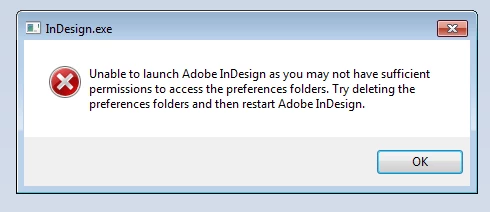
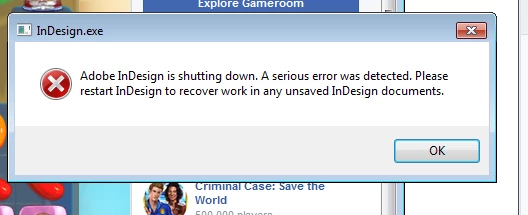
Indesign gives me these two prompts when attempting to open. I tried the Ctr+alt+shift when opening but it still won't work. I have Windows 7, and Illustrator and Photoshop work fine.
This topic has been closed for replies.
Correct answer SanyamTalwar

We have provided an update to CC2018 to addressed crashes and bugs.(If the updates are not available select "Check for app updates" option in Creative cloud application.)

Refer Release notes - https://helpx.adobe.com/indesign/release-note/indesign-cc-13-0-1.html

If you still face issue, Please restart your machine.

12 replies

Participant
October 19, 2022

Sorry to see so many are having issues. The only thing that works for me is to:

1. Start Creative Cloud Desktop

2. Go to "Updates"

3. Click "Check for updates

4. After the check, look in the "Updated recently"-list, double-click on "InDesign v 18.0


Running the software as administrator crashes it. I am using a Windows10 64bit-version and a GeForce 2080 Super-card.

Participant
December 13, 2017

Same problem on my Mac. Please fix it ASAP Adobe!! :-(

Tony_K7980078
Participant
December 5, 2017

Same thing is happening to me on multiple computers running Windows 7. Indesign opens and hangs until I kill it. Nothing in the Event Veiwer logs except that I killed the program. This is frsterating to say the least.

Running indesign as administrator does not work.

The program InDesign.exe version 13.0.1.207 stopped interacting with Windows and was closed. To see if more information about the problem is available, check the problem history in the Action Center control panel.

Process ID: 8030

Start Time: 01d36dd61689d4a4

Termination Time: 12

Application Path: C:\Program Files\Adobe\Adobe InDesign CC 2018\InDesign.exe

Report Id:

Participant
October 31, 2017

I too cannot open InDesign CC 2018 - it will hang following the initial splash screen. Having said that, I followed the advice of one user here and started it with "Run as Administrator" and that worked.

DoctrSuSE
Known Participant
October 31, 2017

Just updated to CC 2018, which freezes on start up (menu/general screen shows up, but never loads the "Recents", etc.

Screenshot:  Dropbox - Screenshot 2017-10-31 10.51.14.png

Doesn't crash and needs to be manually killed off via task manager.

Uninstalled and reinstalled.  No preferences carried over and ensured past versions were also uninstalled.  No improvement.

Tried the CopyPlugins fix that was posted, no improvement.

Starts up fine if run as Administrator, but this is not an acceptable solution.

If I uninstall CC 2018 and reinstall CC 2017, that version still works.

Running Windows 7 Pro.

BobLevine
Community Expert
Community Expert
October 31, 2017

If it’s starting up as an admin it sounds like you have a permissions issue somewhere.

DoctrSuSE
Known Participant
October 31, 2017

What permissions changes were made from 2017 to 2018?

Participant
October 31, 2017

and now CC 2017 keeps crashing....

SanyamTalwar
Participating Frequently
October 31, 2017

Can you please send me the crash logs at santalwa@adobe,com and also try launching InDesign by clearing cache and preference.

Known Participant
October 30, 2017

Ok, I did the bug fix and THAN yours truly did the 4 finger job of control/option/shift/control to ask ID to reset prefrenses as the manual removal did not work. Will do a restart of ID later to see if the fix is for real.

Known Participant
October 30, 2017

The bug fix DOES NOT WORK!!! Did the manual replacement of files deal. Nada. The app worked before, now it's useless. What the hell is going on here?

SanyamTalwar
Participating Frequently
October 30, 2017

Hi,

Can you please send me the crash log and mail me at santalwa@adobe.com

Sanyam Talwar

SanyamTalwar
Participating Frequently
October 27, 2017

Hi,

We believe we have a fix available for the same. Can you follow the steps mentioned in the following KB document - https://helpx.adobe.com/indesign/kb/crash-fixes-october-2017-release.html and confirm if it resolves your issue?

Regards

Sanyam Talwar

InDesign Engineering Team

Participant
October 30, 2017

Hi!

I have followed the steps as described.

Problem still remains.

I have sent crash report through app.

Rok

Rok Lesjak

Vodja računalniške priprave

Head of desktop publishing

Ljubljanska cesta 56

4240 Radovljica

T: 04 537 18 19

E: rok@tkr.si

www.tkr.si

SanyamTalwar
Participating Frequently
October 30, 2017

Hi,

We are aware of the issue and are currently investigating into the issue.

Sanyam Talwar

Participant
October 26, 2017

I have the same issue with the MacOS version of InDesign 2018. It crashes on startup.

AnshulJain19
Adobe Employee
Adobe Employee
October 27, 2017

Hi,

Are you getting the same error of permissions issue to access the preferences folder as in previous note or InDesign is crashing on launch showing any error message. Please send your crash report to ansjain@adobe.com.

Thanks

-Anshul
